Products and selections · Add products
Add a product from the Library
Reuse a product you saved to your firm's Library as an option in a product section, with its details filled in.
Why use it
Most firms specify the same pieces again and again: a favourite sconce, a go-to performance fabric, a standard vanity. The Library keeps those with their photos, vendor and cost, so you add them in seconds instead of looking them up every time.
When to use it
- Repeat specifications. Products you use across projects.
- Quick comparisons. Put a Library staple next to a new find as two options in one section.
- Consistent pricing. Start from the cost you recorded last time.
To pull in a product from another room of this project instead, use the room or Other spaces tab in the same dialog. See Add options to a section.
Before you start
- Products saved in your Library. See Add to the Library.
- A product section in the room. See Add a product section.
Steps
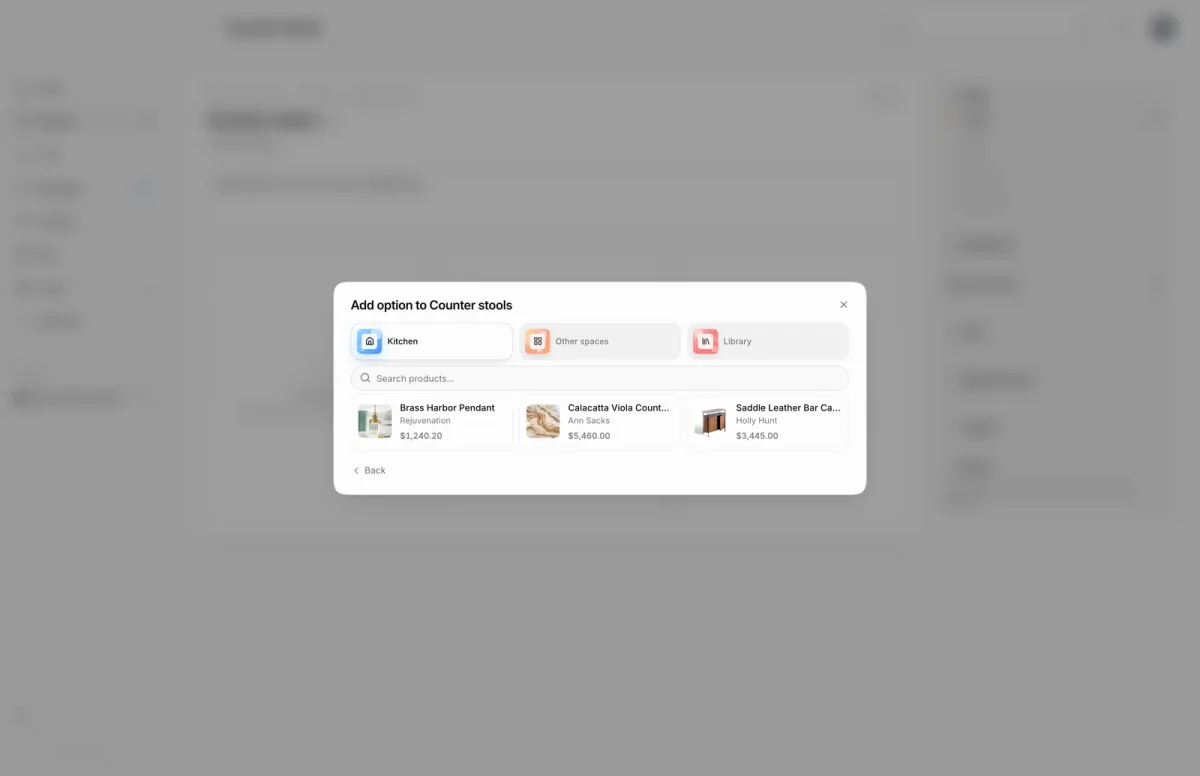
- 1Library tab
- In the Counter stools section, choose an empty Add option card.
- Choose Select from existing to pick a product you already have instead of entering a new one.
- Choose the Library tab to see your firm's saved products from every project.
- Search by name, brand or vendor, for example Walnut, to narrow the list.
- Choose the product, here Walnut Arm Chair at $1,350.00. A copy is added to the room and to this section as an option.
What happens next
- Moodiri shows a message that the product was added from the library, and the option appears in the section.
- The new product is a project copy. Change its price or quantity on its product page.
Troubleshooting
- Couldn't load library products. The Library list did not load. Close the dialog and try again.
- No library products. Your Library is empty. Save products to it first.
Questions
Does changing the project copy change my Library item?
No. Moodiri adds a copy to the project. Edit the copy freely; the Library item stays as it was.
Can I add a Library product without a section?
Yes, from the Library itself. See Add a library product to a project.
Next
Add options to a sectionProducts and selectionsProduct sections and optionsProducts and selectionsAdd a library product to a projectLibrary
Was this page helpful?
Thanks, noted.