Record payments
Log checks, transfers and other money received outside Moodiri against an invoice, with proof, so balances and reports stay right.
Why use it
Plenty of clients still pay by check, Zelle or wire. If those payments live only in your bank app, the invoice still looks unpaid, your reports are wrong, and you might chase someone who already paid. Recording the payment marks the invoice paid (or reduces its balance), keeps the proof with it, and lets you send your client a receipt.
When to use it
- A check, transfer or cash payment arrived. Record it against the invoice. See Record a manual payment.
- One check pays several invoices. Split it in one step. See Record one check that pays several invoices.
- You got paid before sending the invoice. Record it on the draft, then send the paid copy. See Send a receipt or the paid invoice.
- A recorded payment was wrong. Edit, correct or reverse it. See Edit, correct, reverse or void a payment.
Before you start
- Only the owner and admins can record payments.
- Open the invoice from Invoices. Record payment appears on drafts and on sent, viewed and overdue invoices.
Steps
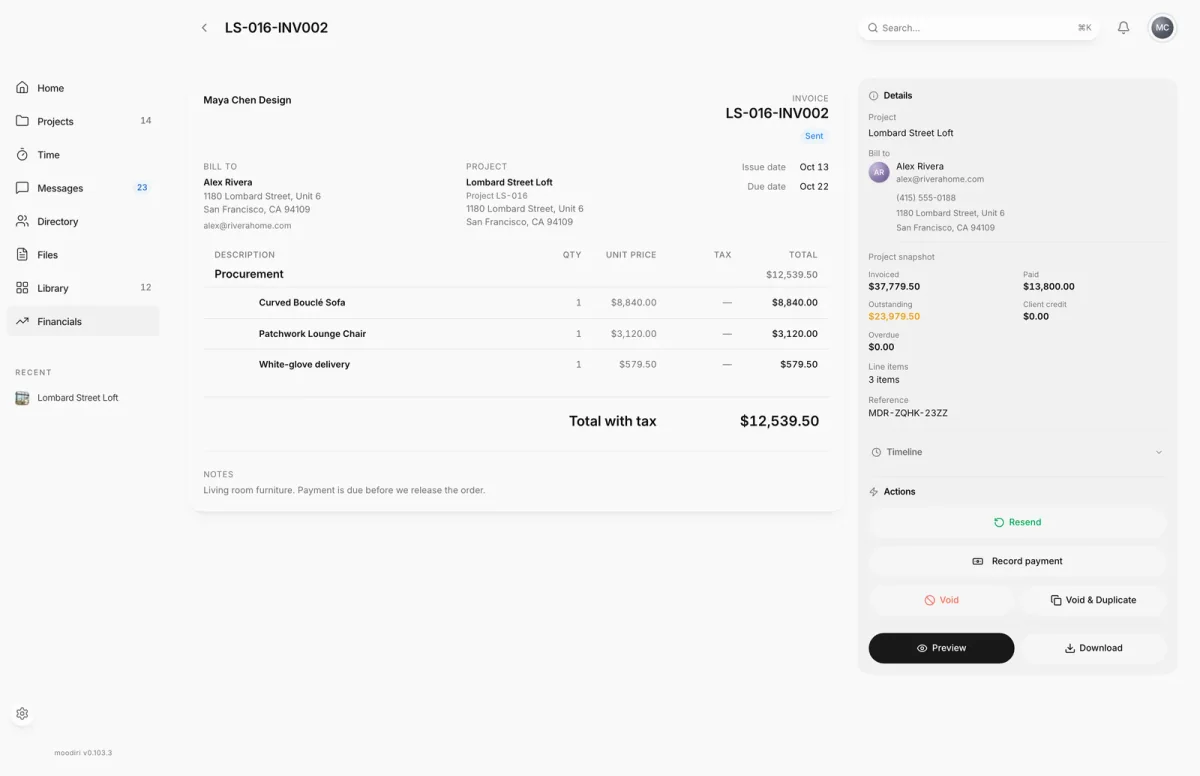
- 1Record payment
- Open the invoice, here LS-016-INV002 with $12,539.50 due, and in Actions choose Record payment.
- Check the Amount received. It starts at the invoice's balance; change it for a partial payment, such as $5,000.00.
- Pick the Payment method, for example Check, and the Date received.
- Optionally add a Reference, such as the check number, and attach Proof of payment.
- Choose Record to save the payment. The button shows the amount, here Record $5,000.00.
Proof of payment
Attach a photo of the check, a transfer screenshot or a PDF to a payment, so anyone on your team can see what came in. Drop the file on Proof of payment, choose it, or paste a copied screenshot.
Tick Share this attachment with the client to show it with this payment in your client's portal. Leave it unticked to keep it internal.
You can add proof later too: open the payment's actions and choose Edit payment, or choose Attach proof from the payments list on Financials.
Payment change history
Every change to a recorded payment is kept. Open the payment's actions, choose Edit payment, and look under History. It lists each change field by field, including the amount, method, reference, date, description, invoice and line items, with the date of the change. Moving a payment between invoices shows as Linked to an invoice, Removed from invoice or Moved to another invoice.
Proof you add in Edit payment is saved straight away, even if you then cancel the edit.
What happens next
- The payment appears under Recorded payments on the invoice, and the balance drops.
- If it covers the balance, the invoice is marked Paid.
- From the confirmation, choose Send receipt to email your client a receipt, or Done.
- The payment is included in your Financials report.
Limits
- Proof files can be PDF, JPG, PNG, WebP, GIF or TIFF, up to 100 MB.
- A reference can be up to 120 characters.
- The date received can't be in the future.
Questions
Do I need to record online payments?
No. Payments your client makes online through Stripe are recorded automatically. Record only money received another way.
Can I record a partial payment?
Yes. Enter the amount you received. The invoice shows the remaining balance and stays unpaid until the rest arrives.
What if the check is for more than the invoice?
Moodiri asks what to do: limit the payment to the invoice balance, or keep the difference as client credit for a future invoice.