Space brief
Attach a question flow to a room so your client can tell you how they use it, then follow their answers as they come in.
- 1Brief status
A space brief is a short set of questions about one room, such as who uses it, when, and what has to stay. You attach one of your published question flows to the space, your client answers it in their portal, and the answers stay with the room. It saves you from collecting the same facts room by room over email.
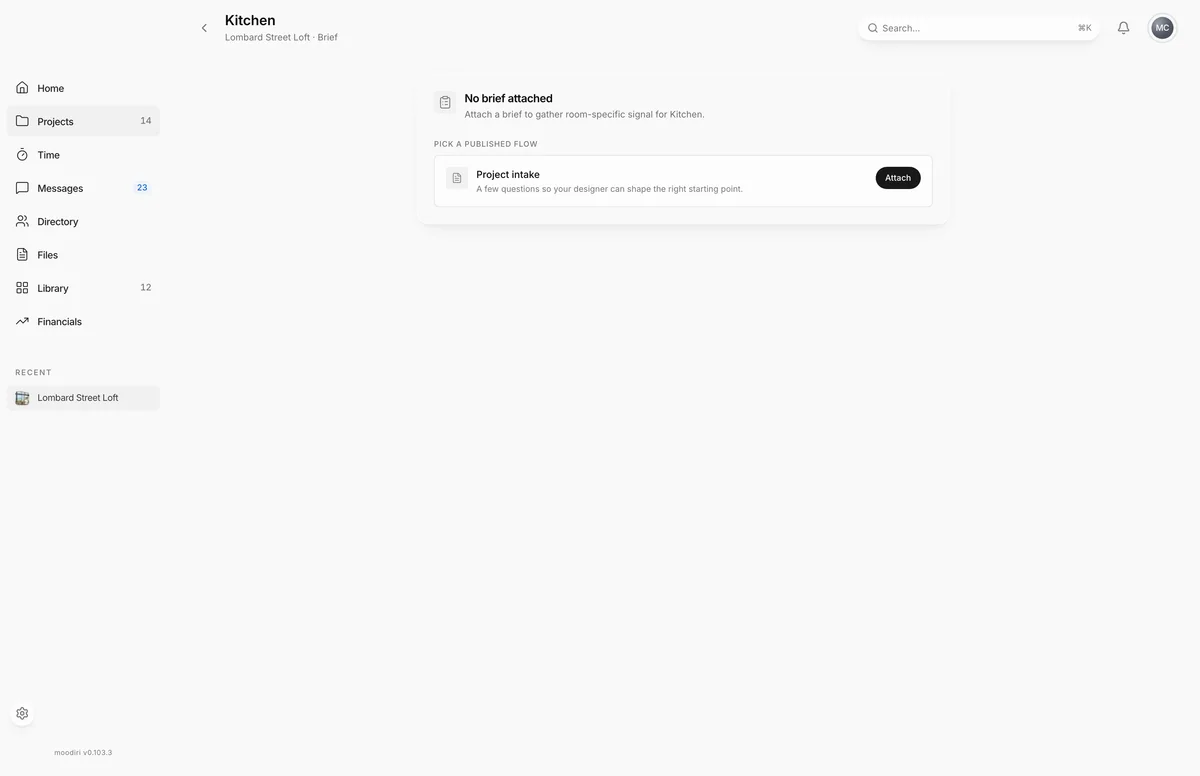
Each space has its own Brief page. Its header shows the space's name, the project name and Brief.
What you see here
- No brief attached: the space has no brief yet. Moodiri lists your published question flows under Pick a published flow, each with Attach. See Attach a brief.
- Attached: the flow's name and description, its status, and the actions View as client and Detach.
- Submitted: your client's answers, read-only.
If you have no published flows, the page says so and offers Create your first flow. See Intake and brief question flows.
Track brief status
The badge next to the brief's name tells you where your client is:
- Awaiting: the brief is attached and your client hasn't started. The page reads Brief sent. The client can answer it from the portal.
- In progress: your client has started. The page shows how many questions they have answered so far.
- Submitted: your client has finished. Their answers show on the page.
Preview as the client
Choose View as client to see the brief the way your client does, including any answers they have given so far. The preview is read-only, so nothing you click there is saved. Use the back arrow to return to the brief.
Detach a brief
Choose Detach, then Detach again to confirm. If your client has started, the confirmation tells you how many in-progress answers will be deleted. Detach a brief to swap in a different flow, or when the room no longer needs one.
Submitted briefs can't be detached. The page shows Submitted briefs cannot be detached.
Questions
Can a space have more than one brief?
No. Each space has one brief at a time. To swap it, detach the current brief and attach another one.
Can I change a brief after my client submits it?
No. Submitted briefs are read-only, so the answers you have used stay as they were given.