Void, void & duplicate, or delete an invoice
Cancel an invoice your client should no longer pay, replace it with an editable copy, or delete a draft you no longer need.
Why use it
Sometimes an invoice should not be paid: the scope changed, the amount was wrong, or it went to the wrong client. Voiding stops payment and keeps an honest record of what was issued. Void & Duplicate does that and hands you an editable copy, so fixing a sent invoice takes one step.
When to use it
- A sent invoice has a mistake. Choose Void & Duplicate, fix the new draft, and send it.
- The invoice is no longer owed. Choose Void.
- A draft was a false start. Choose Delete.
For money already paid, use Refunds and corrections instead.
Before you start
- Only the owner and admins can void or delete invoices.
- Reverse any recorded payments and applied credits first. See Edit, correct, reverse or void a payment and Reverse a credit application.
- Open the invoice from Invoices.
Steps
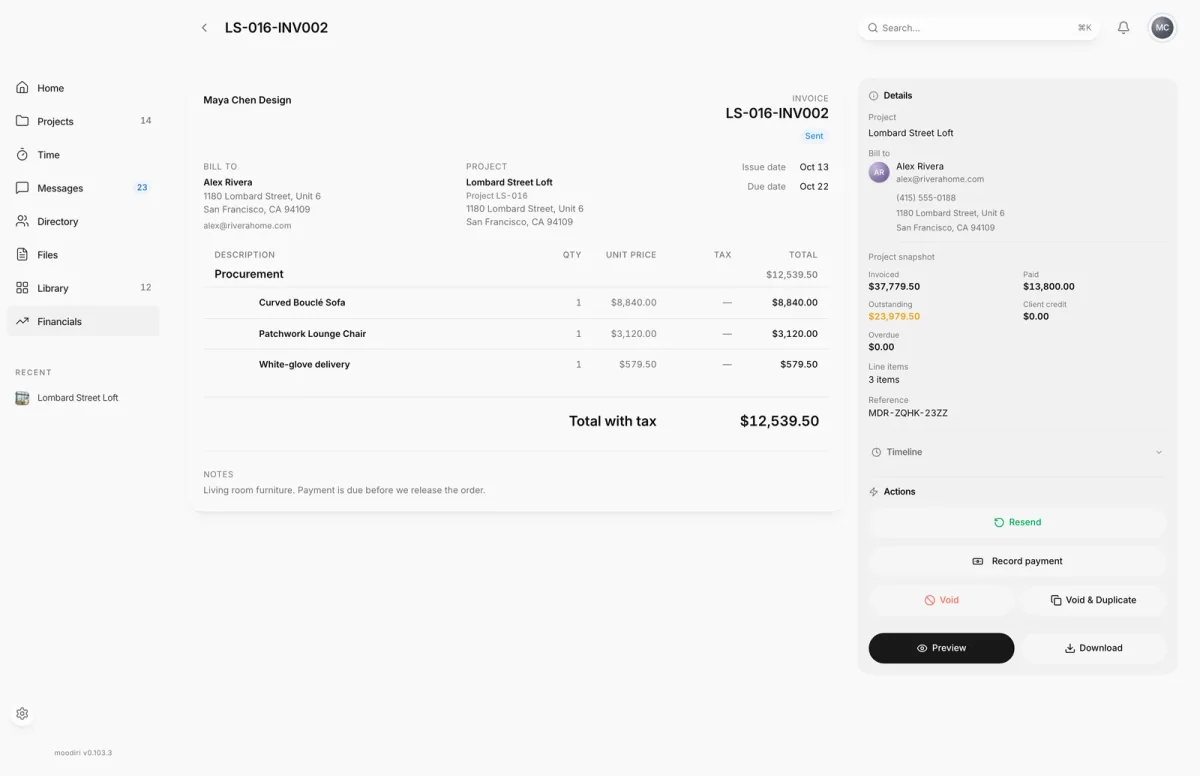
- 1Void
- Open the invoice, here LS-016-INV002, and check it has no recorded payments or applied credit.
- In Actions, choose Void to cancel a sent invoice. It stays on record, marked Void.
- Or choose Void & Duplicate to cancel it and start a new draft with the same details.
- Read the confirmation, then choose Void invoice. Voiding can't be undone.
- A draft you no longer need can be removed instead. Open it, here LS-016-INV004, choose Delete, then confirm with Delete invoice.
Which action you see
| Invoice | Actions offered |
|---|---|
| Draft | Void and Delete |
| Sent, Viewed or Overdue | Void and Void & Duplicate |
| Paid, Void or Corrected | None of these |
What happens next
- Void: the status changes to Void and your client can no longer pay it. You see Invoice voided.
- Void & Duplicate: the invoice is voided and a new draft with the same details is created. Choose View draft in the confirmation to open it.
- Delete: the draft is removed. You see Invoice deleted.
Limits
- Recorded payments and applied credits must be reversed before you void or delete.
- Void & Duplicate isn't offered on invoices that include logged time, and needs at least one line item.
- A draft that replaces a corrected invoice can't be deleted. It is kept for the correction record and settled from the client's credit.
- Voiding and deleting can't be undone.
Troubleshooting
- Reverse recorded payments and applied credits before voiding this invoice. Money is still attached. Reverse the payment or credit, then try again.
- This invoice has no line items to duplicate. Use Void instead and create a new invoice.
Questions
What's the difference between void and delete?
Void keeps the invoice in your records with the status Void, so your history and numbering stay intact. Delete removes a draft entirely. Only drafts can be deleted.
Does my client get an email when I void an invoice?
No email is sent. The invoice can no longer be paid.
I need to refund part of a paid invoice. Should I void it?
No. A paid invoice can't be voided. Use Refund items… instead. See Refunds and corrections.