Timesheet approvals
The queue of submitted weeks waiting for your decision, with each week's hours, flags and entries side by side.
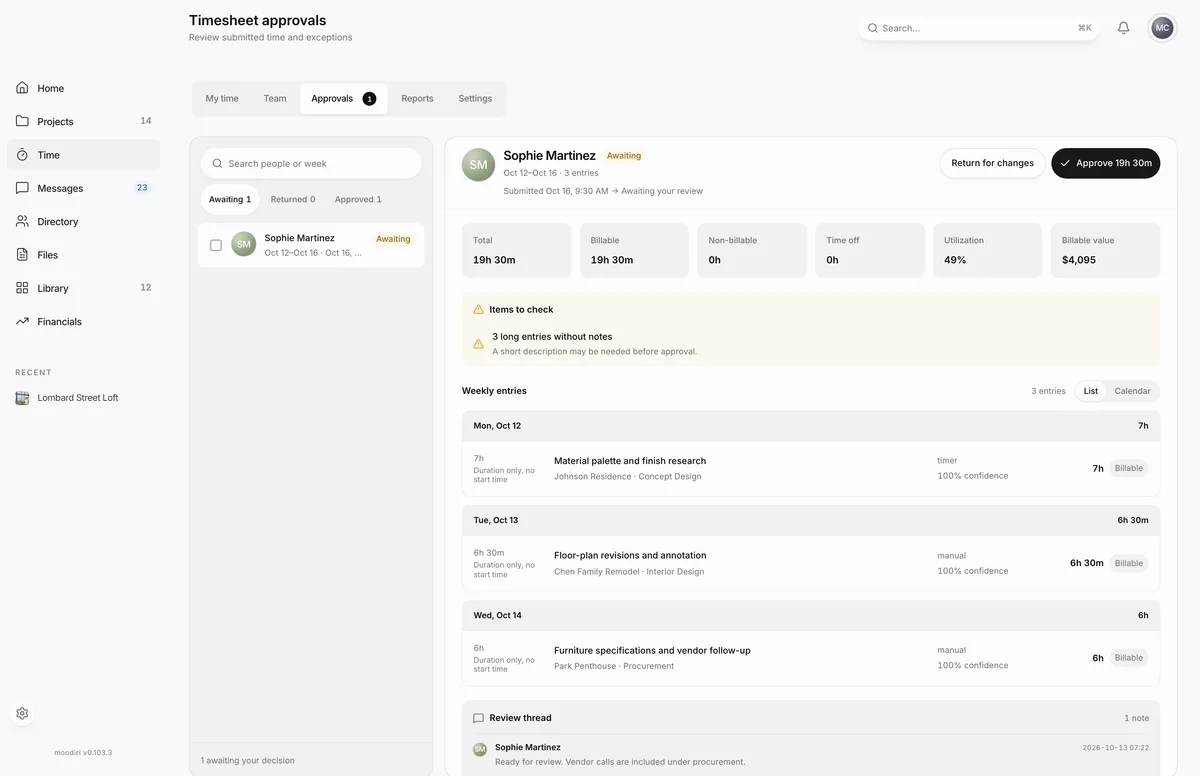
Timesheet approvals is where submitted weeks wait for a decision. Approving a week locks it and makes its billable time ready to invoice. Open Time, then choose Approvals. The badge on the tab shows how many weeks are waiting.
You see this tab if you are the owner, an admin with the Time tracking permission, or someone's assigned approver. Assigned approvers see only the people they approve.
What you see here
- The queue, filtered by Awaiting, Returned or Approved. Search by person or week.
- The selected week, with the person, the week dates and a status line such as Awaiting your review, Approved and locked or Returned for changes.
- Totals: Total, Billable, Non-billable, Time off, Utilization and, where rates are visible, Billable value.
- The entries, as a list or a calendar. Entries marked Suggested or Review, or with low source confidence, are flagged so you can check them.
- Comments between you and the person.
Flags to look for
Before you approve, the week can carry flags such as flagged overtime (approved with the week), a source match below 80% confidence, suggested time included in the submission, or Resubmitted when the person made changes after a return.
When to use it
- Weekly, after the team submits.
- Before invoicing, so billable time from every week is approved and ready.
Limits
- Nobody can approve their own week here. Self-approval happens only on submit.
- Only the owner and admins with the Time tracking permission can reopen an approved week.
Questions
Why is my own week not in the queue?
Nobody approves their own week here. If you can review time, your week is approved when you submit it.
Who gets notified when a week is submitted?
The person's assigned approver. If they have none, the owner and admins with the Time tracking permission.