Install and connect the Chrome extension
Install the Moodiri Chrome extension and connect it to your account with an API key, so you can capture products from any website.
Why use it
Copying a product's name, price, dimensions and photos from a supplier's site into a spec takes minutes, and mistakes creep in. The extension reads the product page for you and sends it to Moodiri in one click. It runs in your own browser, so it works on trade sites where you are signed in to see trade pricing.
When to use it
- You source online. Furniture, lighting, tile and fabric sites, including trade-only portals.
- Several computers. Connect each one with its own key, so you can revoke one without affecting the others.
Before you start
- Chrome on a desktop or laptop computer.
- A Moodiri account. Anyone on your team can create their own key.
- Open Settings and choose the Browser Extension tab.
Steps
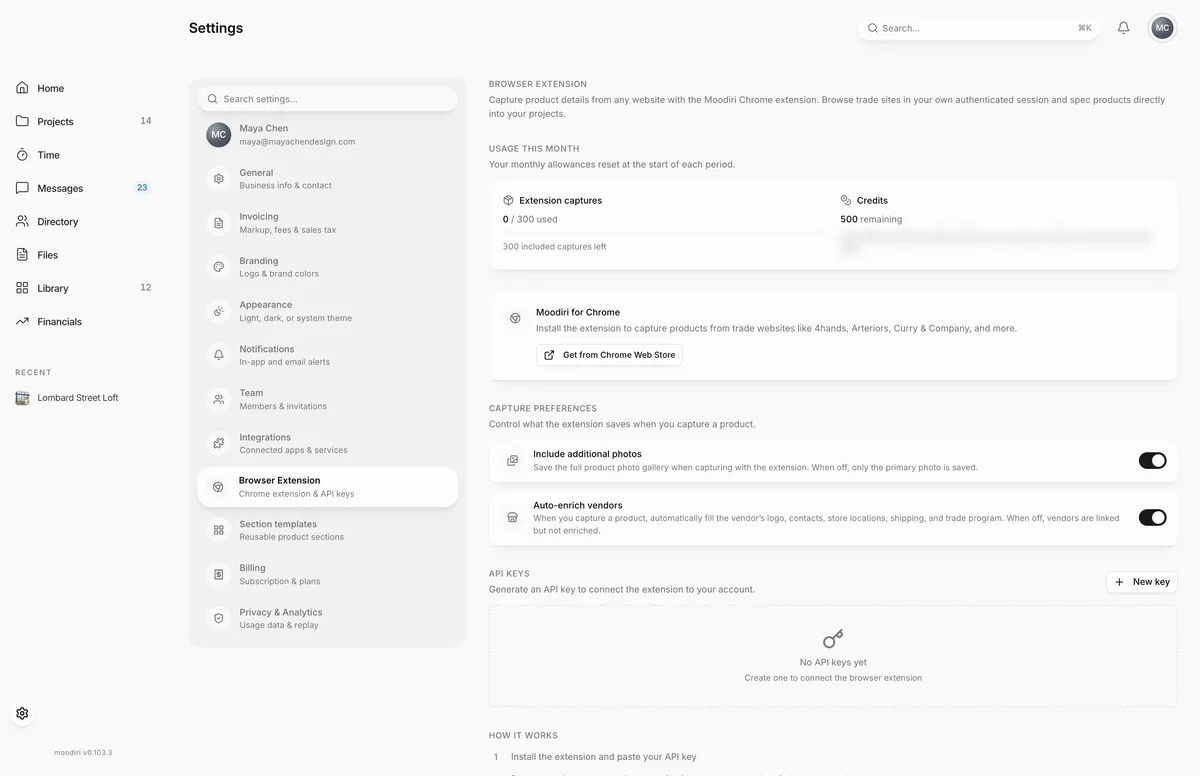
- Choose Get from Chrome Web Store, install the Moodiri extension and pin it to your toolbar.
- In Settings > Browser Extension, choose New key. It is unavailable once you have 5 keys.
- Give the key a Key name you'll recognise, such as Maya's laptop.
- Choose Create key, then copy the key straight away. It is shown only once.
What happens next
- The extension shows it is connected. On a product page its icon turns green.
- The key appears under API Keys with the date it was created and, once used, the date it was last used.
- Next, capture a product.
Capture preferences
Two switches on the same page control what the extension saves for your whole firm. Only the owner and admins with the Firm settings permission can change them.
- Include additional photos: save the product's full photo gallery, not only the main photo.
- Auto-enrich vendors: when you capture a product, fill in the vendor's logo, contacts, store locations, shipping and trade program. When off, the vendor is linked but not filled in.
Limits
- Up to five active keys per person. Revoke one before creating a sixth.
- A key name is up to 50 characters.
- The key is shown only once, when you create it.
Troubleshooting
- Invalid key format. Keys start with "mry_". Paste the whole key, starting with mry_.
- API key expired or revoked. Please re-enter your key. Create a new key in Settings > Browser Extension and paste it into the extension.
- Maximum 5 active API keys allowed. Revoke an existing key first. Revoke a key you no longer use.
Questions
Does each person on my team need their own key?
Yes. Keys belong to the person who creates them, and each person can have up to five active keys.
How do I disconnect a computer?
In Settings > Browser Extension, find the key under API Keys and choose the bin to revoke it. The extension on that computer stops working until you paste a new key.
Is there a limit on captures?
Yes. Captures count towards your firm's monthly captures. Usage this month on the same settings page shows how many you have used and when they reset.