Activity log
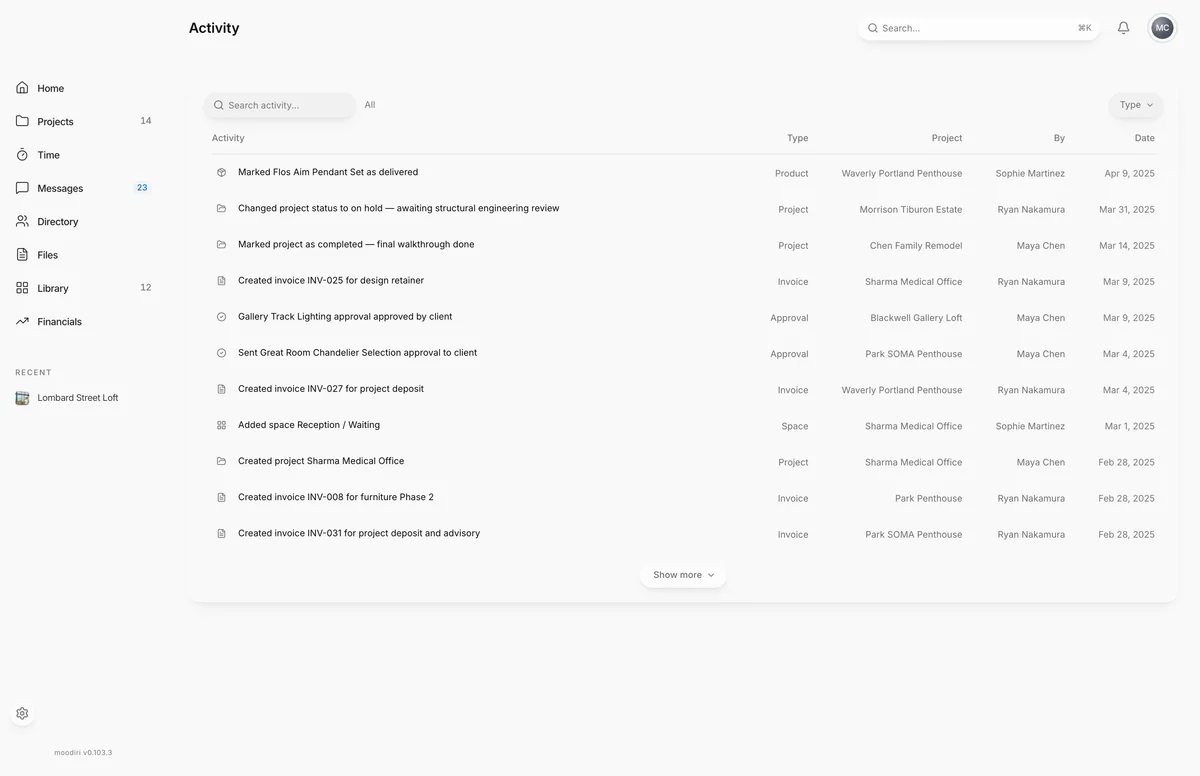
The activity log lists recent changes across your firm (who changed what, on which project, and when) with search, a type filter and sorting.
- 1Search activity
The activity log is your firm's running record. When a client asks when an invoice went out, or a teammate wonders who moved a product, the answer is here: every entry says what happened, which project it belongs to, who did it and when.
Open it from View all on the Recent activity card on Home.
What you see here
A table of the most recent changes, newest first, with these columns:
- Activity: what happened, for example a product added or an invoice sent.
- Type: the kind of record it's about.
- Project: the project it belongs to, when there is one.
- By: the teammate, Client or System.
- Date: when it happened.
Choose a column heading to sort by it, and again to reverse the order. The list shows the first rows; choose Show more to load more.
Search and filter by type
Type in Search activity... to match the description, the person, the project name or the type. Use the Type filter to show one kind of record: Product, Invoice, Approval, Space, Project, Client, Vendor, Organization, Document, Product section, Retainer, Refund, Payment, Library item, Project task or Family configuration.
The heading beside the search shows how many results match. If nothing matches, the page shows No activity matches your search.
Limits
- The log covers your firm's 200 most recent entries.
- The list loads 11 rows at first and 20 more each time you choose Show more.
Questions
Can I see activity for one project only?
Yes. Each project has its own activity page. See Project activity. In the firm-wide log, you can also type the project's name into search.
What does "Client" or "System" mean in the By column?
Client means your client did it in the portal, for example approving an option. System means Moodiri did it automatically.