Refunds and corrections
Refund items on a paid invoice. Moodiri replaces it with a corrected invoice and keeps the money as client credit or records a refund.
Why use it
A client returns a chair after paying for it, or a product is discontinued after you billed it. Changing the paid invoice would rewrite a record your client already has. A correction keeps the original, shows exactly what was refunded, issues a replacement invoice for what remains, and tracks where the money went.
When to use it
- A paid item is returned or cancelled. Refund that line and keep the money as client credit for the next order.
- The client wants their money back. Refund the line and record the refund you paid.
- Everything on the invoice is cancelled. Refund every line; Moodiri creates a $0 replacement record.
To cancel an invoice that hasn't been paid, use Void instead.
Before you start
- Only the owner and admins can refund items.
- The invoice must be Paid in full, in US dollars.
- Open the invoice from Invoices.
Steps
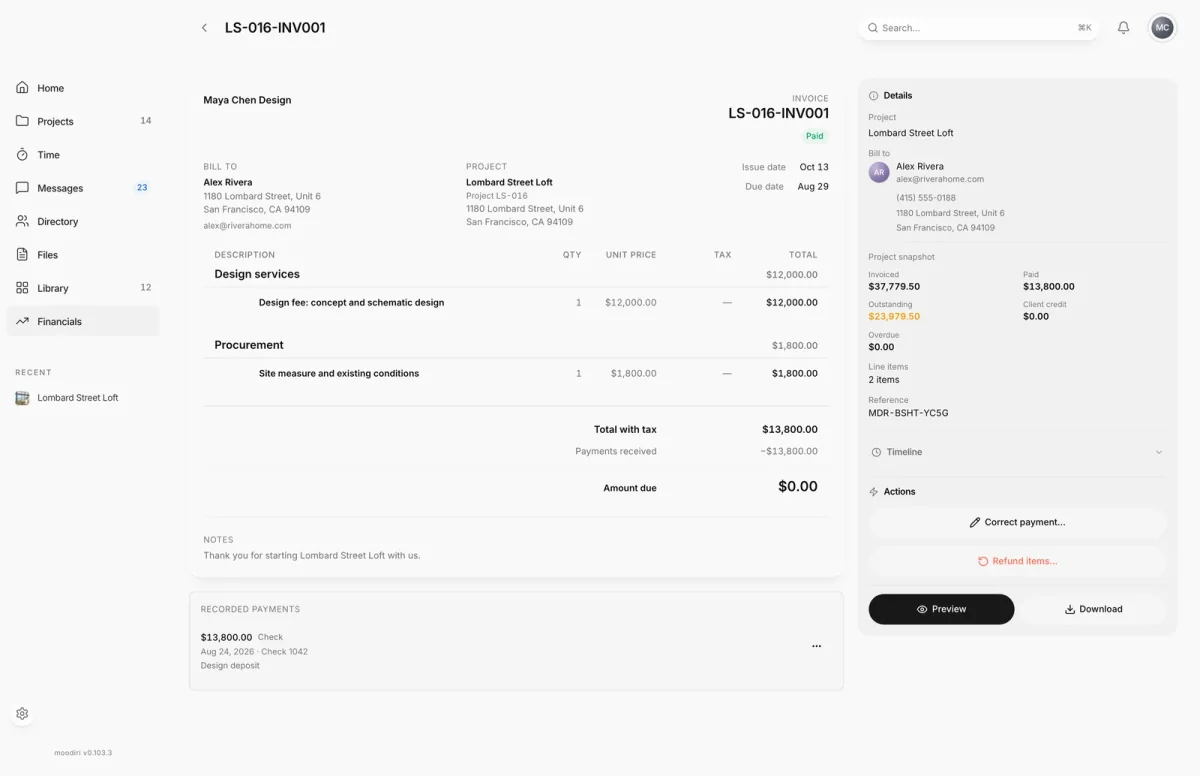
- 1Refund items
- Open the paid invoice, here LS-016-INV001, and in Actions choose Refund items….
- Under 1. Choose items to refund, tick the lines your client is returning or no longer needs, then choose Review refund.
- Under 2. Confirm refund and credit, check the preview and choose what happens to the money: Keep as client credit or Refund to client.
- Give a Reason, then choose Refund and issue credit. A refund can't be undone, so check the preview first.
Refund items
The full steps, including the money choice and proof of refund, are in Refund items: keep as client credit or refund to the client.
Replacement invoices and invoice history
After a refund, the original invoice becomes Corrected and shows Archived — this invoice was corrected and replaced. It is a read-only record and should not be sent. A new replacement invoice holds the remaining items.
Both invoices show Invoice history, listing every version with Current or Replaced. The replacement's Timeline shows Created as replacement with a link to the invoice it replaces, and the original shows Corrected and replaced.
A replacement is never emailed to your client. It is paid from the credit the refund created.
Settle a replacement from credit
Normally the replacement invoice is paid from the client's credit as part of the refund. If that step didn't finish, the replacement shows This invoice replaces a corrected invoice but has not been settled from the client's credit yet. Do not send it — settle it instead. Choose Settle from credit.
Until it is settled, the replacement can't be sent, edited or deleted.
Limitation: replacements omit saved grouping labels
If the original invoice grouped its products under room, vendor or category headings, the replacement lists the products without those headings. The amounts are unaffected.
What happens next
- The original invoice is marked Corrected, and the replacement becomes the current invoice.
- With Keep as client credit, the refunded amount becomes client credit. See Overpayments and client credit.
- With Refund to client, the refund is recorded against that credit. See Refunds paid back to clients.
- Your client sees the refund in their portal. See Refunds and refund receipts.
Limits
- Only fully paid invoices in US dollars can be refunded item by item.
- Invoices paid with retainer funds, paid across more than one card payment, or paid by a mix of card and recorded payments can't be refunded item by item.
- A product's sales tax is refunded with it.
- After a correction, the original invoice's recorded payments are read-only.
Troubleshooting
- Refunds are not enabled. Item refunds are switched off, so Refund items… stays unavailable.
- A payment on this invoice is still finalizing. Try again once it has settled. Wait for the card payment to settle.
- A refund, dispute, or other payment-provider change affecting this correction could not be reconciled automatically. The related client credit is frozen until it has been reviewed by hand.
Questions
Why not edit the paid invoice?
A paid invoice is a record your client already has. Moodiri keeps it as it was, marks it Corrected, and creates a replacement that shows what they now owe, so both versions stay on file.
Does Refund to client send money back to the card?
No. Moodiri records the refund you make. To refund a card payment, refund it in Stripe; Moodiri picks that up automatically.
Can I refund an invoice that is only partly paid?
No. Only a fully paid invoice can be refunded item by item.