Approvals
Edit an approval
Change a draft or a sent request before your client answers: its title, description, due date, space and options.
Why use it
Prices change, a vendor drops a finish, or you spot a typo after sending. Editing the request keeps one record of the decision instead of a trail of near-duplicates your client has to sort through.
When to use it
- Fix a draft before you send it.
- Swap an option that became unavailable before your client answers.
- Move the due date or correct the price on an option.
If your client has already answered, send a new request with the updated options. See Create an approval request.
Before you start
- The request must be a draft, or sent and not yet answered.
- Requests from a product section can be edited in full only while they are drafts.
- Open the project's Approvals list, choose the request and choose Open full screen.
Steps
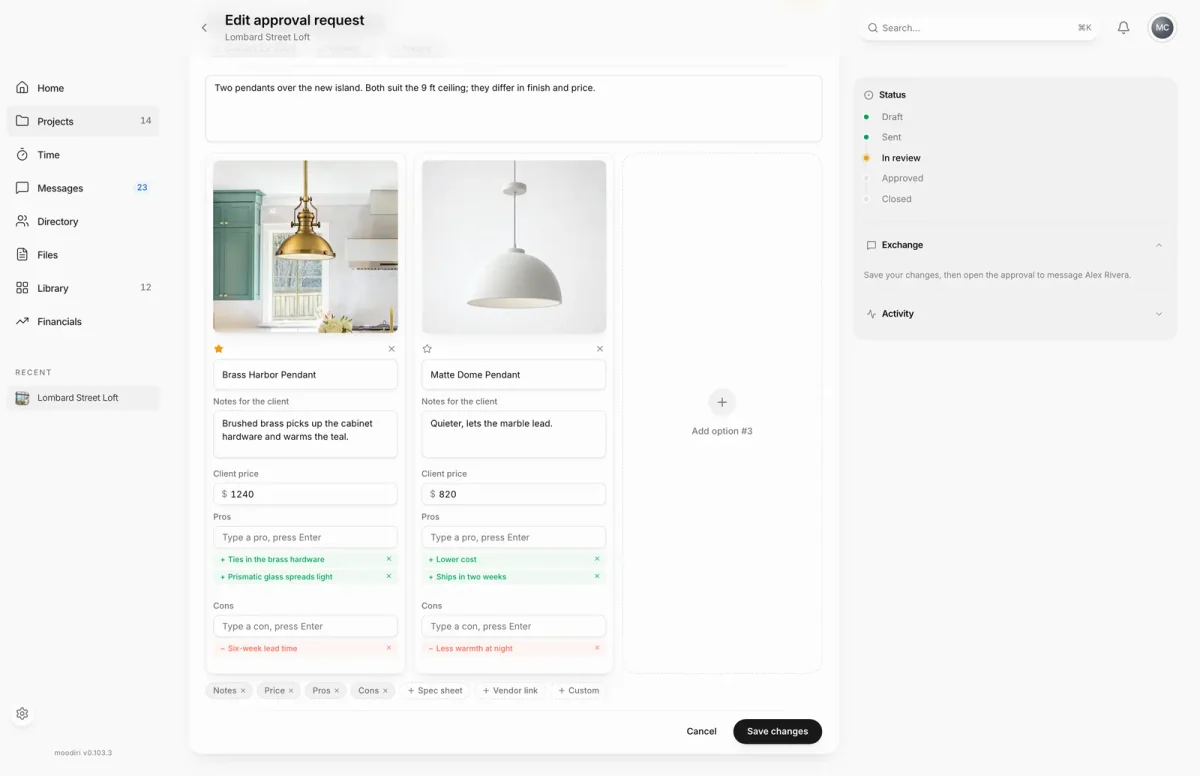
- 1Save changes
- Open the request, such as Kitchen island pendants, and choose the pencil, Edit request, under Actions.
- The request opens as Edit approval request. Change the Title, due date, space or category here.
- Update an option's details, such as the Matte Dome Pendant's Client price from $860 to $820.
- Choose Save changes to keep your edits, or Cancel to leave the request as it was.
What happens next
- Moodiri shows Changes saved and returns you to the request.
- The status doesn't change. If the request was sent, your client sees the updated version the next time they open it.
Limits
Limits
- Only drafts, and sent requests your client hasn't answered, open in the builder. Closed and answered requests, and sent requests from a product section, open their details instead.
- After your client answers, the options can't change. The page says Options cannot be edited after the client has responded.
- Family proposals can't be edited. Cancel the proposal and prepare a new one. See Family revision proposals.
- All the limits for new requests still apply: up to three options, a title and at least one option.
Questions
Does my client get a new email when I save?
No. Saving keeps the request's status and sends nothing. Choose Resend if you want your client to look again.
Why does Edit open a small form instead of the builder?
The request is past the point where options can change, for example a sent request from a product section. The short form still changes the title, description, category and due date.
Next
Was this page helpful?
Thanks, noted.