Space page
Everything for one room in one place: its products, approval requests, documents, measurements, totals, chat and activity.
- 1Edit space
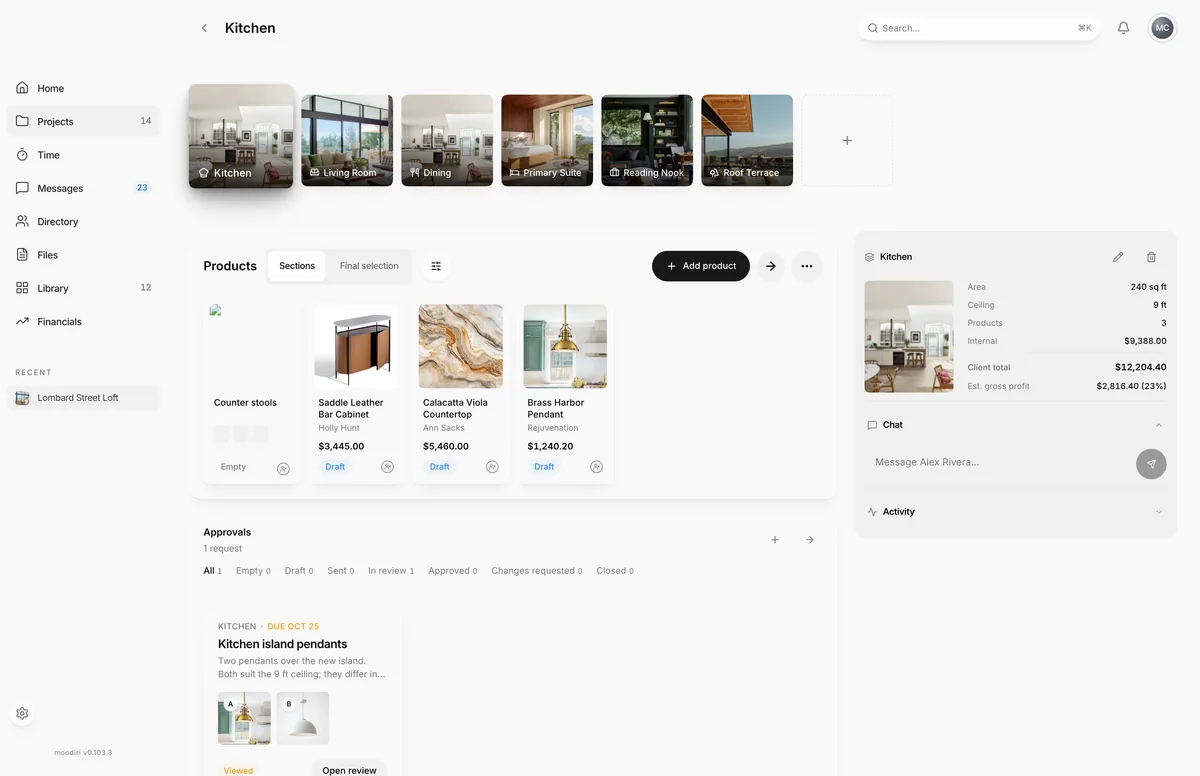
The space page is where you work on one room. It brings together the room's products, its approval requests and its documents, with the room's measurements, totals, client chat and recent activity alongside. Open it by choosing a space on the spaces list or the project overview.
The room strip (switching rooms)
The strip of room photos across the top lists every space in the project. The room you are in sits raised above the others. Choose another photo to switch rooms; the strip stays where it is, so you can move through a whole house quickly. The dashed square at the end of the strip is Add space.
What you see here
- Products lists the room's product sections and products, with filters and Add product. Choose View all for the full product list. See Products in a space.
- Approvals shows the room's approval requests and how many there are. Choose New request to start one with this space filled in, or View all to open Space approvals.
- Documents shows the five most recent files filed under this room. Drag a file onto the card to upload it, or choose View all to open Space documents.
- Chat holds your conversation with the client about this room.
- Activity shows the latest changes to the room.
Space facts (area, wall, ceiling, totals)
On wider screens, a panel on the right shows the room's photo and facts:
- Area, Wall and Ceiling, when you have entered them.
- Products: how many products the room holds.
- Internal: your cost for the room.
- Client total: what the client pays for the room.
- Est. gross profit: what you expect to earn on the room, with the margin as a percentage. It is based on planned client totals and recorded costs, and leaves out refunds and payment fees.
If any product in the room has no cost recorded, Est. gross profit shows Not tracked, with a count of the costs still missing. Record every cost to see the estimate. Internal costs and profit are for your team only.
The panel's header holds Edit space and Delete space. See Edit a space and Delete a space.
Questions
Why can't I see the room's measurements or the Edit space button?
The panel with the room's facts, Edit space and Delete space shows on wider screens. Widen the window, or edit the room from its card on the spaces list.
Does switching rooms lose my place?
No. The room strip stays put while the room below it changes, and the back arrow returns you to the project, not to the previous room.