Spaces (rooms) · Space page
Edit a space
Change a room's photo, name, type and measurements. Products, costs and totals stay as they are.
Why use it
Rooms change as a project firms up. The client measures the sitting room, the study becomes a nursery, or you finally have a good photo of the space. Keeping each space accurate means your team and your client see the right room, with the right size, next to the products chosen for it.
When to use it
- After a site visit. Add the floor area, wall area and ceiling height you measured.
- A room changes use. Rename it and change its type.
- A better photo. Replace the default image with a photo of the real room.
To remove a room altogether, see Delete a space.
Before you start
- Anyone on your team can edit a space.
- Open the project, choose View all under Spaces, and open the space. Edit space is in the panel on the right, which shows on wider screens.
Steps
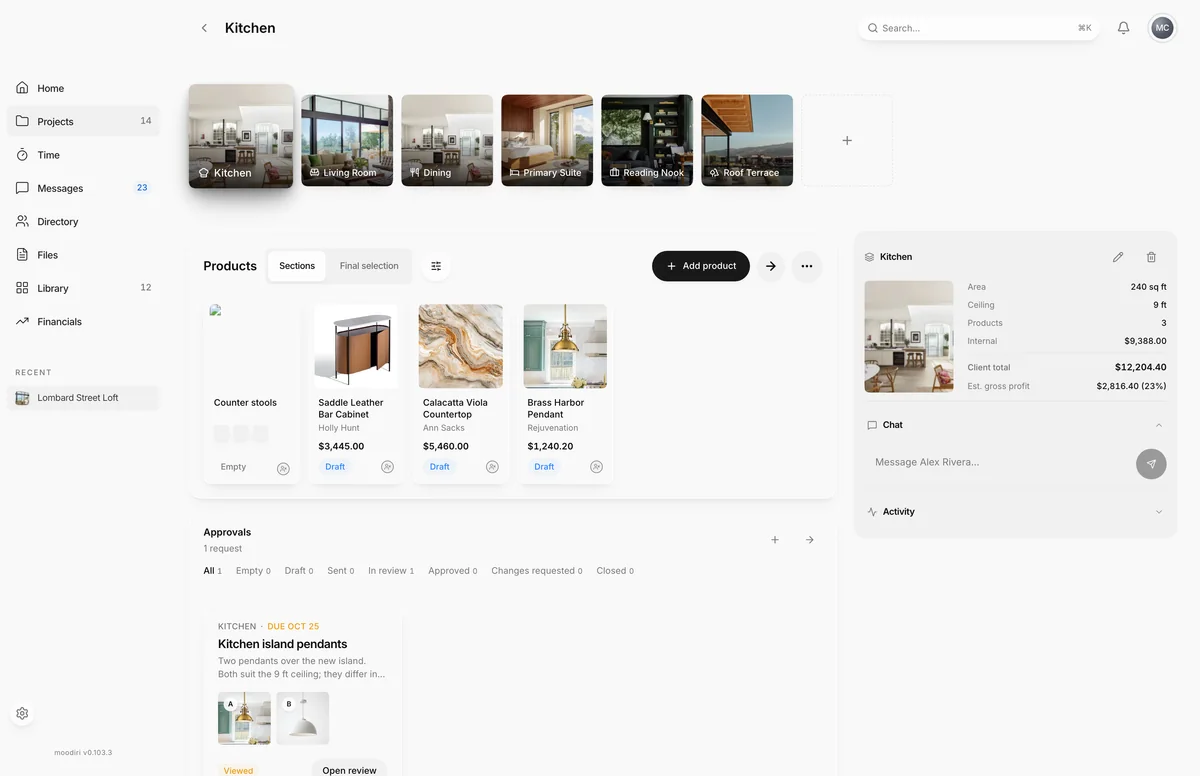
- Open the space and choose Edit space at the top of the panel on the right.
- Choose the photo square to upload a new photo of the room.
- Products, Internal cost and Client total are for reference, such as 3 products and $12,204.40 for the Kitchen.
- Change the Name, for example to Kitchen and breakfast nook, or pick a new Type.
- Enter the Floor area (sq ft), Wall area (sq ft) and Ceiling height (ft) you measured.
- Choose Save changes to update the room everywhere it appears.
What happens next
- Moodiri confirms with Space updated and the page shows your changes.
- The new name and photo appear on the spaces list and in the room strip.
- The dialog also shows the room's Products, Internal cost and Client total for reference. They change only when the room's products change.
Limits
Limits
- A room photo must be an image of 5 MB or less.
- Space names must be unique within a project.
- Notes and attributes added when the space was created can't be changed here. Add them in the new space wizard when you create the room.
Troubleshooting
- Space name is required. The Name field can't be empty.
- Discard changes? You closed the dialog with unsaved edits. Choose Keep editing to go back, or Discard to drop them.
Questions
Can I edit a space from the spaces list?
Yes. Hover the space's card and choose the pencil icon. That shorter form changes the Type, Name and Floor area (sq ft) only.
Does changing the type change the products in the room?
No. Products, sections and approvals stay as they are.
Next
Was this page helpful?
Thanks, noted.