Invoicing and payments
Edit a draft invoice
Change a draft's name, project, due date, lines and notes before you send it. Sent invoices are locked.
Why use it
Drafts change: a client adds a lamp, a price is confirmed, a due date moves. Editing the draft keeps one invoice up to date instead of deleting and rebuilding it, and your client only ever sees the final version.
When to use it
- Prices or quantities changed before you send.
- You saved a draft to finish later and are ready to complete it.
- The wrong project or due date was picked.
Once an invoice is sent, it can't be edited. Use Void & Duplicate instead.
Before you start
- Only the owner and admins can edit invoices.
- The invoice must be a Draft. Edit only appears on drafts.
Steps
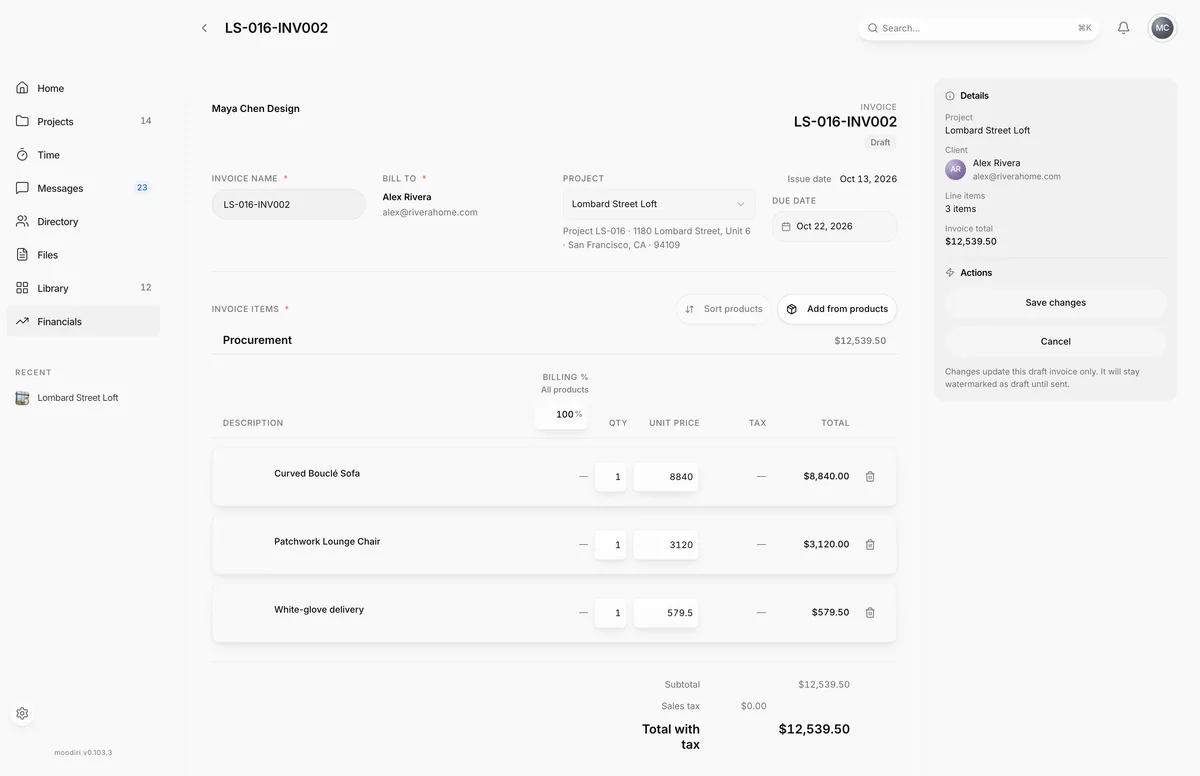
- Open the draft invoice, here LS-016-INV004, and in Actions choose Edit.
- Change the Invoice name if needed. It must stay unique on the project.
- Move the Due date if the terms changed. It can't be in the past.
- Edit a line's quantity or price, for example the design fee from $9,500.00 to $10,500.00. The totals update as you type.
- Choose Add from products to bill more of the project's products on this draft.
- Choose Note to client to add or change payment terms your client reads on the invoice.
- Choose Save changes to keep your edits, or Cancel to leave the draft as it was.
What happens next
- The draft updates and you return to its invoice page. The status stays Draft.
- Its PDF stays watermarked as a draft until you send it.
- When you are ready, choose Send invoice. See Send an invoice.
Limits
Limits
- Only drafts can be edited.
- The invoice name is required, up to 120 characters, and must be unique within the project.
- An imported invoice keeps the name in its original PDF and can't be renamed.
- A draft that replaces a corrected invoice can't be edited. It is settled from client credit instead.
- Every line needs an amount above $0.00.
Troubleshooting
- Cannot edit invoice after it has been sent. Only status changes and internal notes are allowed on non-draft invoices. The invoice was sent, possibly by a teammate, while you were editing. Open it again to see its current state.
- Another invoice with the same name already exists. Pick a different Invoice name.
- This line has a $0.00 total. Enter an amount or remove it before saving. Give the line a price or remove it.
- Confirm the trade discount on each flagged line before saving. Choose Confirm on each line marked Trade discount needs review.
Questions
How do I change an invoice I already sent?
You can't edit it. If it has no payments or credit, choose Void & Duplicate to cancel it and get an editable draft with the same details.
Can I change whether the client pays the card fee?
Not per invoice. Processing fees follow your firm's invoicing preferences, and the setting in effect when the invoice is sent decides it. See Invoicing settings.
Next
Send an invoiceInvoicing and paymentsInvoice pageInvoicing and paymentsAdd project products to an invoiceInvoicing and payments
Was this page helpful?
Thanks, noted.