Invoice page
One invoice in full: the document your client sees, its payments and balance, its timeline, and every action you can take on it.
- 1Timeline
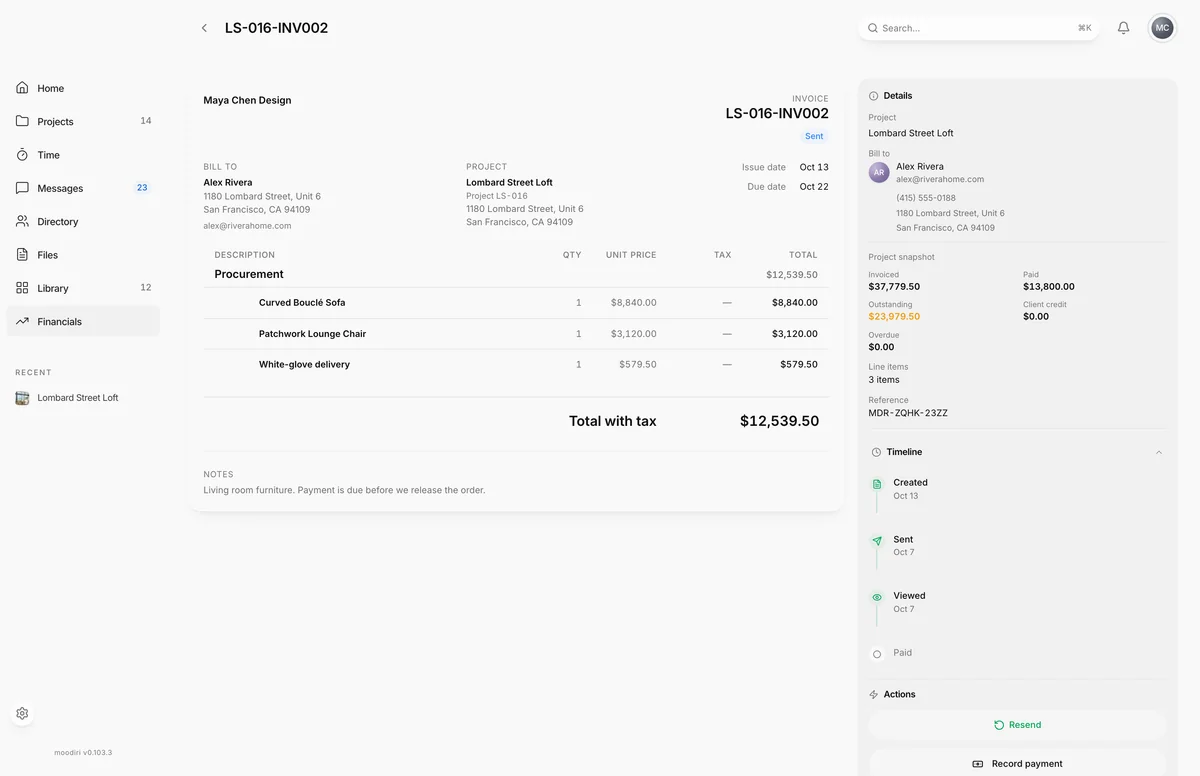
The invoice page is where you follow one invoice from draft to paid. The left side shows the invoice document as your client will see it, with its balance and payments. The right side holds the details, the timeline and the actions for its current status. Open it by choosing any invoice on the invoices list.
What you see here
- The invoice document: your logo, the invoice name, Bill to, Project, every line, and the totals (Subtotal, Sales tax when it applies, Total with tax).
- Balance: any Retainer applied, Overpayment credit applied and Payments received, then the Amount due.
- Recorded payments: each payment you recorded, with its method, date and any reversals. See Recording payments.
- Notes your client sees, and Internal notes (not visible to client).
- Details: the project, the bill-to client and their contact details, a Project snapshot (Invoiced, Paid, Outstanding, Client credit, Overdue), the number of line items and the reference.
- Actions: what you can do now. See Send an invoice, Recording payments and Void, void & duplicate, delete a draft.
Timeline and details
The Timeline shows when the invoice was Created, Sent, Viewed and Paid. Steps that haven't happened yet show as not done. For an invoice that replaced a corrected one, it shows Created as replacement with a link to the invoice it replaces, and a corrected invoice shows Corrected and replaced. When QuickBooks is connected, the timeline also shows when the invoice and its payments were sent to QuickBooks.
Fee breakdown and your payout
When your client pays online, Payment details shows what happened to the money:
- What the client was charged, or the invoice total.
- The Stripe processing fee and any other deductions.
- Your payout: what reaches your bank account.
If your firm passes card and bank fees on to clients, the amount charged to your client includes the processing fee. Set this under Payment fees in Invoicing settings.
Draft and client-ready PDFs
On a draft, the PDF group offers two versions:
- Draft PDF: watermarked as a draft. Choose Preview to open it or Download to save it. Use it for internal review.
- Client-ready PDF: the clean version your client will get. Owners and admins can preview or download it before sending.
After the invoice is sent, the group offers Preview and Download of the issued invoice.
Client preview
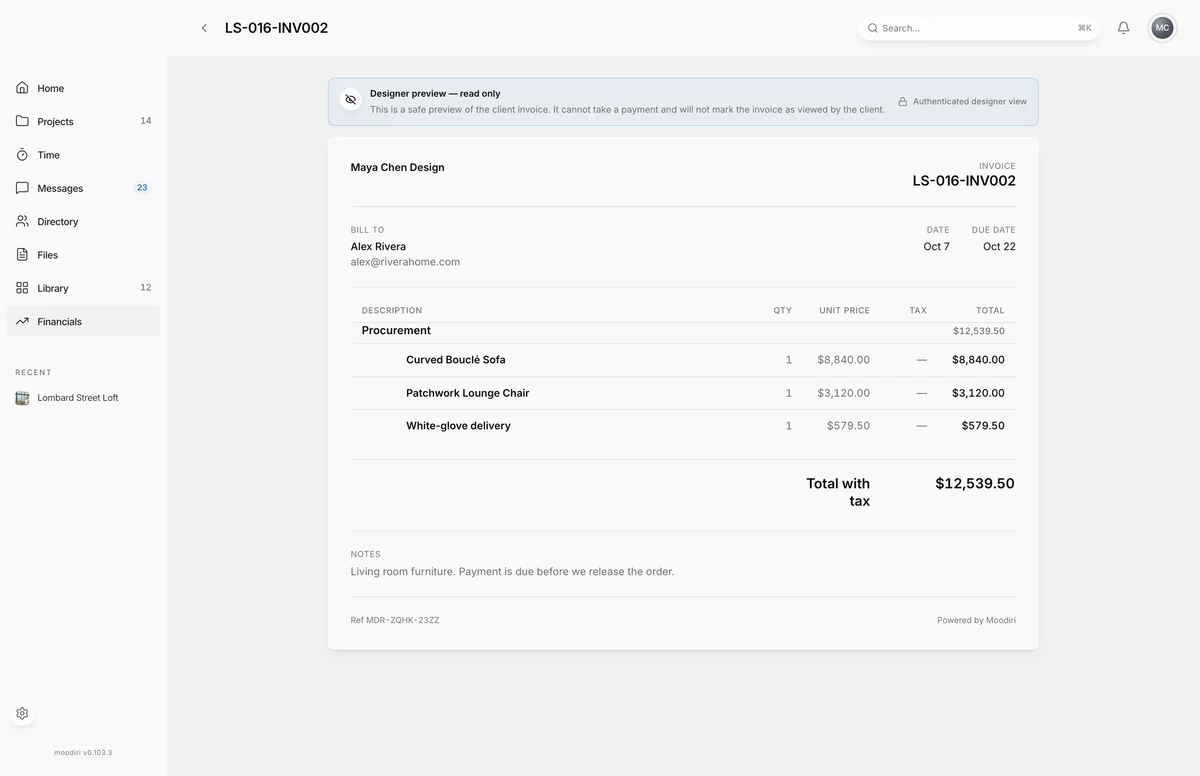
The client preview shows the invoice exactly as your client sees it online, marked Designer preview — read only. It can't take a payment and doesn't mark the invoice as viewed. It is available once the invoice has been sent. To see the live payment page instead, choose Open payment page under Client payment link.
Corrected invoices and banners
- Payment processing means a bank payment is settling. ACH payments take 3-5 business days to settle, and you are notified when they do.
- Payment cleanup in progress means an earlier payment attempt is being released. Collection actions come back on their own, usually within a few minutes.
- Archived — this invoice was corrected and replaced marks an old version after an item refund. Use the current invoice instead. See Refunds and corrections.
Questions
Why are some actions missing?
Actions follow the invoice's status. A draft offers Send invoice, Edit and Delete; a sent invoice offers Resend, Record payment and Void; a paid invoice offers PDFs and, where it applies, Refund items…. Money actions are for the owner and admins.
Where is the invoice number shown to my client?
The invoice name at the top of the document is what your client sees on the invoice and in the email.