Projects list
Every project your firm runs, as cards you can open, with separate Active, Archive and Deleted views and a button to start a new project.
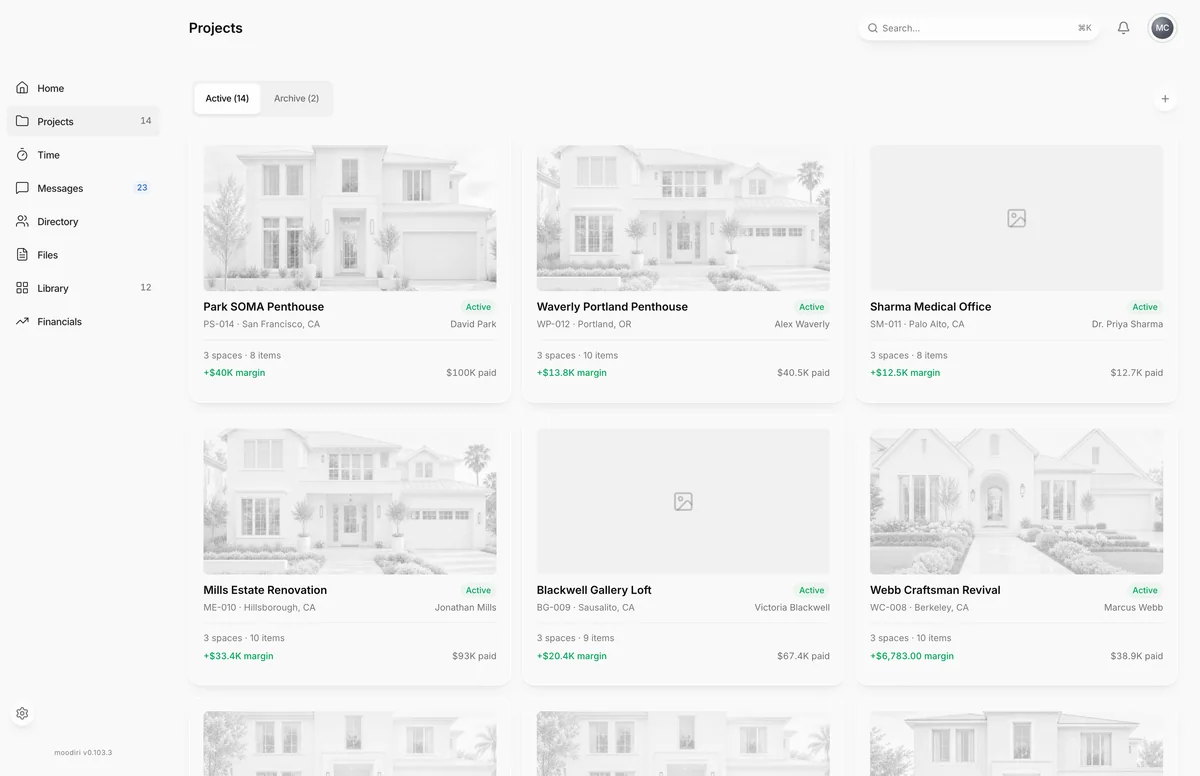
- 1New project
The projects list is where every client job lives. Each project shows as a card with its cover photo, name and project code, so you can find a job at a glance and open it with one click. Choose Projects in the sidebar to open it.
What you see here
- Project cards. One card per project. Open a card to go to its project overview.
- New project. The round + button at the top right (its label is New project) opens the project wizard. It shows on the Active view only.
- View switcher. Active, Archive and, when there is something in it, Deleted. Each shows how many projects it holds.
When your firm has no projects yet, the page shows No projects yet with a Create project button instead.
Active, Archive and Deleted views
Projects sit in one of three views, so finished and paused work stays out of your way without being lost.
- Active holds projects you are working on now.
- Archive holds completed, paused (On hold), cancelled and archived projects. Cards are dimmed and show a Restore button that makes the project active again.
- Deleted holds projects that were deleted in the last 30 days. Each card shows how many days are left, with Restore and Delete now. See Delete, restore and permanently delete a project.
The Deleted view only appears when at least one project is deleted.
To move a project out of Active, see Pause or close a project.
Limits
- Archive holds projects that are archived, plus any project whose status is completed, on hold or cancelled.
- Deleted only shows when at least one project is deleted. Deleted projects are removed for good after 30 days.
- Restore and Delete now need the Delete projects permission.
Questions
Where did my paused project go?
Paused projects are On hold, so they move from Active to Archive. Open Archive and choose Restore on the card to make it active again.
Why don't I see a Deleted view?
Deleted only appears when at least one project has been deleted. Once the last deleted project is restored or removed, the view disappears again.
Are invoices lost when a project is deleted?
No. Invoices, payments and retainers are always kept, even after a deleted project is removed for good.