Delete, restore and permanently delete a project
Deleted projects wait 30 days in Deleted before they are removed. Restore one in that time, or delete it now. Financial records are always kept.
Why use it
Mistakes happen: a duplicate project, a test, a job that never went ahead. Deleting moves the project out of sight right away, but gives you 30 days to change your mind. Financial records are never lost, so your books stay complete.
When to use it
- A duplicate or test project. Delete it, and choose Delete now if you want it gone immediately.
- A project deleted by mistake. Restore it from Deleted within 30 days.
For a finished job, close it instead so its history stays easy to find: Close a project.
Before you start
- You need the Delete projects permission to delete, restore or permanently delete a project.
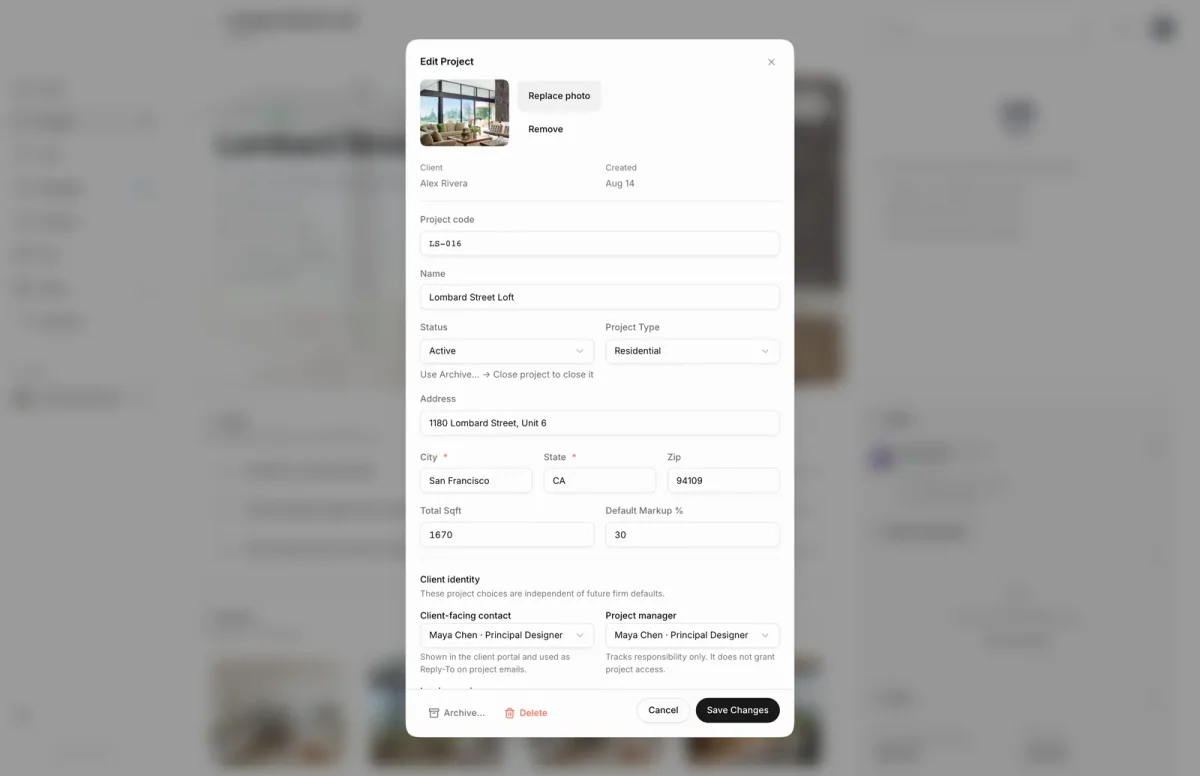
- Delete starts from the project itself: open it and choose Edit project.
Steps
- 1Delete
- Open the project, choose Edit project, then choose Delete in the dialog footer.
- Moodiri asks Delete this project? and says it moves to Deleted for 30 days. Choose Delete to confirm.
- Open Projects and switch to Deleted. Each card shows how many days are left, with Restore and Delete now.
- To remove a project before the 30 days are up, choose Delete now on its card, then Delete permanently.
What happens next
- After Delete, you return to the projects list with Project "…" moved to Deleted. The project no longer appears in Active or Archive.
- The Deleted view appears and shows the project with its days left, then Deleting soon on the last day.
- After 30 days, the project's non-financial data is removed automatically. Invoices, payments and retainers are always kept.
- Restore returns the project to where it was before you deleted it.
Limits
- Deleted projects are removed automatically after 30 days.
- Permanent delete is refused when the project has invoices, payments, retainers, tax certificates or time records.
- Delete starts from the project overview: Edit project › Delete.
- The Deleted view only appears when at least one project is deleted.
Troubleshooting
- This project has retained business history (financial, tax, or time-tracking records) and cannot be permanently deleted.: the project has records Moodiri keeps for you. Leave it in Deleted, or restore it and close it instead.
Questions
Should I delete or close a finished project?
Close it. Closing keeps the project and its history in Archive. Delete is for projects created by mistake or that you no longer need at all.
Why can't I permanently delete a project?
It has invoices, payments, retainers, tax certificates or time records. Those are kept for your records, so the project can't be removed permanently. Close it instead.
What happens to the project's files?
Documents are set aside with the project. If you restore it within 30 days, they come back with it.