Team
See who is in your firm, how many paid seats are in use, and invite, edit, unassign or remove teammates.
- 1Team
- 2Invite people
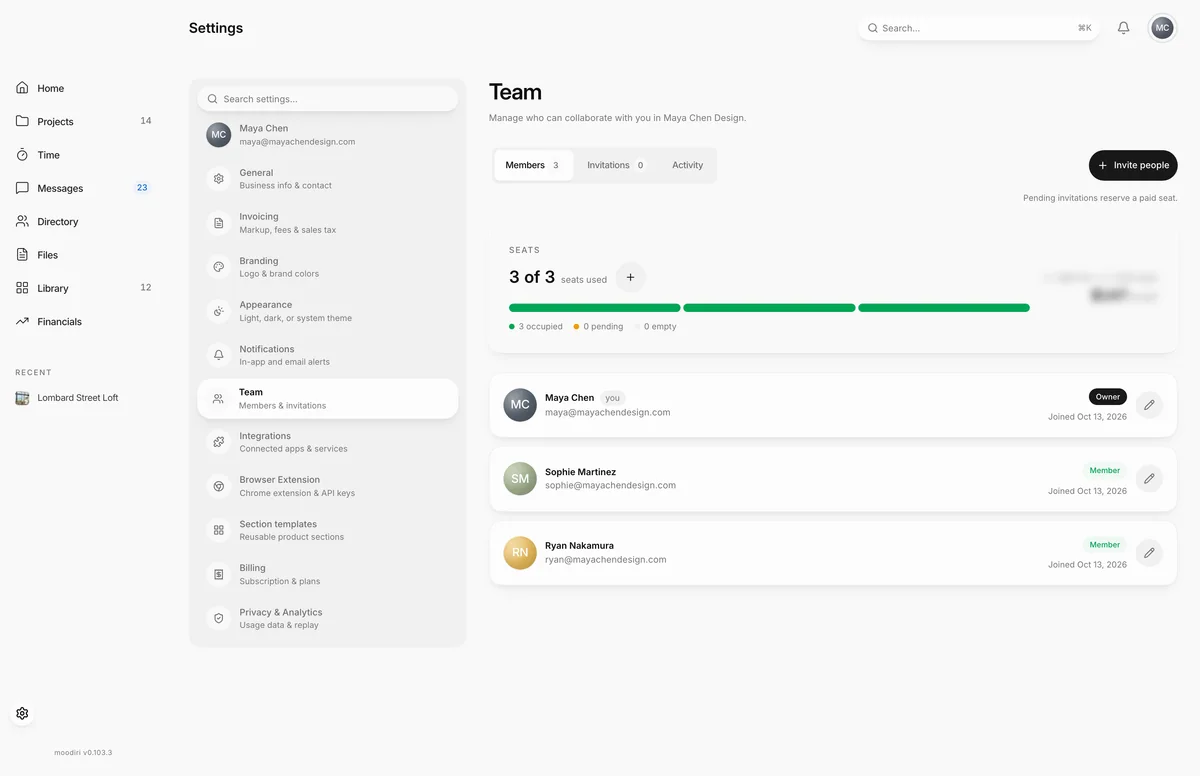
Team is where you manage the people in your firm: who has a seat, what role they have, and who has been invited. It also shows how many of your paid seats are used, so you know whether there is room to invite someone.
Open Settings, then choose Team.
What you see here
- Members, Invitations and Activity. Three views of the team, with counts.
- Members lists everyone with a seat: name, email, role (Owner, Admin or Member) and the date they joined. Admins also show their access level, such as Standard Admin, Full access Admin or Custom Admin. Teammates whose seat was unassigned appear under Without a seat.
- Invitations lists pending invitations with their expiry date, and Resend and Revoke buttons.
- Activity shows who joined, who was invited, and whose seat was unassigned, newest first.
- Invite people. Opens the invitation dialog. See Invite people.
- Seats. How many paid seats are in use, with a bar split into occupied, pending and empty seats. People with the Subscription billing permission see a + button to change the seat count. See Seats.
To edit a teammate, choose the pencil button on their row. From there you can change their name and title, change their role and admin permissions (owner only), or end their access. See Roles and admin permissions and Remove a member.
Who can do what
- Owner. Everything: invite Members and Admins, change roles and admin permissions, unassign seats, and permanently remove people.
- Admin. Invite Members, edit Members, and unassign Members' seats. Admins cannot manage other Admins or Owners.
- Member. Sees the team list and roles. A note explains that an Admin or Owner invites teammates and manages seats.
Changing the seat count also needs the Subscription billing permission. See Plans, roles and feature availability for what each role can do across Moodiri.
Limits
- Pending invitations reserve a paid seat.
- Inviting someone or reactivating a teammate needs an empty paid seat.
- Invitations expire after 7 days.
- Nobody can change their own role or remove their own account.
- A firm must always keep at least one active Owner.
Questions
Does a pending invitation use a seat?
Yes. Each pending invitation reserves one paid seat until it is accepted, revoked, or expires.
What happens to a teammate's work when they leave?
It stays. Historical project and billing records remain under their name. If they were a client-facing contact or project manager, you choose who takes over.
Can members see the team list?
Yes, members see who is on the team and each person's role. Inviting people and managing seats is for the owner and admins.