Sign in to your portal
Sign in to your designer's client portal with a code sent to your email, a password, Google or Apple. No account to create first.
Why use it
Your designer keeps everything about your project in one place: the choices waiting on you, your invoices, shared documents and your conversations. Signing in takes you straight there, without searching your inbox for the latest version of a file or a price.
When to use it
- Your first visit. Open the invitation email and sign in with a code.
- Coming back later. Use your designer's portal link, or any link in a newer email from them, and sign in again if you've been signed out.
- Switching projects. If you have more than one project with the same designer, you pick one after signing in.
Before you start
- Your designer has invited you to the portal. The invitation comes by email, from your designer's studio.
- Use the email address your designer has for you. Sign-in codes are only sent to addresses with portal access.
Steps
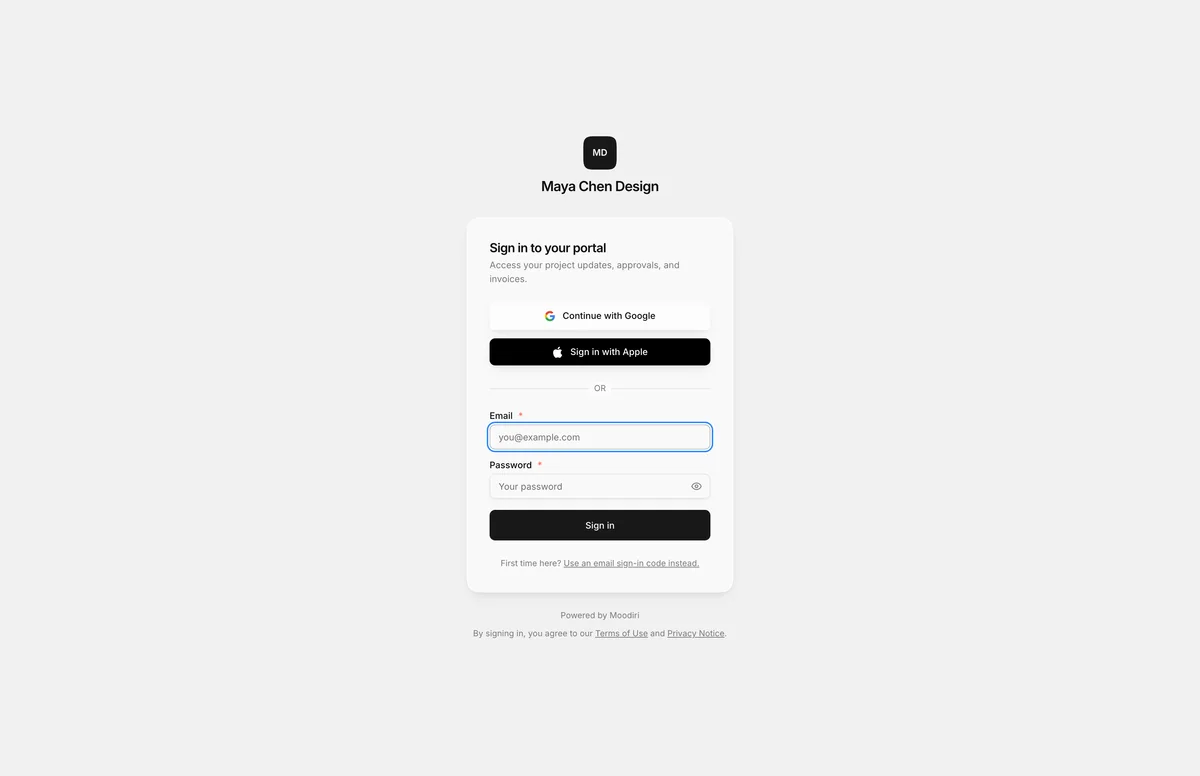
- Open the link your designer sent, such as View your project in their invite. It opens Sign in to your portal.
- Choose Continue with Google, or Sign in with Apple when offered, using the email your designer has for you.
- First time here with no password? Choose Use an email sign-in code instead.
- Type the Email your designer has for you, such as alex@riverahome.com.
- Choose Email me a code, then type the Six-digit code from the email and choose Continue.
Email code, password, Google, Apple
There are four ways in. They all lead to the same portal.
- Email code. Choose Use an email sign-in code instead., enter your email and choose Email me a code. The email holds a six-digit code and a Sign in to your portal button. The code works once and expires after 10 minutes. Asking for a new code makes the old one stop working.
- Password. If you have set a password, enter your Email and Password and choose Sign in. You can add or change a password later in Portal settings.
- Google. Choose Continue with Google and pick the Google account that uses the email your designer has for you.
- Apple. Choose Sign in with Apple. If Apple hides your email, the portal shows the private relay address. Use it exactly as shown next time.
To go back to the password form, choose Sign in with an existing password instead.
Choose a project
If you have one project with your designer, you go straight to it. If you have several, you see Choose a project with each project's name, code and status. Archived projects are listed separately under Past projects.
Signed in with the wrong email? Choose Sign out and use another email.
What happens next
- You land on the project Overview, with what is waiting for you at the top.
- You stay signed in for 30 days on that device.
Limits
- Sign-in codes are six digits, work once, and expire after 10 minutes.
- Code requests are limited per minute and per day. If you hit the limit, wait a few minutes before asking again.
- Password sign-in allows 5 attempts per minute.
- Sign in with Apple is only offered when your designer's portal has Apple sign-in set up.
- A sign-in lasts 30 days on the device.
Troubleshooting
- Portal access is not enabled. Your designer hasn't turned on portal access for this email yet. Use the contact link on the page, or reach them the usual way, and ask them to enable it.
- That code is invalid or has expired. Codes last 10 minutes and work once. Choose Use a different email to start again, then request a new code.
- Invalid email or password. Check both, or switch to an email code instead.
- Apple sign-in isn't available on this server. Use an email code, Google or a password instead.
- This older portal link is no longer active. Sign in with your email and you'll go to the same project, as long as you still have access.
Questions
Do I need to create an account?
No. Your designer gives you access. Enter the email they have for you and sign in with a code, or use Google or Apple with that same email.
How long do I stay signed in?
30 days on the same device and browser. After that, or after you choose Sign out, you sign in again.
I didn't get a code. What now?
Check your spam folder, and make sure you typed the email your designer has on file. If it still doesn't arrive, your designer may not have turned on portal access for that address yet. Ask them to check.