Overpayments and client credit
When a client pays more than they owe, the extra is kept as client credit. Track it on Financials, apply it to invoices or refund it.
Why use it
A client rounds up a check, pays an invoice twice, or you refund an item from a paid invoice. That money belongs to the client until it is used or returned. Client credit keeps it visible and separate from your revenue, so you can apply it to the next invoice or refund it, and nobody loses track.
When to use it
- A client paid too much. Keep the extra as credit and apply it later.
- A client paid in advance. Record the payment without linking an invoice.
- Items were refunded on a paid invoice. Keep the refund as credit for the next order.
Before you start
- Only the owner and admins can apply, reverse or refund client credit.
- Open Financials and find the Overpayments card.
Steps
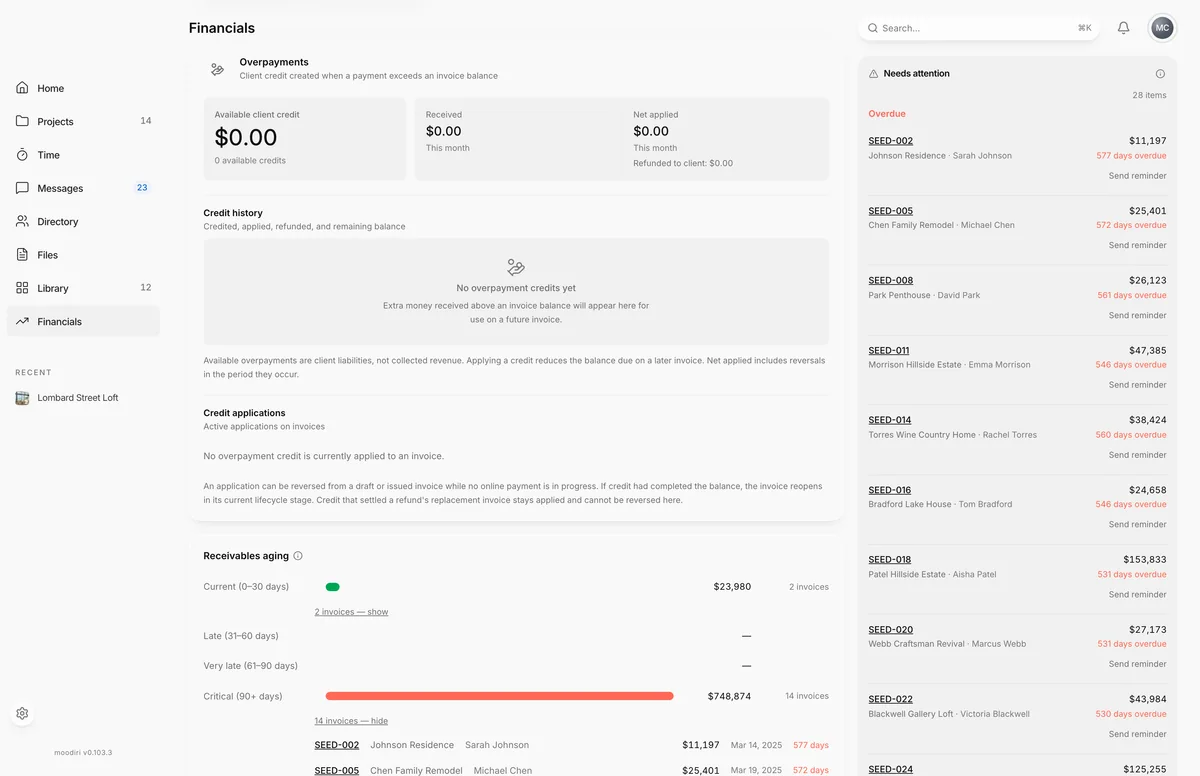
- 1Overpayments
- Open Financials and scroll to Overpayments.
- Check Available client credit, plus what was Received and Net applied this month.
- Under Credit history, review each credit: the client, the project it came from, what is left and its status.
- Under Credit applications, see which invoices used credit. To use a credit, open the client's next unpaid invoice and choose Apply overpayment.
When credit is created
Client credit is created when:
- A recorded payment is more than the invoice balance and you choose Add difference to overpayment.
- You record a payment without linking an invoice (Not linked — add to overpayment credit).
- One check pays several invoices and part of it isn't applied.
- You refund items on a paid invoice and keep the money as client credit. See Refunds and corrections.
Each credit shows its status: Available, Fully applied, Exhausted (used up by refunds), Reserved for replacement or Manual review.
Apply credit to an invoice
On a draft or unpaid invoice for the same client, choose Apply overpayment. See Apply credit to an invoice. You can also tick Apply credit to this invoice while creating a new one.
Reverse a credit application
Under Credit applications on Financials, each active application has Reverse. Choose it, then Reverse application to return the money to the client's available credit, or Keep applied to cancel. If the credit had paid the invoice in full, the invoice reopens. You can also do this from the invoice with Correct payment….
An application can be reversed on a draft or sent invoice while no online payment is in progress. Credit that settled a refund's replacement invoice stays applied.
Refund credit to the client
To return available credit, choose Refund to client on the credit row. You record how you paid it back, such as a check or Zelle; Moodiri doesn't move the money. See Record a refund to a client.
What happens next
- Applied credit lowers the invoice's Amount due and shows as Overpayment credit applied.
- The credit's remaining balance drops, and its history shows what was credited, applied and refunded.
- Your Financials report reports credit separately from revenue.
Limits
- Credit can be applied only to the same client's draft, sent, viewed or overdue invoices.
- Credit imported from QuickBooks can't be refunded in Moodiri.
Questions
Is client credit income?
No. Available overpayments are money you owe your client, not collected revenue. Applying a credit reduces what they owe on a later invoice.
Is client credit the same as a retainer?
No. Client credit comes from overpayments and refunds. Retainers are requested and tracked separately. See Retainers.
Can a client use credit from one project on another?
Yes. Credit belongs to the client. When you apply it, Moodiri shows which project the credit was received for.