Family revisions
Change a product family safely: undo quick moves, send a change your client must accept, or apply it yourself.
Why use it
Changing a family your client has already approved, such as swapping a sectional's chaise, changes what they agreed to and possibly the price. Family revisions make that change visible: either your client accepts the new family with its new price, or you record that you applied it on their behalf. Changes to drafts nobody has seen stay quick, with an undo.
When to use it
- Rearranging drafts. Move pieces between families before your client sees them, with Undo if you slip.
- Changing an approved family. Send the change to your client to accept. See Propose a family change.
- A change your client already agreed to. Apply it now without a client review, for example after a site meeting.
Before you start
- A product family. See Product families.
- A client on the project with an email address, if you will send a proposal.
Steps
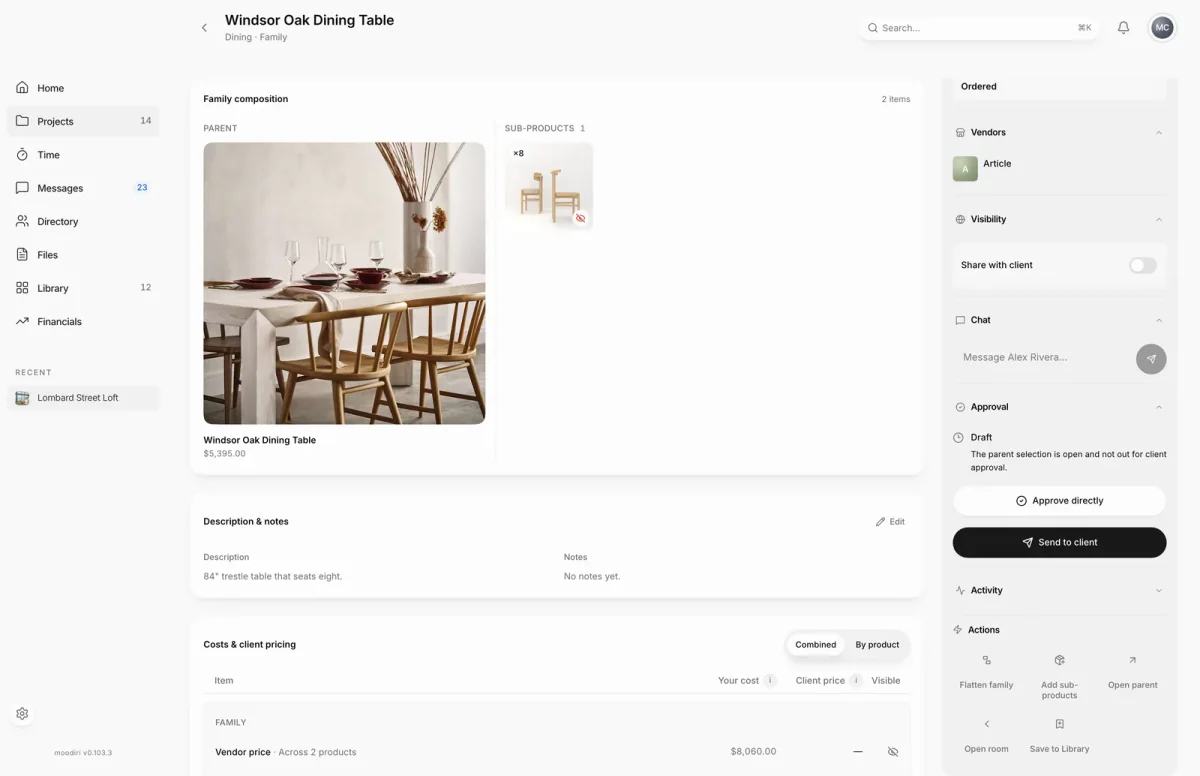
- 1Add sub-products
- On the family page, here Windsor Oak Dining Table, choose Add sub-products in Actions.
- Find the product, for example by searching Oak across the Whole project, then choose it or its Copy button.
- Confirm with Copy product or Move product. When the change touches products your client has reviewed or can see, Moodiri asks how to apply it.
- Choose Send for client review or Apply now without client review.
- If you sent it for review, choose Review proposal, check the pricing, then choose Send for client approval.
Move uncommitted products (with Undo)
When a move affects nothing your client has reviewed or can see, Moodiri applies it right away and offers Undo. In the Add sub-products dialog, the undo sits at the top of the dialog; from Add to a family, it appears in the confirmation message for 10 seconds. Moodiri shows Move undone when it is reversed.
Undo is for moves only, not copies, and only while the products have no approvals or invoices.
Apply a change without client review
Choose Apply now without client review when your client has already agreed. The change applies as accepted: the family becomes your client's selection, earlier approvals for these products are archived, and issued invoices stay as they are. If the price changed, the product page prompts you to notify your client.
You cannot apply a change this way while the family has a draft proposal. Send or cancel the proposal first.
Limitations and billing effects
- A family with a proposal already out with your client takes no further changes. Review or withdraw that proposal first.
- If products or commitments change while a proposal is being prepared, Moodiri asks you to cancel it and review the current family again.
- Accepting a proposal updates draft invoices. Issued invoices and payments are never changed.
- If client-reviewed family updates are not available, Moodiri shows Client-reviewed family updates are temporarily unavailable. You can still organize draft products or copy into a draft family.
What happens next
- Draft moves apply immediately, and the family's totals update.
- A proposal appears as an approval request titled Proposed changes to the parent's name. Your client accepts it in their portal.
- When your client accepts, the family changes are applied and the proposal is kept as a receipt.
Limits
- Undo is offered for 10 seconds in the confirmation message, and only for moves that affect nothing your client has seen.
- Applying a change without client review is refused while the family has a draft proposal.
Questions
Does my family change while the proposal is out?
No. The current family stays active until your client accepts. Then the moves, selection changes and draft invoice updates are applied.
What happens to invoices already sent?
Issued invoices and payments stay as they are. A proposal only updates draft invoices when your client accepts it.