Products and selections · Product families
Save a family to the Library
Save a complete product family as a reusable Library configuration, so you can add the same set to future projects.
Why use it
If you specify the same set often, such as a sectional in a standard layout or a vanity with its fixed mirror and sconces, rebuilding the family in every project is slow. Saving it to the Library keeps the pieces, their quantities and roles together, ready to drop into the next project.
When to use it
- Signature pieces. Sets you specify across many projects.
- Standard packages. A room package you offer often, such as a guest bath.
- Keeping a known-good configuration. Save the set once its pieces and quantities are right.
To save a single product instead, see Add to the Library.
Before you start
- A product family with its sub-products. See Add or remove sub-products.
- Open the family page from the room's products page.
Steps
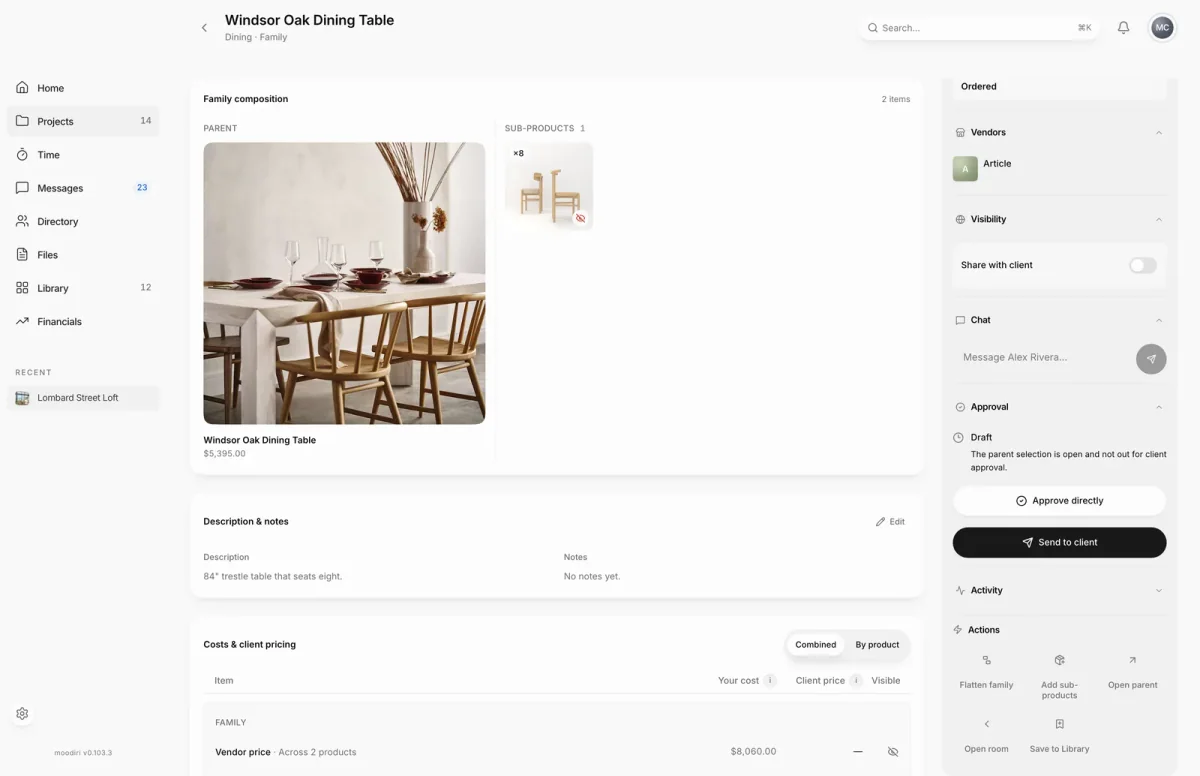
- 1Actions
- Open the family, here Windsor Oak Dining Table, and find its Actions panel.
- Choose Save to Library to keep this table and its chairs as one reusable set.
- Enter a Configuration name, for example Windsor dining set for 8, and an optional Description.
- For each sub-product, such as the Oak Dining Chair, set its Library role to Regular or Supplemental.
- Choose Update configuration to refresh the saved set, or Save as new to keep both. A first save reads Save new configuration.
What happens next
- Moodiri shows Family saved to Library, with View in Library to open it.
- The configuration appears under Library families. From there you can edit it or add it to a project.
Limits
Limits
- Configuration name is required, up to 120 characters. Description can be up to 2,000.
- Later edits to the configuration do not change families already in projects.
- A supplemental product can be added to a project only through a family configuration.
Questions
If I edit the Library configuration later, do my projects change?
No. Later edits to the configuration do not change families already in projects.
Someone else changed the configuration while I was editing. What now?
Moodiri keeps your edits and lets you reload the latest version, or save your settings as a new configuration.
Next
Library familiesLibraryAdd a library family to a projectLibraryProduct familiesProducts and selections
Was this page helpful?
Thanks, noted.