Products and selections · Product families
Add or remove sub-products
Build a product family: add sub-products to a parent, add a product to a family, remove one, or flatten the family.
Why use it
Many pieces are really one purchase: a dining table and its leaf, a bed frame and its headboard, a sectional's modules. Grouping them as a family keeps their costs together, lets you hide the small parts from your client, and puts one decision and one invoice line in front of them.
When to use it
- Multi-piece furniture. Sectionals, modular storage, bed frames with separate headboards.
- Fixtures with parts. A light with its canopy, a faucet with its valve.
- Sets repeated across rooms. Copy pieces into a family without moving the originals.
Before you start
- The products in the project, or in your Library.
- Open the parent's product page or family page. Family actions are in Actions.
Steps
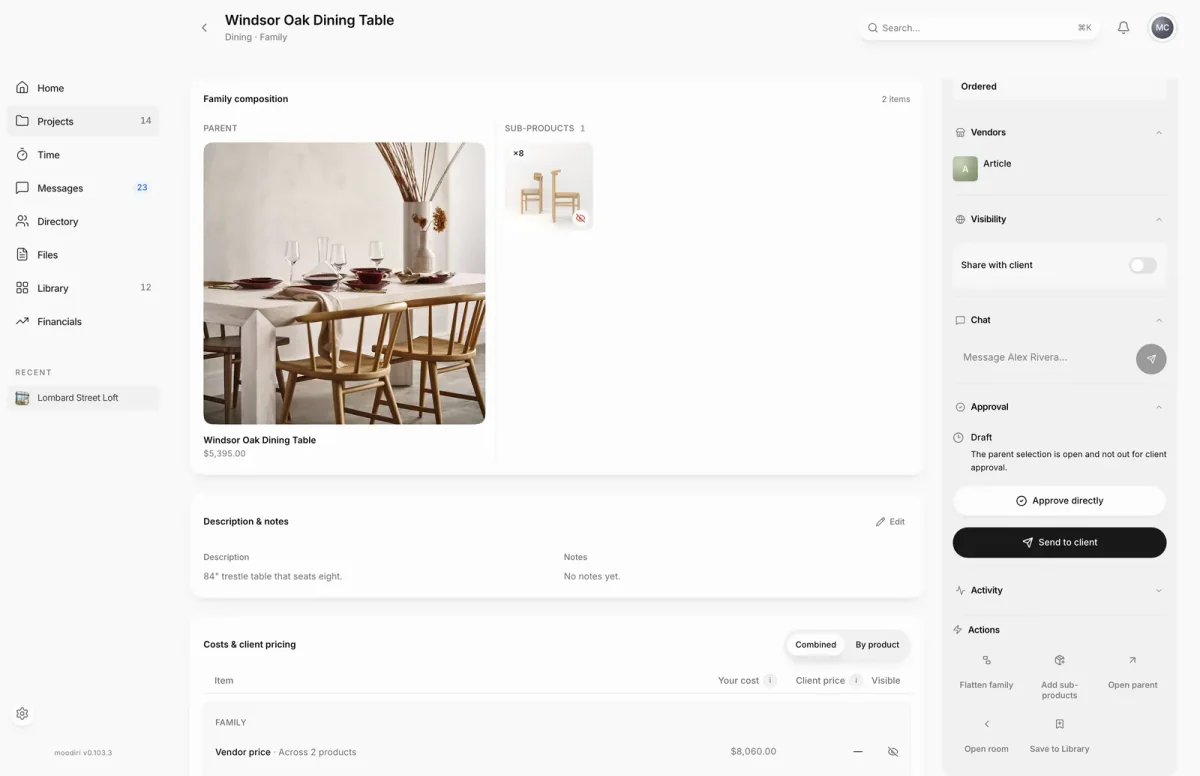
- 1Actions
- Open the family, here Windsor Oak Dining Table, and find its Actions panel.
- Choose Add sub-products to pick pieces for this family.
- Choose where to look, This room, Other rooms, Whole project or Library.
- Search by name to narrow the list, for example Oak.
- Choose a product to move it in, or its Copy button to leave the original where it is.
- Confirm with Copy product or Move product. It joins the family right away, with Undo if you change your mind.
- To take a piece out, open it and choose Remove from family. To break up the whole family, choose Flatten family.
What happens next
- Moodiri confirms each piece moved, copied or added. The family's client total updates.
- Sub-products shown to your client bill as their own lines; hidden ones fold into the parent's price. Set this under Visibility on the family page.
- If the change affects products your client has reviewed or can see, Moodiri asks you how to proceed. See Family revisions.
- Remove from family makes the piece a standalone product. If it was the only sub-product, the parent becomes standalone too.
- Flatten family makes the parent and every sub-product standalone. Each keeps its current quantity, and hidden pieces stay unbilled until you show them.
Limits
Limits
- Flatten family checks billing each time its dialog opens. When invoices already bill the family, the dialog explains why it cannot be flattened instead of offering Flatten family.
- With Add to a family, the parent must be a standalone product or an existing family's parent, not a sub-product.
- Moving into a family removes the product's editable section placements.
Questions
Can I add a product to a family from the product itself?
Yes. On a standalone product, choose Add to a family, then pick the parent. The product moves into the parent's room.
Can I undo a move?
Often, yes. Right after moving a product into a family, choose Undo. See Move uncommitted products.
Next
Product familiesProducts and selectionsFamily revisionsProducts and selectionsProducts in a spaceProducts and selections
Was this page helpful?
Thanks, noted.