Notifications
Choose how your firm is alerted to overdue invoices, payments and approvals, and whether invoice emails you send copy you in.
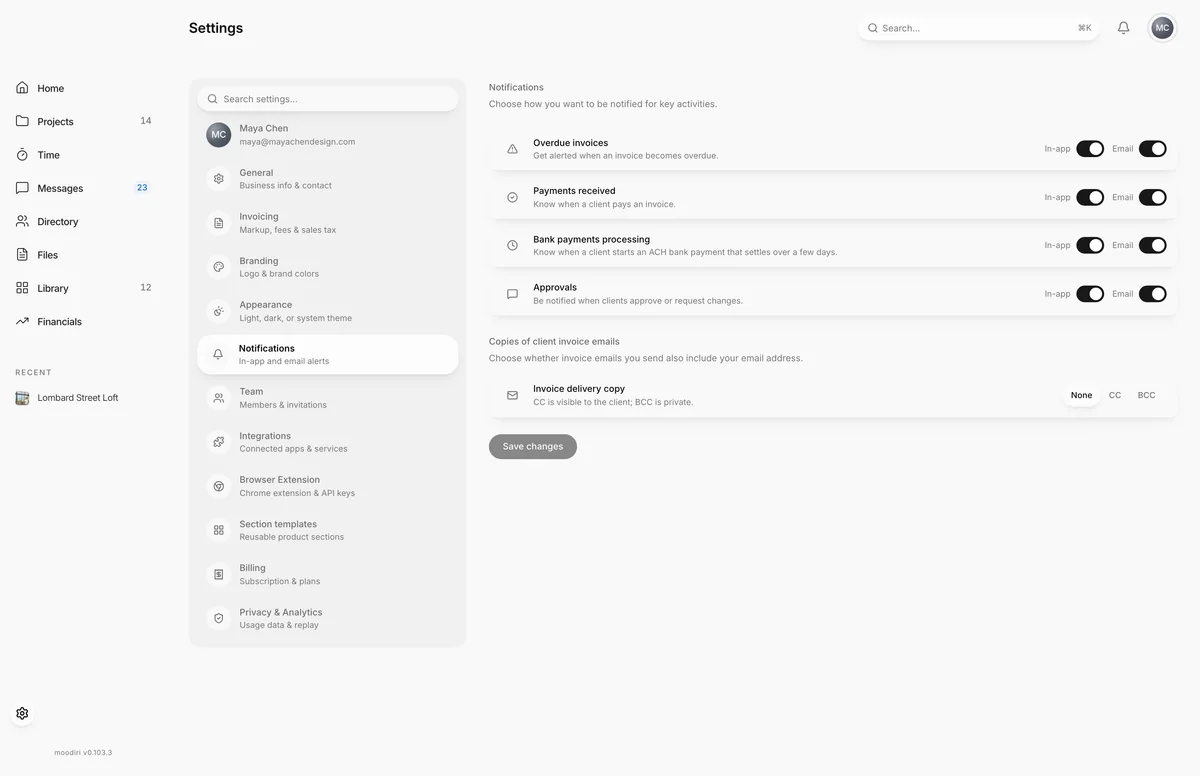
- 1Invoice email copies
- 2Save changes
Notifications controls which key events reach your firm in Moodiri and by email, so a payment or an overdue invoice is never missed. It also sets whether you get a copy of the invoice emails you send.
Open Settings, then choose Notifications.
What you see here
Four events, each with an In-app switch and an Email switch:
- Overdue invoices. When an invoice becomes overdue.
- Payments received. When a client pays an invoice.
- Bank payments processing. When a client starts an ACH bank payment, which takes a few days to settle.
- Approvals. When clients approve or request changes.
All are on until you turn them off. These switches apply to the whole firm, so only the owner and admins with the Firm settings permission can change them.
Copies of client invoice emails
Invoice delivery copy decides whether invoice emails you send also go to your own email address:
- None. No copy.
- CC. You are copied, and the client can see it.
- BCC. You are copied privately.
This one is personal, so every member can set their own.
Choose Save changes to save. It becomes available once you change something. You see Notification settings saved. when it worked.
To read the alerts themselves, see Notifications.
Limits
- Alert switches apply to everyone in the firm.
- The invoice copy choice applies only to invoice emails you send. Firm-wide copy rules are set in General.
Troubleshooting
- Notification channels were saved, but the invoice copy setting wasn't. Try again. The alert switches are saved. Choose Save changes again to save your invoice copy choice.
Questions
Why can't I change the alert switches?
They are firm-wide and need the Firm settings permission. Your own invoice copy choice stays editable.
Will my client see that I'm copied on an invoice email?
With CC, yes. With BCC, no.