Library families
Saved family configurations: a parent product, its children and their quantities, stored in your Library to reuse across projects.
- 1Add to project
- 2Edit configuration
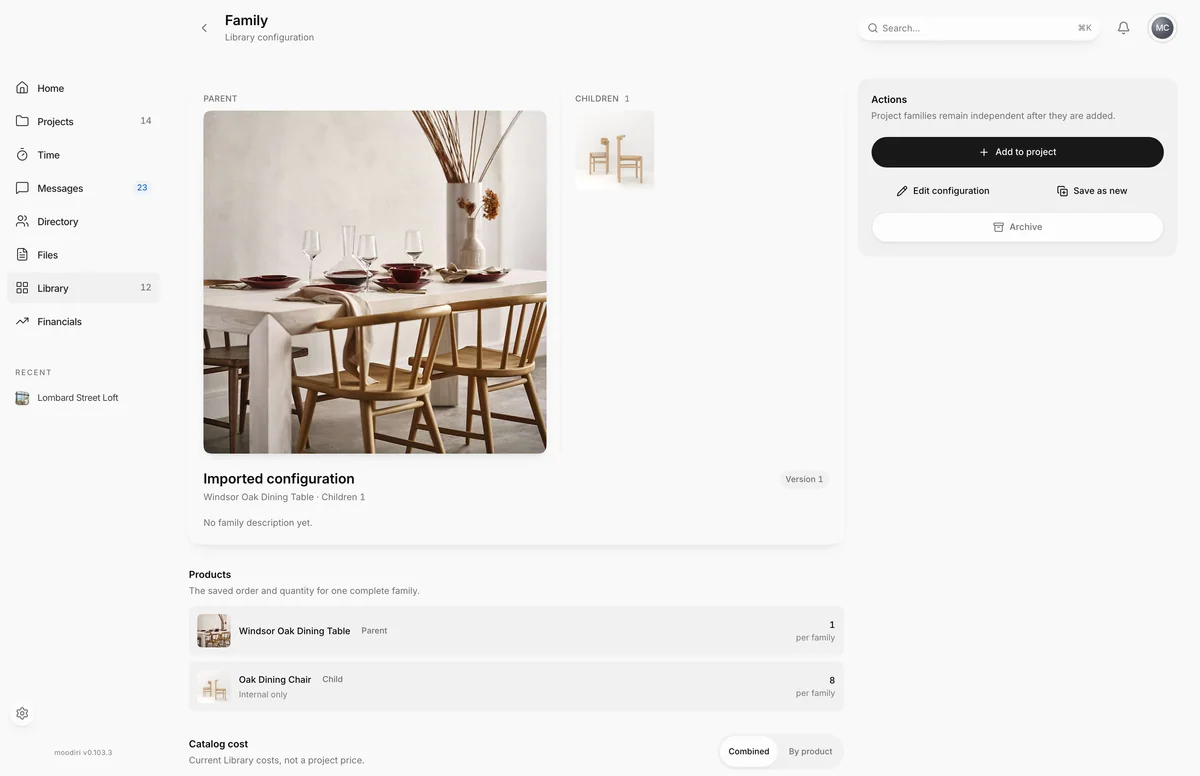
A library family is a reusable recipe for a product family: one parent product, the children that go with it, and how many of each make one complete family. A vanity with its basin, tap and mirror, or a sofa with its cushions, is set up once and then added to any room in one step.
Open Library, choose Products, then Families. Each card shows the parent, the number of children, the catalog cost, and how many projects use it. Choose View family to open it, or Add family to put it in a project.
What you see here
- Products: the parent and each child, in their saved order, with the quantity per family.
- Catalog cost: the current Library cost of one complete family. Switch between Combined and By product. This is the Library cost, not a project price.
- Used in projects: the projects that have used this family. Choose one to open it.
- Actions: Add to project, Edit configuration, Save as new and Archive.
- The Version badge goes up each time the configuration is saved.
Family configurations (regular vs. supplemental, shared vs. internal)
Each child has two settings that carry into every project the family is added to.
- Regular or supplemental. A regular product can also be added to a project on its own. A supplemental product, such as a fixing kit, only makes sense inside its family, so it can only be added as part of one. The Library's Supplemental filter lists these products.
- Shared with client or internal only. Shared children show in the client portal with the family. Internal children stay visible to your team only.
In the Library, the Families filter (All products, Families, Supplemental) switches between ordinary products and saved families. In the Families view you can search, filter by Vendor and Project, and sort by Most used, Recently updated, Name or Catalog cost.
Limits
- A configuration needs at least one child and can have up to 100.
- Parent and child quantities are whole numbers from 1 to 10,000.
- Archived configurations can no longer be added or updated. Families already in projects do not change.
Questions
How do I save a family to the Library?
Open a family in a project and choose Save to Library. See Save a family to the library.
If I change a saved family, do my projects change too?
No. Project families stay exactly as they are. A saved family only shapes the families you add from now on.