Library · Library families
Add a library family to a project
Add a complete saved family, parent and children in their saved quantities, to a room in any project.
Why use it
A family with six children and different quantities is slow to rebuild and easy to get wrong. Adding a saved family puts every product in the room at once, in the right ratio, so you can move on to pricing and client review.
When to use it
- A standard set. Your usual vanity, basin, tap and mirror for a bathroom.
- Repeated rooms. The same bedside set in three bedrooms: set Families to the number you need.
To add a single Library product instead, see Add a library product to a project.
Before you start
- Everyone on your team (owner, admins and members) can add a family to a project.
- The project needs at least one room (space). See Add a space.
- Open Library, choose Products, then Families.
Steps
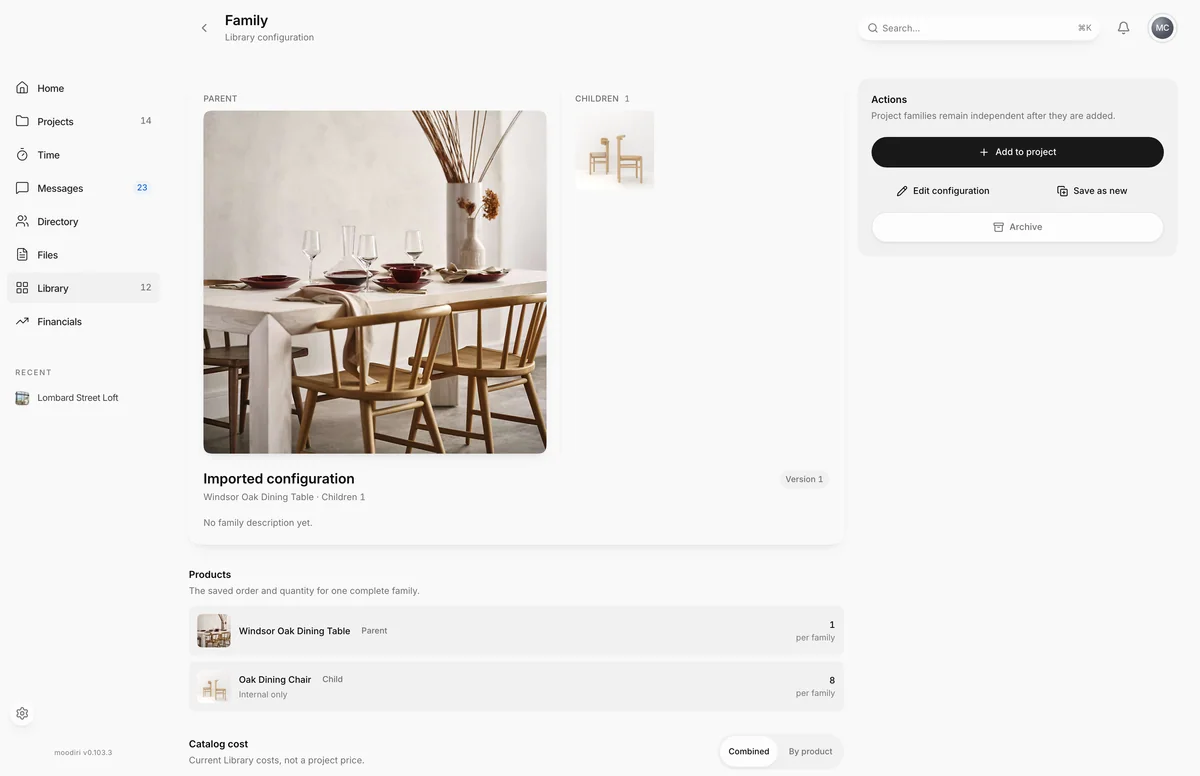
- On the saved family's page, choose Add to project. From the Families list, choose Add family on its card.
- Under Choose a project, choose the project, for example Lombard Street Loft. Each shows its room count.
- Choose the room the family belongs in, for example Dining.
- Under Families, enter how many complete families you need, for example 2.
- Choose Review family to see the project, room and every product's quantity before anything is added.
- Check the totals, then choose Add family. Use Back to change the project, room or count.
What happens next
- You see Family added and Moodiri opens the new family in the project.
- The family appears in the room as a product family, with its children shared with the client or kept internal as saved.
- The saved family's Used in projects list now includes this project.
Limits
Limits
- Families is a whole number from 1 to 10,000.
- Nothing is added until you choose Add family, and a failed add changes nothing.
Troubleshooting
- Multiple family copies are not available yet. Set Families to 1 and try again. Add one family, then add it again for more.
- This Library family changed. Close this dialog, refresh, and review the latest version. A teammate edited the family. Refresh the page and start again.
- One or more saved products is incomplete. Edit this Library family before adding it. Open Edit configuration, fix the incomplete product and save.
Questions
If I later edit the saved family, does this project change?
No. Project families stay independent once they are added.
I clicked Add family twice. Do I get two families?
No. A repeated request is recognised, and you see Family already added.
Next
Product familiesProducts and selectionsProducts in a spaceProducts and selectionsLibrary familiesLibrary
Was this page helpful?
Thanks, noted.