Overview
Your project's home page: the decisions and invoices waiting on you, your designer's contact details, your rooms, documents and recent activity.
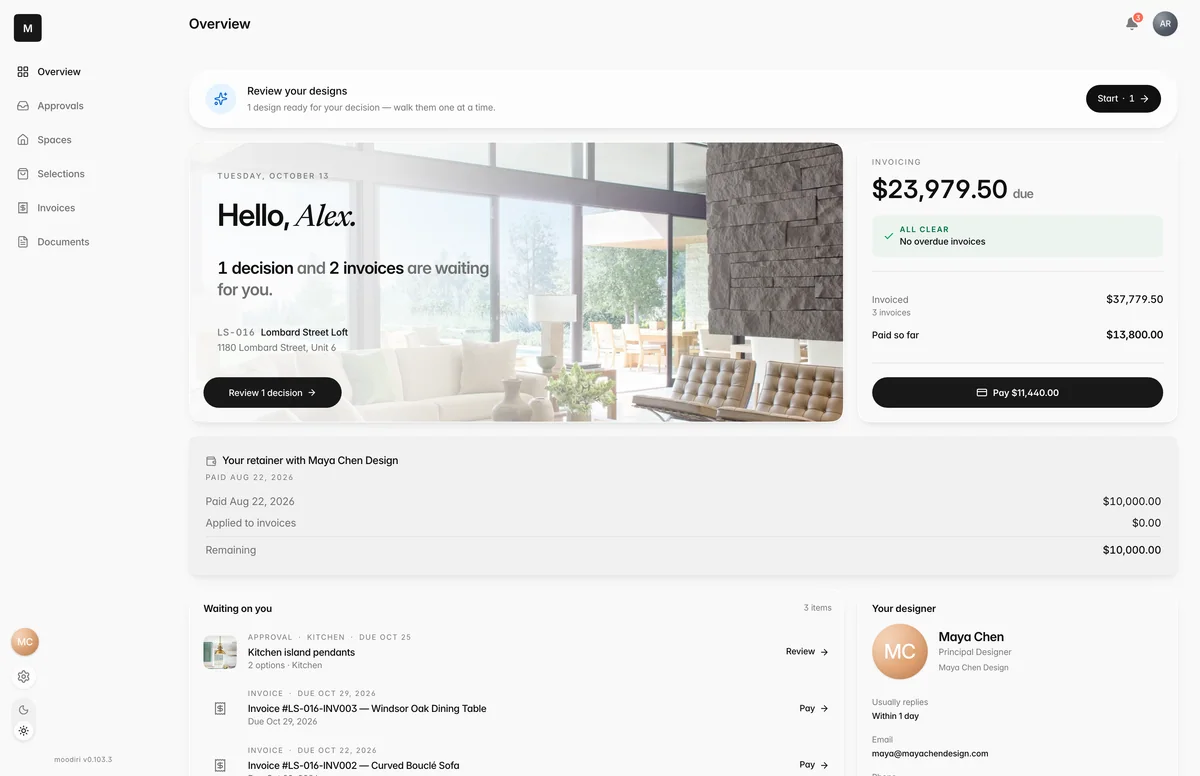
- 1Overview
- 2Navigation
The Overview is the first page you see after signing in. It answers one question: is anything waiting on me? Decisions, invoices and new files are gathered here, so you don't have to dig through emails to find them.
What you see here
- Hello card. Today's date and a line such as 2 decisions and 1 invoice are waiting for you, or Everything is on track. when nothing is. Buttons take you straight to the next step: Review 2 decisions, or Pay overdue invoice when an invoice is past due.
- Invoicing. The amount due now (or overdue, shown in red), plus your Outstanding and Paid totals. All clear means no invoice is overdue.
- Waiting on you. Each open decision, invoice and new document, with its room and due date. Choose one to open it. When the list is empty you see You're all caught up.
- Your designer. Their name, photo, how quickly they usually reply, and their email and phone.
- Your rooms. A strip of your spaces. Choose one to see what's chosen and what still needs your review. See Spaces and briefs.
- Documents and Recent activity. The latest shared files and project updates, each with a link to see them all.
Getting around
The menu on the left (or behind the menu button on a phone) holds Overview, Approvals, Spaces, Selections, Invoices and Documents. Below it:
- Your designer's photo opens chat. A red number shows unread messages.
- The gear opens Portal settings.
At the top right, the bell shows notifications, and your initials open a menu with Settings, Dark mode and Log out.
Retainer balance
If your designer took a retainer (a payment up front that's held for later invoices), a card shows Your retainer with your designer's studio. It lists what you Paid, the amount Applied to invoices, and what is Remaining. A retainer you haven't paid yet shows Awaiting payment.
The card is for reference only; there's nothing to do on it. If the retainer is cancelled or refunded, the card says so instead of showing a balance. Projects without a retainer don't show the card.
Call or book a time with your designer
The Your designer card has three buttons:
- Email opens a new email to your designer.
- Call dials their phone number. It's greyed out when no number is on file.
- Book opens your designer's booking page so you can pick a meeting time. If they haven't set one up, you see Booking isn't available yet instead.
For questions about the project, chat keeps the conversation with the project instead of in your inbox.
Limits
- The retainer card is read-only, and it only appears when your project has a retainer.
- Book works only after your designer adds a booking link in their settings.
Questions
What does "Everything is on track" mean?
Nothing is waiting on you right now: no open decisions and no invoices that need a payment.
Why doesn't the Book button work?
Your designer hasn't turned on meeting booking yet. Email or call them instead, or ask them to add a booking link.