Time settings
Set each person's capacity, rates and approver, choose who can log time to each project, and add firm holidays.
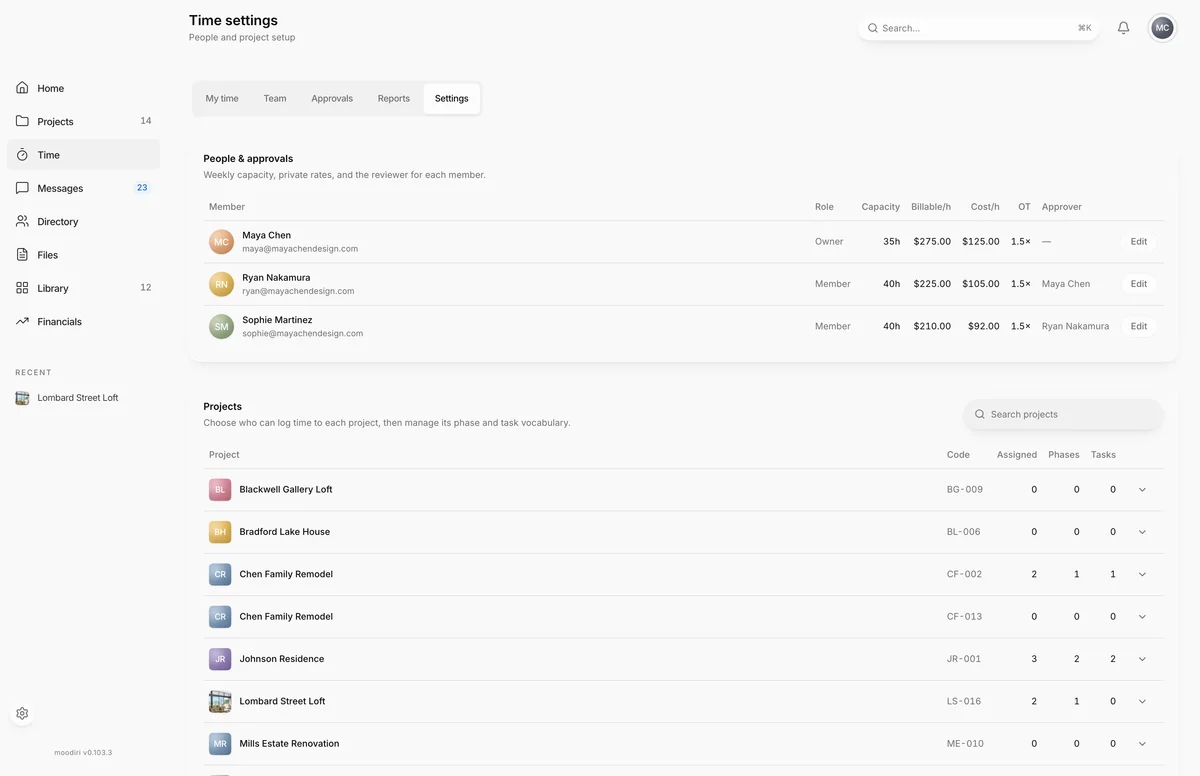
- 1People & approvals
Time settings is where the owner and admins with the Time tracking permission set up how time works for the studio: each person's weekly capacity and rates, who approves whose time, which projects each person can log to, and the days the studio is closed. Open Time, then choose Settings.
What you see here
- People & approvals. Weekly capacity, private rates and the reviewer for each member.
- Projects. Who can log time to each project, and its phases and tasks. Search with Search projects.
- Holidays. Dates the studio observes.
People and approvers
Choose Edit on a person to change:
- Timezone, used for their days and weeks.
- Capacity / week (hours), used for utilization and the capacity strip on their timesheet.
- Billable / hour and Cost / hour, used for billable value and margin.
- OT multiplier, applied to overtime billing.
- Approver, the teammate who reviews their weeks. Choose No approver to leave it to the owner and admins with the Time tracking permission.
Choose Save to apply the changes.
Project phases and tasks
Open a project under Projects to manage Access (who can log time to it, and their role: Contributor, Project manager or Approver), its Phases and its Tasks. See Project phases and tasks.
Holidays
Add each day the studio is closed with a Date and a Name, such as Thanksgiving, then choose Add holiday. Holidays show on everyone's timesheet, with a one-click option to log holiday time for that day. Choose Remove to take one off.
Limits
- Only the owner and admins with the Time tracking permission can open Settings. Anyone else is sent to My time.
- Weekly capacity must be between 0.25 and 168 hours.
- Rates must be empty or a non-negative number.
- A person can't be their own approver. Pick someone else, or leave it empty so the owner and admins with the Time tracking permission approve.
Questions
Who can see the rates I set here?
Rates are private to the owner and admins with the Time tracking permission. Team time and the timesheet never show them to the team.
Why can't a teammate find a project in Log time?
They are not assigned to it. Open the project under Projects here and assign them.