Set up project phases and tasks
Give a project the phases and tasks your team logs time against, with billing, rates and hour budgets per phase.
Why use it
When everyone logs to "the project" in general, you cannot tell how long design development took compared with sourcing or site work. Phases and tasks give your team the same vocabulary to log against, so reports show where the hours went and phase billing rules apply on their own.
When to use it
- At project kickoff, to set up the phases you bill by.
- Fixed-fee phases, to track hours against a fee without billing them hourly.
- Non-billable phases, such as internal reviews, so that time is never invoiced.
Before you start
- You need to be the owner or an admin with the Time tracking permission.
- The project must already exist in Moodiri. See Create a project.
Steps
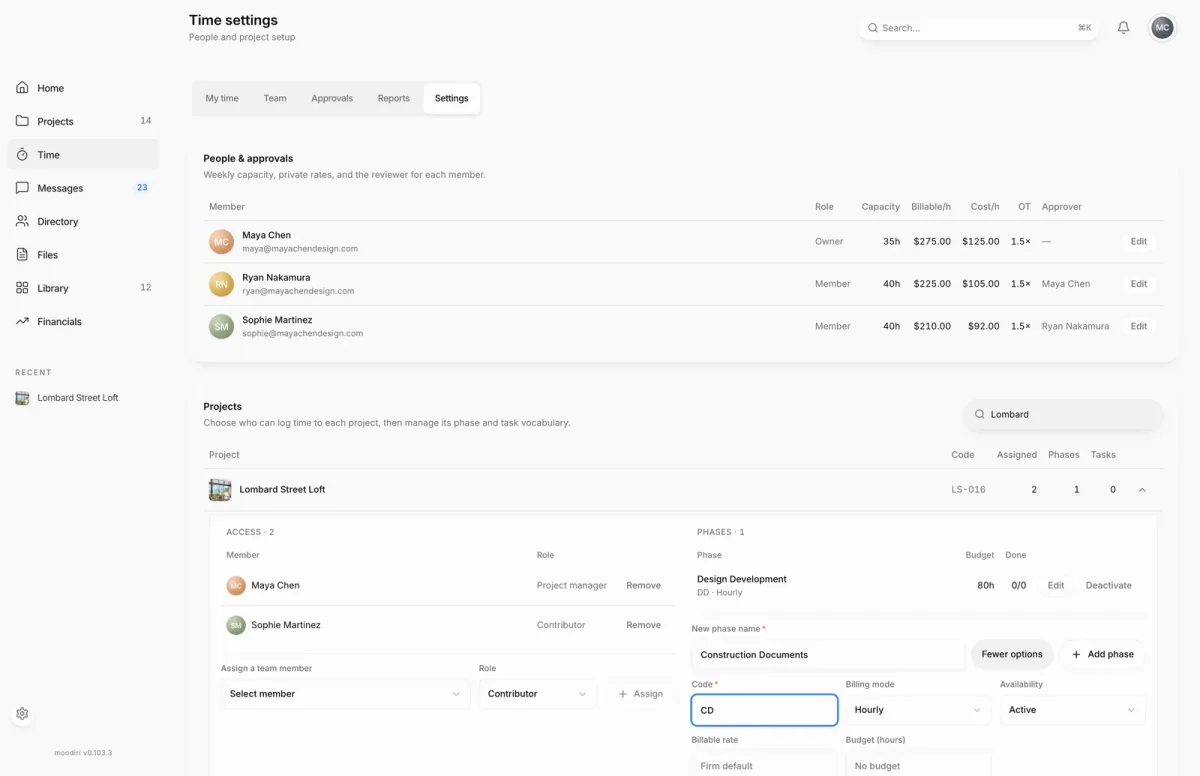
- 1Add phase
- Open Time, choose Settings, and type in Search projects to find the project, here Lombard Street Loft.
- Choose the project's details button to open its Access, Phases and Tasks.
- Under Access, choose Assign a team member, pick a Role, and choose Assign.
- Under Phases, type a New phase name, such as Construction Documents.
- Choose Phase options to set the Code, Billing mode, Availability, Billable rate and Budget (hours).
- Choose Add phase. It appears in the project's phase list, ready for time.
- Under Tasks, type a New task name, such as Review floor plan, and pick its Phase.
- Choose Add task. People can now pick it when they log time to that phase.
Edit phases and tasks
Choose Edit next to a phase to change its Phase name, Code, Billing mode, Billable rate, Budget (hours) or Availability, then choose Save phase. For a task, choose Edit to change its Task name, Phase, Status (To do, In progress or Done) and Assignee, then Save task. Choose Mark done or Reopen to change a task's status in one click.
What happens next
- New phases and tasks appear in Log time and Start timer for everyone assigned to the project.
- Phase billing decides whether time logged to it can be invoiced.
Limits
- A phase needs a name and a code.
- A phase billable rate must be empty or between 0 and 10,000,000.
- A phase budget must be empty or a positive number of hours.
Questions
Can I delete a phase?
Phases are deactivated, not deleted. Choose Deactivate to retire one, and Activate to bring it back.
Can I leave the rate empty?
Yes. An empty Billable rate uses the firm default rate.