Invoicing and payments · Send an invoice
Send a reminder or resend an invoice
Email an unpaid invoice to your client again, or send a reminder once it is overdue. Moodiri never sends reminders on its own.
Why use it
Invoices get buried in inboxes. A reminder puts the invoice and its payment link back at the top of your client's email, without you writing a new message or finding the PDF.
When to use it
- The invoice is overdue. Choose Send reminder to nudge your client.
- Your client can't find the email. Choose Resend to send it again.
- You'd rather message them yourself. Copy the payment link instead. See Client payment links.
Before you start
- Only the owner and admins can resend invoices.
- The invoice must be Sent, Viewed or Overdue.
- The client needs an email address. Otherwise the button shows Add an email to this client first.
Steps
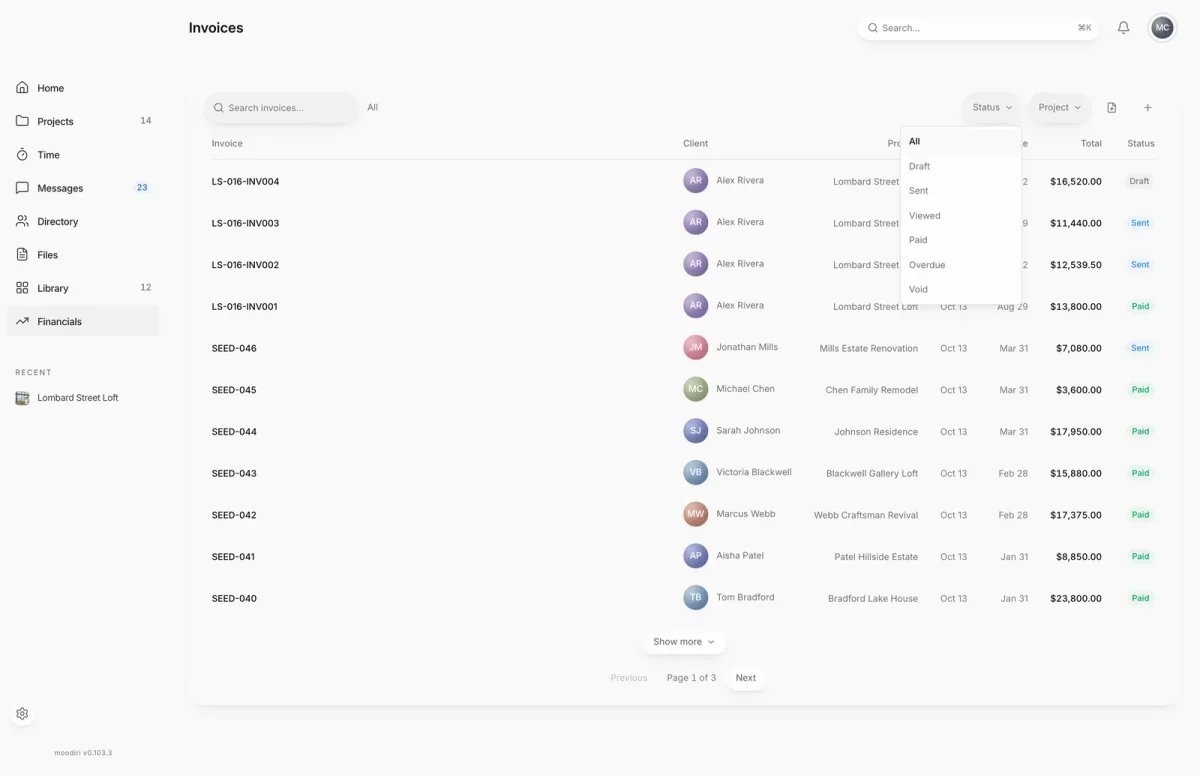
- 1Status
- On Invoices, open the Status filter and choose Overdue to find late invoices.
- Open the unpaid invoice, here LS-016-INV002 for $12,539.50, and check it is still Sent.
- In Actions, choose Resend. On an overdue invoice the same button reads Send reminder.
What happens next
- Moodiri confirms with Invoice resent to your client's email.
- The invoice keeps its status, due date and payment link. Nothing on the invoice changes.
- If delivery is delayed, you see Invoice reminder queued and will retry automatically. Moodiri keeps trying.
Limits
Limits
- Reminders are only sent when you choose to send them.
- While a bank payment is processing, or while a payment attempt is being released, collection actions such as Resend are hidden. They return once the payment settles or clears.
Troubleshooting
- The reminder is no longer deliverable because the invoice or payment state changed. Refresh before sending another reminder. The invoice was paid, voided or changed meanwhile. Refresh the page.
- Couldn't finish resending invoice. Please try again. Try again in a moment.
Questions
Does Moodiri send overdue reminders automatically?
No. When an invoice passes its due date your team is notified, but your client is only emailed when you choose Send reminder or Resend.
Can I send the link another way?
Yes. Under Client payment link, choose Copy link and paste it into a text or your own email.
Why is there no Resend button?
The invoice may be a draft (send it first), paid, void, or have a payment still processing. Reminders are only for sent invoices with a balance to collect.
Next
Invoice pageInvoicing and paymentsRecord paymentsInvoicing and paymentsInvoices listInvoicing and payments
Was this page helpful?
Thanks, noted.