Time tracking · Time reports
Invoice unbilled time
Turn approved billable hours into a draft invoice for the project, choosing exactly which entries go on it.
Why use it
Billable hours that never make it onto an invoice are money you did the work for and never asked for. Unbilled time collects every approved billable entry that is not on an invoice yet, by project, so nothing slips through at month end.
When to use it
- Month-end billing for hourly projects.
- After a phase wraps up, to bill its hours in one go.
- Catching stragglers left over from an earlier invoice.
To bill time while you build an invoice from scratch, use Create an invoice instead.
Before you start
- You need to be the owner or an admin with the Time tracking permission.
- The time must be billable and from an approved week.
- Connect Stripe if you want clients to pay online. See Connect Stripe before invoicing.
Steps
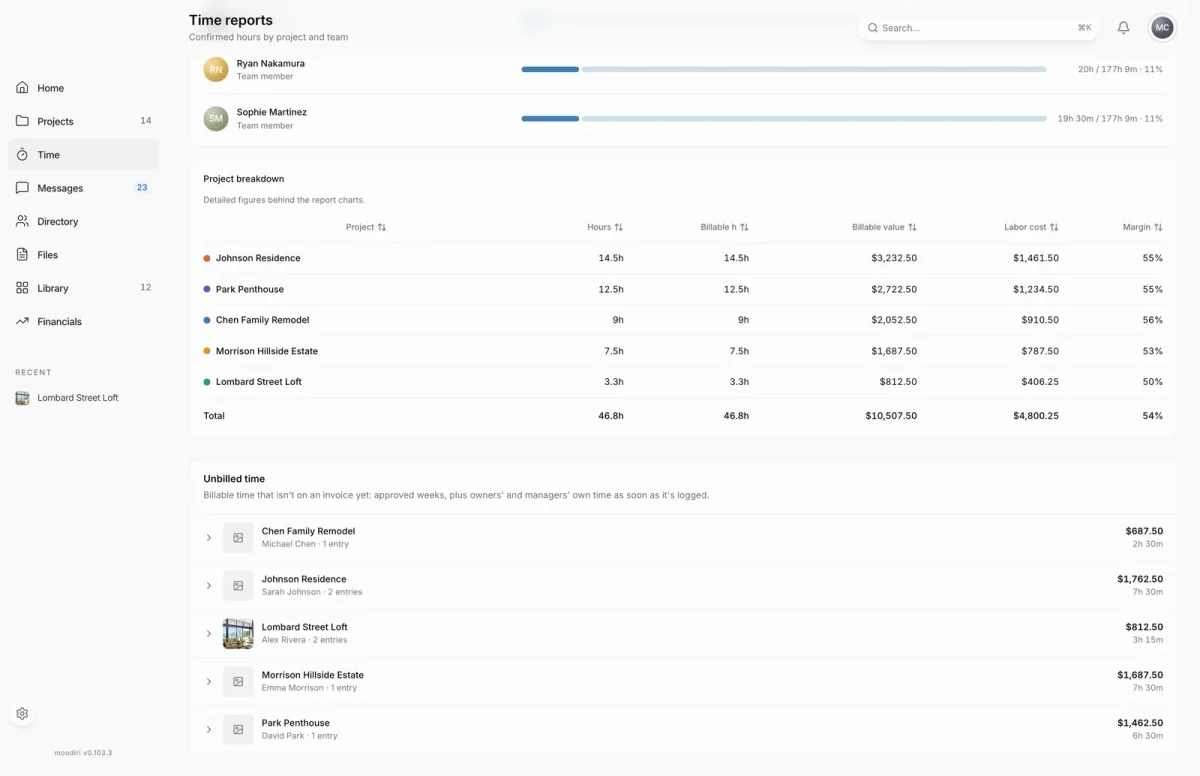
- 1Unbilled time
- Open Time, choose Reports, and scroll to Unbilled time. Each project shows its client, entries, value and hours.
- Choose a project, here Lombard Street Loft with 2 entries worth $812.50, to open its entries.
- Untick any entry you don't want to bill yet. It stays in Unbilled time for a later invoice.
- Tick Include event descriptions when your client should see what each entry was for.
- Optionally write Your invoice note for your client.
- Choose Create draft invoice. The button shows how many entries it includes, here 1.
What happens next
- Moodiri creates a draft invoice for the project and shows Draft invoice created with a View draft invoice link.
- The billed entries leave Unbilled time.
- Ticked details are visible to your client. Review the draft before you send it.
Limits
Limits
- Up to 500 entries per invoice. If a project has more, the first 500 are selected; create that invoice, then invoice the rest.
- When there is more unbilled time than one view can list, the oldest entries show first.
- Only billable time from approved weeks is listed, plus the owner's and managers' own billable time.
Troubleshooting
- No approved unbilled time. Nothing is waiting. Check Timesheet approvals for weeks still to approve.
- The draft invoice could not be created. Try again. Your selections are kept.
Questions
Why isn't this week's time listed?
Unbilled time lists approved weeks. Owners' and managers' own billable time appears as soon as it is logged. Everyone else's appears once their week is approved.
Does my client see the invoice straight away?
No. Moodiri creates a draft. Review it, then send it when you are ready. See Send an invoice.
Can I add logged time while building an invoice instead?
Yes. See Bill logged time.
Next
Edit a draft invoiceInvoicing and paymentsSend an invoiceInvoicing and paymentsTime reportsTime tracking
Was this page helpful?
Thanks, noted.