Spaces (rooms) · Space brief
Attach a brief
Give a room its own short questionnaire. Pick a published question flow and your client can answer it from their portal.
Why use it
Knowing how a client lives in a room shapes every selection, but those questions tend to get lost in long emails or a first-meeting notebook. A brief puts the same short questionnaire in front of your client for each room and keeps their answers with that room, ready when you start sourcing.
When to use it
- Rooms with specific needs. A nursery, a home office or a kitchen used for entertaining.
- Remote clients. Let them answer in their own time instead of on a call.
- Repeat questions. Reuse one flow, such as a bedroom brief, across every bedroom.
For questions about the whole project, use a project intake instead. See Intake and brief question flows.
Before you start
- You need at least one published question flow. See Create a question flow.
- The space must not already have a brief. Detach the current one first if you want to swap it.
Steps
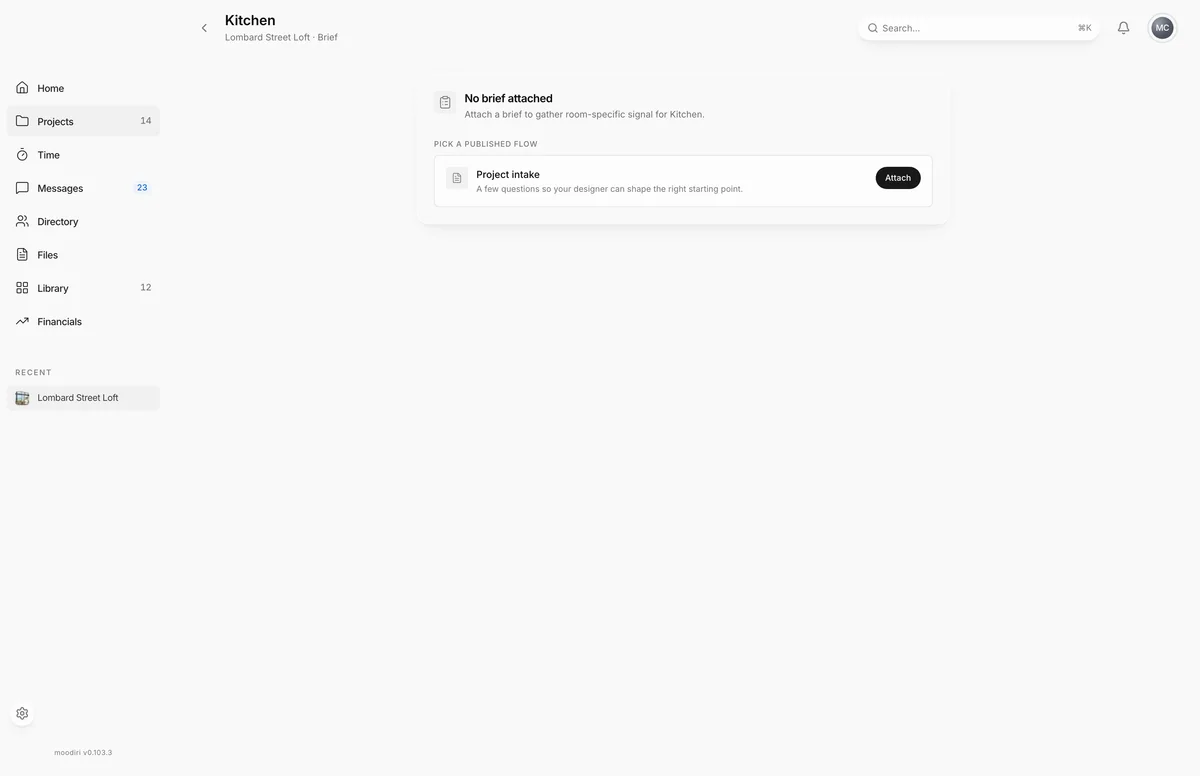
- 1Attach
- In Question flows, check that the flow you want, such as Project intake, shows Published.
- Open the space's Brief page. A room without one shows No brief attached.
- Under Pick a published flow, find the flow that fits the room.
- Choose Attach next to the flow. The brief is attached at once and shows Awaiting.
What happens next
- The brief shows Awaiting until your client starts, then In progress, then Submitted.
- Your client answers the brief from their portal. See Answer a space brief.
- Once submitted, the answers show on the space's brief page, read-only.
Limits
Limits
- Only published question flows can be attached. Publish a draft flow first.
- One brief per space at a time. To swap it, detach the current brief, then attach another.
- Submitted briefs can't be detached or changed, so the answers stay as your client gave them.
Questions
Why isn't my flow in the list?
Only published flows can be attached. Publish the flow first, then come back to the brief page.
Can I attach the same flow to several rooms?
Yes. Each space gets its own brief, and your client answers each one separately.
Next
Space briefSpaces (rooms)Publish and attach a question flowClient portal (designer side)Answer a space briefFor clients
Was this page helpful?
Thanks, noted.