Client portal (designer side) · Intake and brief question flows
Publish and attach a question flow
Publish a finished question flow, then attach it to a space so your client can answer it as that room's brief in the portal.
Why use it
A brief only works if the client fills it in. Attaching it to the space puts it in front of your client in the portal, next to the room it is about, and the answers come back to that space.
When to use it
- Starting a room. Attach the brief before your first concept so you design from your client's answers.
- Standard rooms. Reuse one Bathroom brief across every bathroom.
For more on attaching and following up a brief from the space side, see Attach a brief.
Before you start
- A finished flow in Draft. See Create a question flow.
- A project with the space you want the brief for.
- Your client needs portal access to answer it. See Invite clients and manage access.
Steps
- In the flow's builder, choose Publish, then confirm.
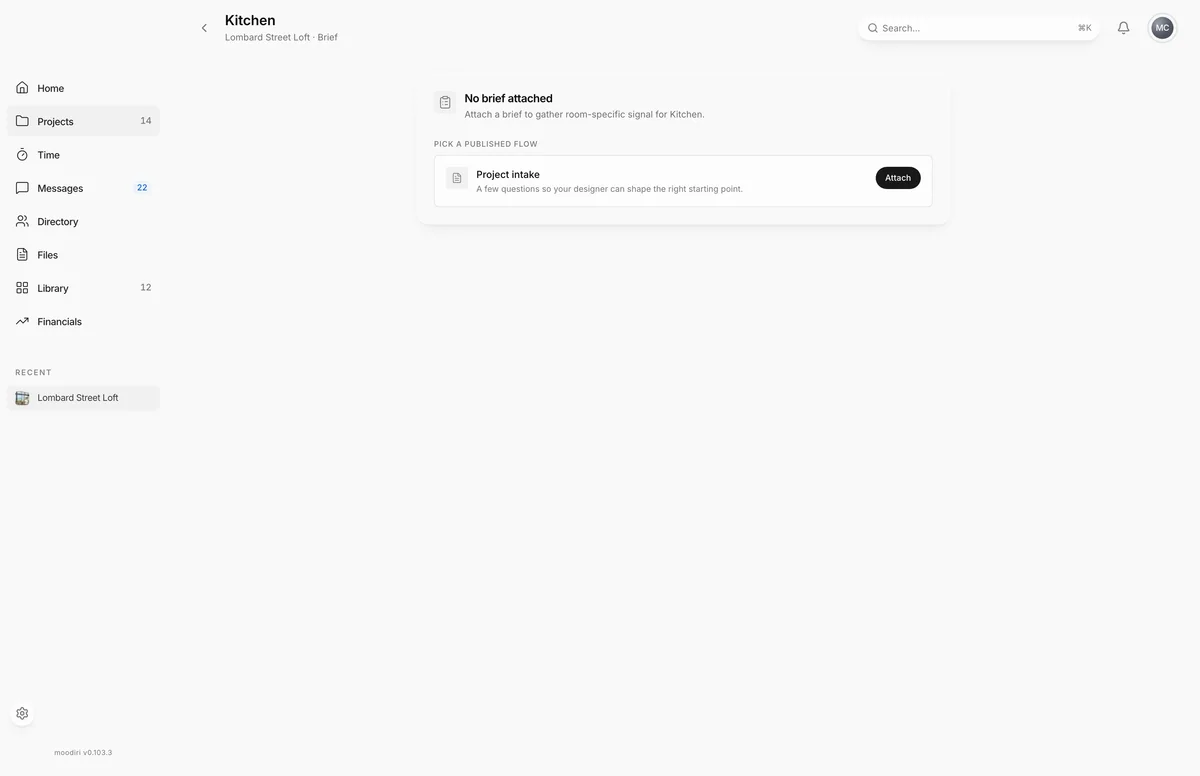
- Open the space, for example the kitchen in Lombard Street Loft, and choose its Brief tab.
- Under Pick a published flow, find the flow and choose Attach.
What happens next
- The Brief tab shows Brief sent. The client can answer it from the portal.
- As your client answers, it shows how many questions they have answered so far.
- Once they submit, the answers are read only. See Space brief to follow progress or detach a brief.
Limits
Limits
- Publishing makes the flow's questions read only.
- Only published flows are offered on a space's Brief tab.
- Project intake uses its own automatic client intake for each project; you do not attach flows to projects.
Troubleshooting
- You don't have any published flows yet. Publish a flow, or choose Create your first flow to build one.
Questions
Why isn't my flow in the list?
Only published flows are offered. Open the flow and choose Publish first.
Can I use one flow in several spaces?
Yes. Attach the same published flow to each space. Each space keeps its own answers.
Can I attach a flow to a whole project?
No. Projects get their own client intake automatically. Flows are attached to spaces.
Next
Space briefSpaces (rooms)Answer a space briefFor clientsIntake and brief question flowsClient portal (designer side)
Was this page helpful?
Thanks, noted.