Invoicing and payments · Record payments
Send a receipt or the paid invoice
Email your client a receipt for a payment you recorded, or send the paid invoice when it was settled before you issued it.
Why use it
When a client pays by check or transfer, they often want written confirmation. Sending the receipt from Moodiri gives them a clear record of what you received and keeps a note on the payment that it was sent, so nobody wonders later.
When to use it
- Your client paid by check, wire or Zelle and you recorded it. Send a receipt.
- The client paid before you issued the invoice. You recorded the payment on the draft, so the invoice is Paid but was never sent. Choose Send paid invoice to give them the invoice for their records.
- The invoice was paid entirely from client credit. Send paid invoice sends the settled invoice.
Before you start
- Only the owner and admins can send receipts and paid invoices.
- The client needs an email address. Without one you see This client has no email on file. Add one to send a receipt.
Steps
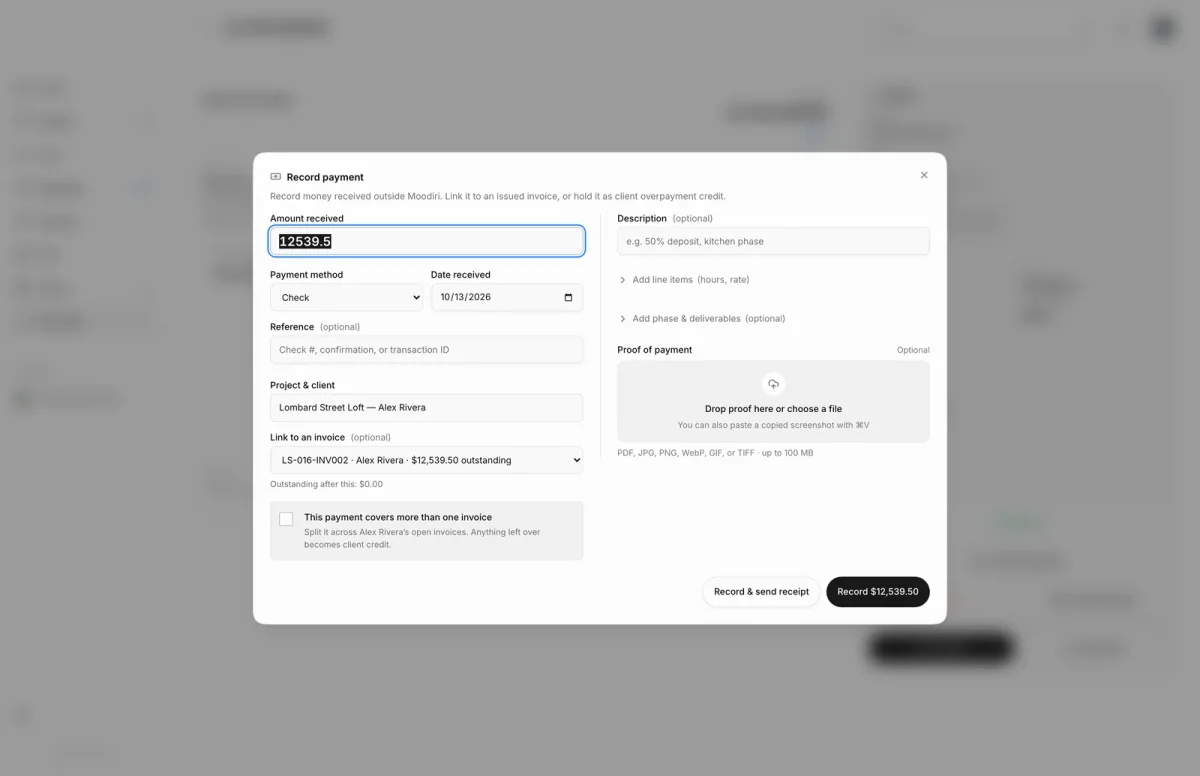
- 1Record & send receipt
- While recording a payment, choose Record & send receipt to save it and email your client the receipt in one step.
- For a payment you already recorded, open Financials and find it under Manual payments.
- Open the payment's actions, here the $13,800.00 check on LS-016-INV001, and choose Send receipt. It sends right away.
What happens next
- Your client gets the email at the address on their client record.
- Send paid invoice confirms with Paid invoice sent to your client's email. If delivery is delayed, Moodiri says the email is queued and will retry automatically.
- Your client can also see the invoice and its payments in their portal. See Download PDFs and receipts.
Limits
Limits
- Receipts are sent only when you choose to send them for recorded payments.
- Send paid invoice appears only on a paid invoice that was never sent, or one paid entirely from client credit.
Troubleshooting
- Couldn't send the receipt. Try again in a moment.
- The paid invoice copy could not be sent. Please try again. Choose Send paid invoice again.
Questions
Do clients get a receipt automatically?
For online payments, yes. For payments you record yourself, only when you choose Send receipt. See Payment receipts.
Can I send a receipt again?
Yes. Choose Send receipt again and your client gets another copy.
Can I send a receipt for a voided payment?
No. A voided payment can't have a receipt.
Next
Payment receiptsInvoicing and paymentsEdit, correct, reverse or void a paymentInvoicing and paymentsRecord paymentsInvoicing and payments
Was this page helpful?
Thanks, noted.