Products and selections · Add products
Add a product from a link
Paste a vendor's product page and Moodiri fills in the name, brand, model, category, price and photo for you.
Why use it
Copying a product's name, model number, finish and price from a vendor site by hand is slow and easy to get wrong. Pasting the link fills those fields in for you and keeps the link on the product, so you, your team and (if you choose) your client can get back to the source.
When to use it
- Sourcing online. You have the vendor's product page open.
- Building options fast. Paste three links into a section to give your client three choices.
- Keeping a record. The link stays on the product for reordering later.
When you are already on the vendor page in Chrome, the Chrome extension captures it without copying the link.
Before you start
- A product section in the room. See Add a product section.
- The full product page address, not a search results page.
Steps
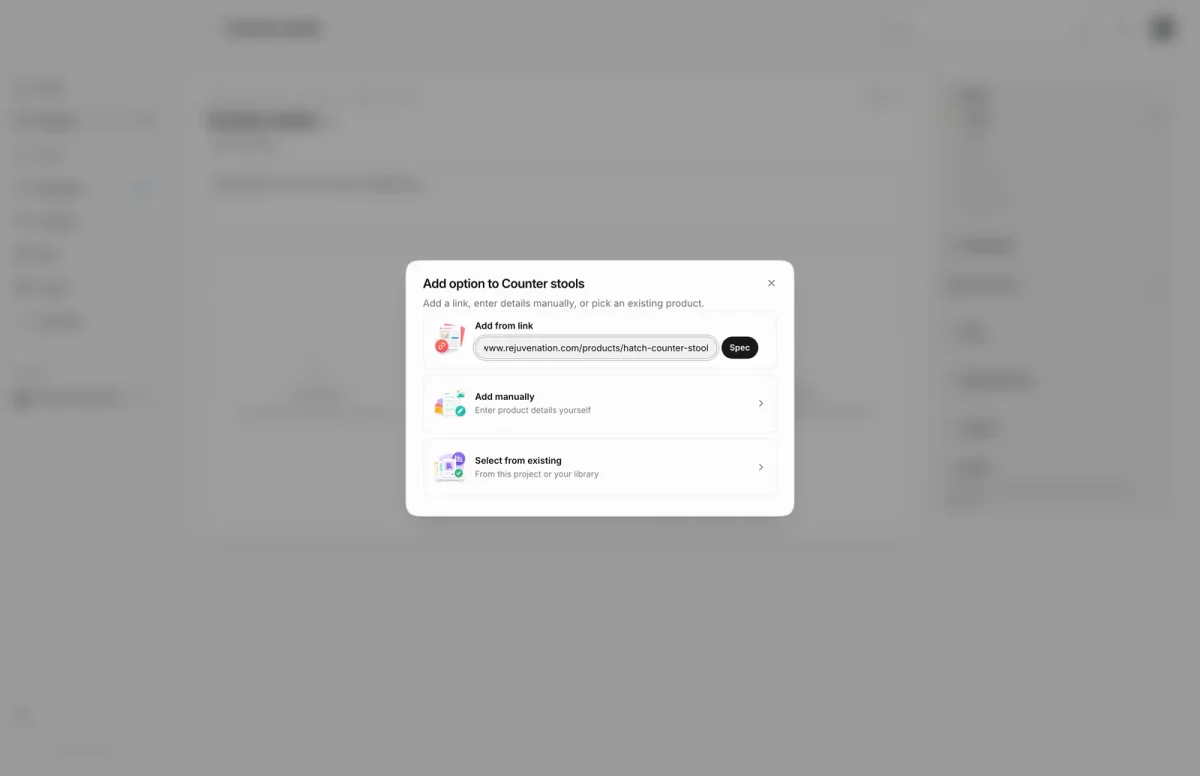
- 1Spec from URL
- In the Counter stools section, choose an empty Add option card.
- Under Add from link, paste the vendor's product page address.
- Choose Spec. Moodiri reads the page and opens the product form with the photos and details it found.
What happens next
- The product is added to the section as an option, ready to compare and send.
- The link is saved on the product. Whether your client sees it is up to you; see client visibility settings.
Limits
Limits
- Your firm can look up 10 product links per hour. Links Moodiri already knows are filled in instantly and do not count.
- Some vendor sites block automatic lookups. Enter the details by hand when that happens.
Troubleshooting
- Couldn’t spec this URL. Moodiri could not read the page. Choose add the details manually instead to open an empty form.
- Too many scrapes this hour. Try again later. The hourly limit is used up. Add the details by hand or try again later.
- The page took too long to load. Try again. The vendor site was slow to respond.
Questions
Can I use a link when adding a product outside a section?
Yes. In the product form, open Source link, paste the address and choose Fetch. Save link keeps the address without filling anything in.
Does Moodiri overwrite what I already typed?
No. Fetching fills empty fields only and tells you how many it filled.
Next
Add options to a sectionProducts and selectionsProduct sections and optionsProducts and selectionsProduct pageProducts and selections
Was this page helpful?
Thanks, noted.