Products and selections · Product page
Add a product to an invoice
Bill a product from its product page: start a new invoice for it, or add it to a draft invoice on the project.
Why use it
When a client approves a product, the next job is usually to bill it. Starting the invoice from the product carries over its client price and charges, so nothing is retyped and nothing is billed twice.
When to use it
- Billing one product. Start a new invoice from it, such as a deposit on a sofa.
- Adding to an invoice in progress. Drop the product onto a draft you are already building.
- After a price change. Bill the difference with an adjustment invoice.
To bill many products at once, start from the invoice instead. See Add project products to an invoice.
Before you start
- The admin role. Adding products to invoices is limited to admins.
- Stripe connected if you want your client to pay online. See Connect Stripe before invoicing.
- Sub-products are invoiced with their parent, so start from the parent.
Steps
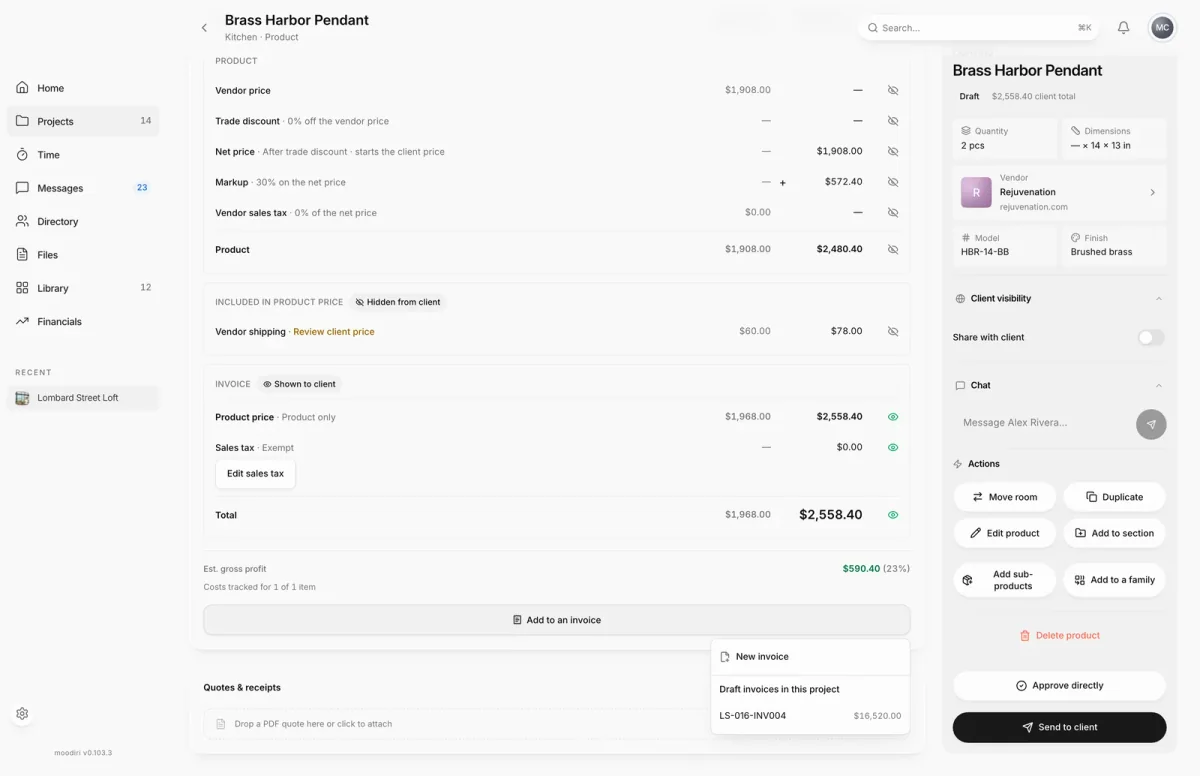
- 1New invoice
- Open the product. Under Costs & client pricing, choose Add to an invoice.
- Choose New invoice to start an invoice with this product on it.
- Or pick one of the Draft invoices in this project to add the product to it.
What happens next
- With New invoice, a new invoice opens with the product on it. Finish and send it as usual. See Send an invoice.
- With a draft, Moodiri confirms the product was added to that invoice number.
- The invoice appears under Linked invoices on the product page.
Limits
Limits
- A fully invoiced product offers Review billing and corrections instead of a new invoice.
- Only draft invoices of the same project are listed.
- A sub-product cannot be added on its own. It is invoiced with its parent.
Troubleshooting
- This product is already fully invoiced. Every charge is already on an invoice. Use Review billing and corrections to correct an invoice, credit or refund.
- No draft invoices in this project yet. Choose New invoice instead.
Questions
Can I bill the same product twice by mistake?
Moodiri checks first. A fully invoiced product cannot be added again, and a partly billed one asks you to confirm what to add.
The price changed after I invoiced it. What do I do?
Open Add to an invoice. It offers New adjustment invoice for the difference, or Review billing and corrections when linked invoices already cover the price.
Next
Create an invoiceInvoicing and paymentsAdd project products to an invoiceInvoicing and paymentsProduct pageProducts and selections
Was this page helpful?
Thanks, noted.