Products and selections · Product page
Move, duplicate, edit or delete a product
Move a product to another room, copy it, change its details, or delete it, from the Actions on its product page.
Why use it
Plans change. A chair moves from the living room to the study, the same lamp goes in two bedrooms, a spec changes after a site visit, or a product is dropped altogether. These actions keep the record accurate without re-entering anything.
When to use it
- Move room when a product belongs in a different space of the same project.
- Duplicate when the same product goes in another room, such as matching nightstands in two bedrooms.
- Edit product when the price, finish, quantity, vendor or order details change.
- Delete product when it is no longer part of the project.
Before you start
- Open the product's product page.
- Moving and duplicating need at least one other space in the project.
- Deleting a product needs the admin role.
Steps
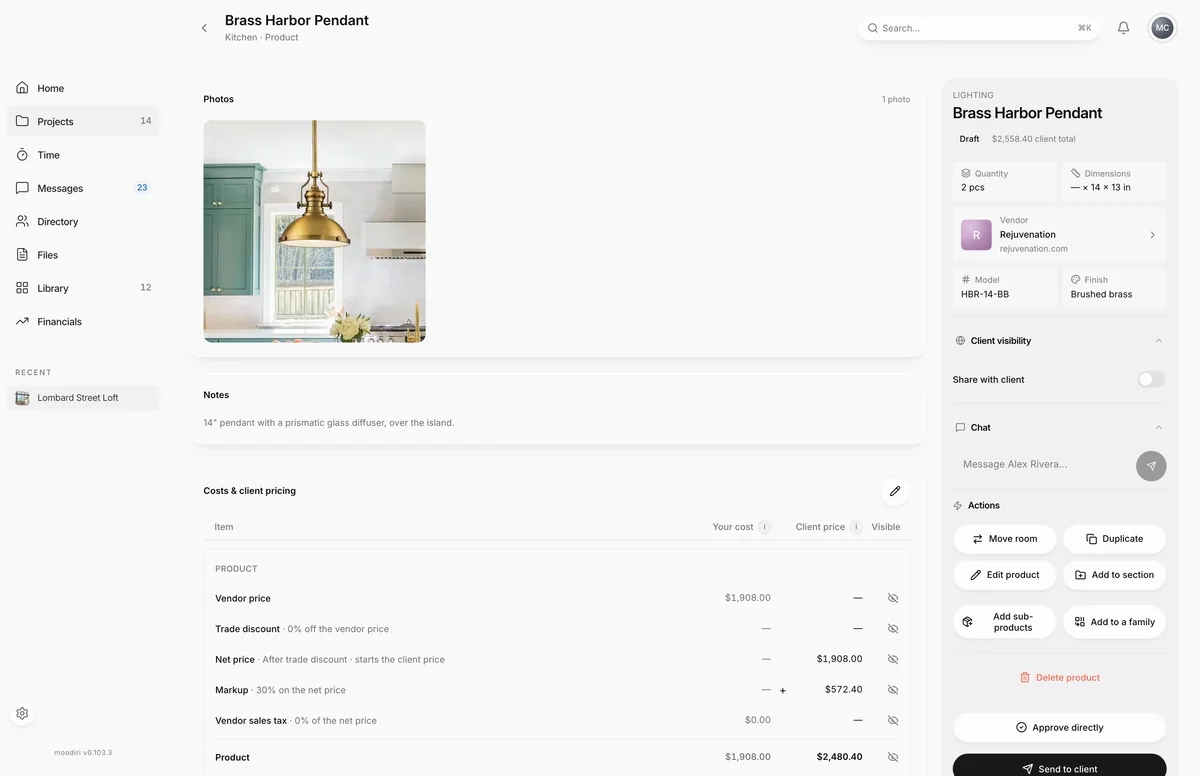
- Open the product, here Brass Harbor Pendant in the Kitchen, and find Actions in the side panel.
- To change its details, choose Edit product, make your changes and choose Save changes.
- To put it in a different room, choose Move room, then pick the space, such as Living Room. It moves as soon as you pick.
- To copy it into another room, choose Duplicate, then pick the space. The copy is made as soon as you pick; the original stays.
- To remove it for good, choose Delete product, then Delete. This can't be undone.
What happens next
- After a move or duplicate, Moodiri confirms with the space's name. Open that room to find the product.
- Edits update the product's totals right away. If the product is on a draft invoice, Moodiri may ask before updating the draft.
- A deleted product is removed from the room. If it was a family parent, its sub-products become standalone products.
Limits
Limits
- Move room and Duplicate show only when the project has another room. Move room is hidden on sub-products, which move with their parent.
- Delete is refused when the product carries issued sales-tax records or has billed sub-products.
- A duplicate does not copy additional charges or charge groups, or a parent's sub-products.
- Only admins can delete a product. Members can edit, move and duplicate.
Questions
Does a duplicate copy everything?
No. Additional charges and charge groups are not copied. Duplicating a family parent copies only the parent, not its sub-products, so the copy's price leaves them out.
The product came from an approval. What happens when I delete it?
Moodiri asks whether to choose Delete just the product or Also archive the approval request, so no stale request is left behind.
Next
Product pageProducts and selectionsAdd or remove sub-productsProducts and selectionsProducts in a spaceProducts and selections
Was this page helpful?
Thanks, noted.