Financials · Retainers
Request a retainer from a project
Create a Stripe payment link for a retainer from the project page, then share it with your client to collect funds up front.
Why use it
Ordering furniture and committing hours before a client has paid anything puts your studio's cash at risk. A retainer collects a deposit up front through Stripe, holds it against the project, and lets you apply it to invoices as the work happens.
When to use it
- At project kickoff, before you start design work.
- Before a large order, to have client funds in hand.
- A percentage of the contract, when your agreement asks for a deposit, such as 30%.
Before you start
- You need to be the owner or an admin.
- Connect Stripe. If it is not connected, the window shows Connect Stripe instead. See Connect Stripe payouts.
- To use a percentage, set the project's contract value. See Edit project details.
Steps
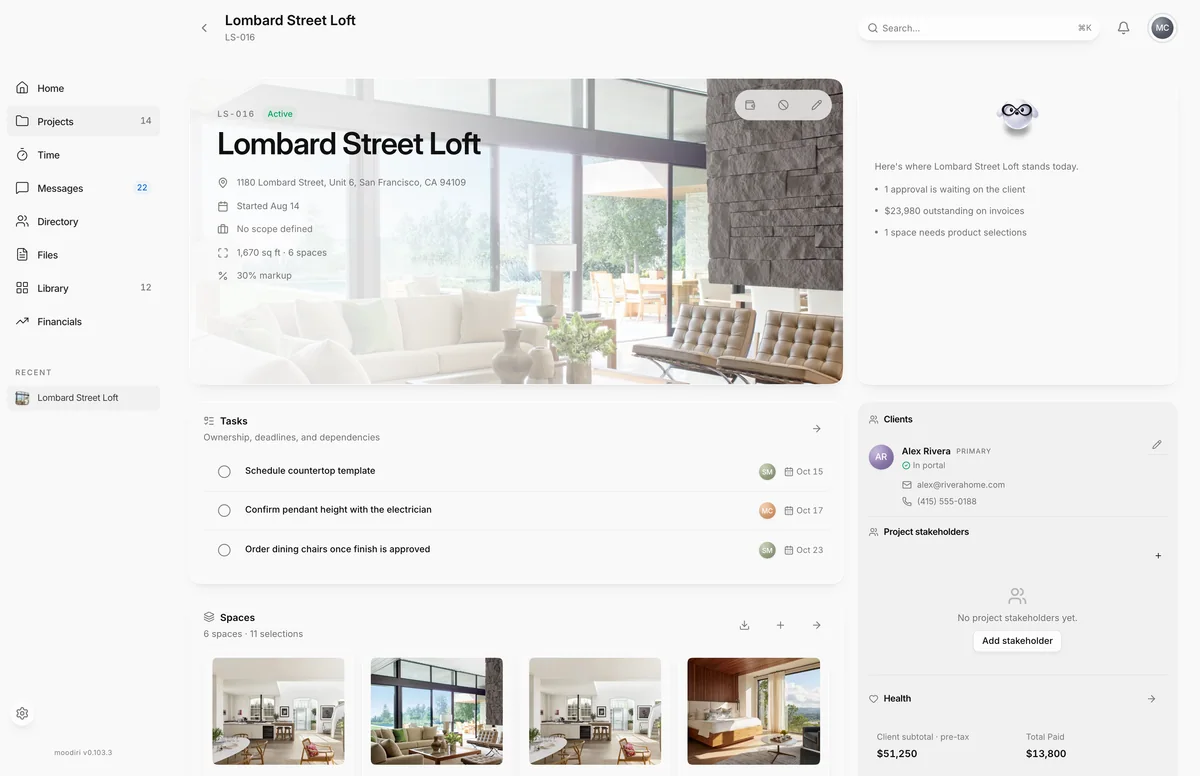
- Open the project, for example Lombard Street Loft, and choose Request retainer (the wallet button).
- The Request retainer window opens. If Stripe isn't connected yet, choose Connect Stripe first; it takes about two minutes.
- Enter the Amount. Switch between a dollar amount and % of the contract value.
- Choose Create Stripe link. The payment page opens in a new tab; copy its link and send it to your client.
What happens next
- The retainer appears in Retainers as Awaiting payment, with the payment link on its page.
- When your client pays, it becomes Active and the funds land in your Stripe account.
- Your client sees the retainer balance in their portal. See Paying a retainer.
- Apply it to invoices later. See Apply a retainer to an invoice.
Limits
Limits
- A retainer must be between $0.50 and $999,999.99, in whole cents.
- Request retainer is not shown on a cancelled project.
Troubleshooting
- Connect your Stripe account first to collect retainers. Connect Stripe, then try again.
Questions
Does Moodiri email the link to my client?
No. Copy the payment link and send it yourself. You can find it again on the retainer's page while it is awaiting payment.
My browser blocked the new tab. Did it work?
Yes. The window says the retainer was created and shows the link to copy, with Open in new tab.
Can I change the amount after creating the link?
Not on the same retainer. Cancel it while it is unpaid and request a new one. See Cancel or refund a retainer.
Next
Was this page helpful?
Thanks, noted.