Financials · Retainers
Apply a retainer to an invoice
Use retainer funds you hold to pay part or all of a draft invoice, so your client is only charged what is left.
Why use it
A retainer sitting unapplied is money your client has paid but cannot see working. Applying it to an invoice uses those funds for real work, reduces what the client owes, and keeps your books clear about what is still held.
When to use it
- The first invoices of a project, drawing down the deposit.
- Closing out a project, using the last of the retainer on the final invoice.
Before you start
- You need to be the owner or an admin.
- The invoice must be a draft with an outstanding balance.
- The project needs an active retainer with money left.
Steps
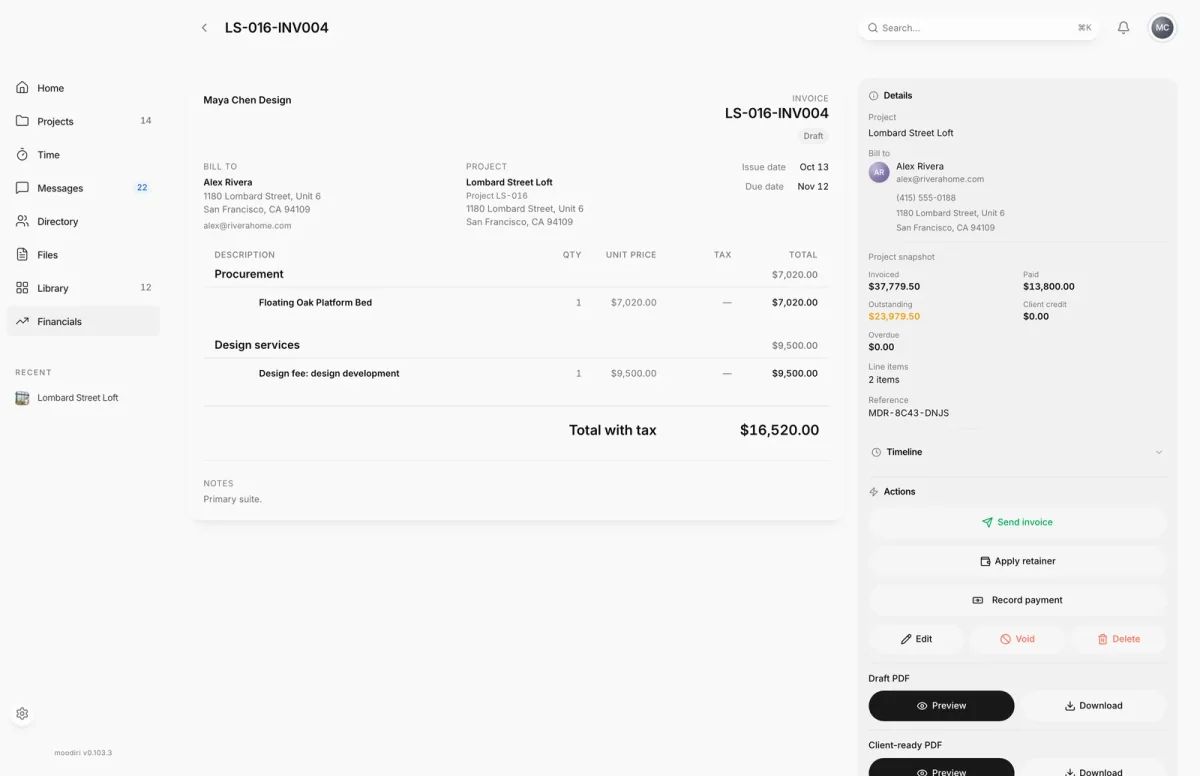
- 1Apply retainer
- Open a draft invoice on a project with an active retainer, for example Lombard Street Loft.
- Choose Apply retainer. It shows only on drafts whose project has a retainer with a balance.
- Enter the Amount to apply, here $5,000 of the $10,000.00 available.
- Choose Apply with the amount, here Apply $5,000.00. Your client is only charged what is left.
What happens next
- The invoice shows the retainer applied, and your client is charged only the remaining balance when you send it.
- An invoice fully covered by the retainer is marked paid.
- The retainer's Applied and Remaining amounts update, and its Ledger records the application. When the balance reaches zero, the retainer shows Closed.
Limits
Limits
- Only on draft invoices with an active project retainer carrying a balance.
- You cannot apply more than the retainer's remaining balance or the invoice's outstanding balance.
- Apply retainer is unavailable when the invoice has no outstanding balance.
Questions
What if the retainer covers the whole invoice?
The invoice is marked paid automatically. The window tells you before you apply.
Can I apply a retainer to an invoice I already sent?
No. Apply retainer shows only on draft invoices.
Next
Was this page helpful?
Thanks, noted.