Clients, vendors and directory · Clients
Send or resend a portal invite
Email your client a link to their project in your client portal, or send it again if they cannot find the first one.
Why use it
Sending clients links over email or text means they end up with several links and no idea which is current. An invite gives them one address for their project, where they can review approvals, pay invoices and chat with you.
When to use it
- A project is ready to share. Once the first approvals or the brief are in place.
- The client lost the link. Resend it from here.
- A second client on the project. Each client gets their own invite.
To invite from inside a project, or to revoke access, use Invite clients and manage access.
Before you start
- Only the owner and admins can send portal invites.
- The client needs an email address on their record. See Edit or delete a client.
- The client needs to be on at least one project. See Add a client to a project.
- Open Directory > Clients and choose the client.
Steps
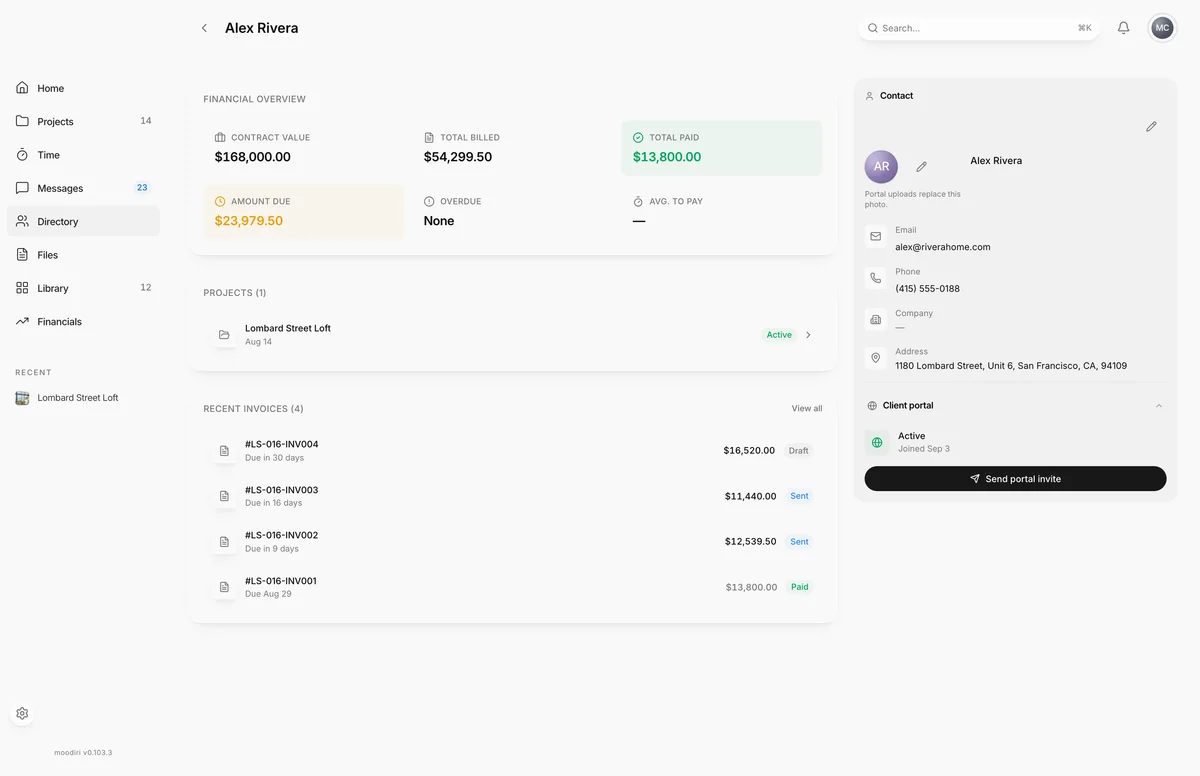
- 1Send portal invite
- In Directory > Clients, choose the client, for example Alex Rivera.
- Find the Client portal panel. It shows Not invited, Invited with the date, or Active once they have signed in.
- Choose Send portal invite, or Resend portal invite if they were invited before. The email goes out straight away.
What happens next
- You see Portal invite sent to and the client's name.
- The Client portal panel shows Invited with the date. When the client signs in for the first time it changes to Active.
- Your client follows the link and signs in. See Signing in to your portal.
Limits
Limits
- The client needs a project before an invite can be sent.
- The client needs an email address.
- Each invite is for one project. To invite them to another project, choose it and send again.
Troubleshooting
- Add a project for this client before sending an invite. Add the client to a project, then come back.
- This client has no email address. Add one before inviting them to the portal. Choose Edit client, add an email and save.
Questions
What does the email say?
It arrives as {your firm name} invited you to view your project and links to that project in your client portal. Replies go to the project's client-facing contact.
My client never got the invite. What now?
Check the email on their record, ask them to look in spam, then choose Resend portal invite.
Next
Invite clients and manage portal accessClient portal (designer side)How the client portal worksClient portal (designer side)Sign in to your portalFor clients
Was this page helpful?
Thanks, noted.