Edit or delete a client
Update a client's name, contact details, address and notes, change their photo, or delete a client who has no projects.
Why use it
Clients move house, change email, and pick up new phone numbers. Updating the record once keeps every project, invoice and portal invite pointed at the right person.
When to use it
- New contact details. An updated email before you send an invoice or a portal invite.
- Add an address. Fill in the client's address for your records.
- Clean up. Delete a client added by mistake, or a duplicate with no projects.
Before you start
- Only the owner and admins can edit clients.
- Deleting a client needs the Delete clients permission. The owner always has it.
- Open Directory > Clients and choose the client.
Steps
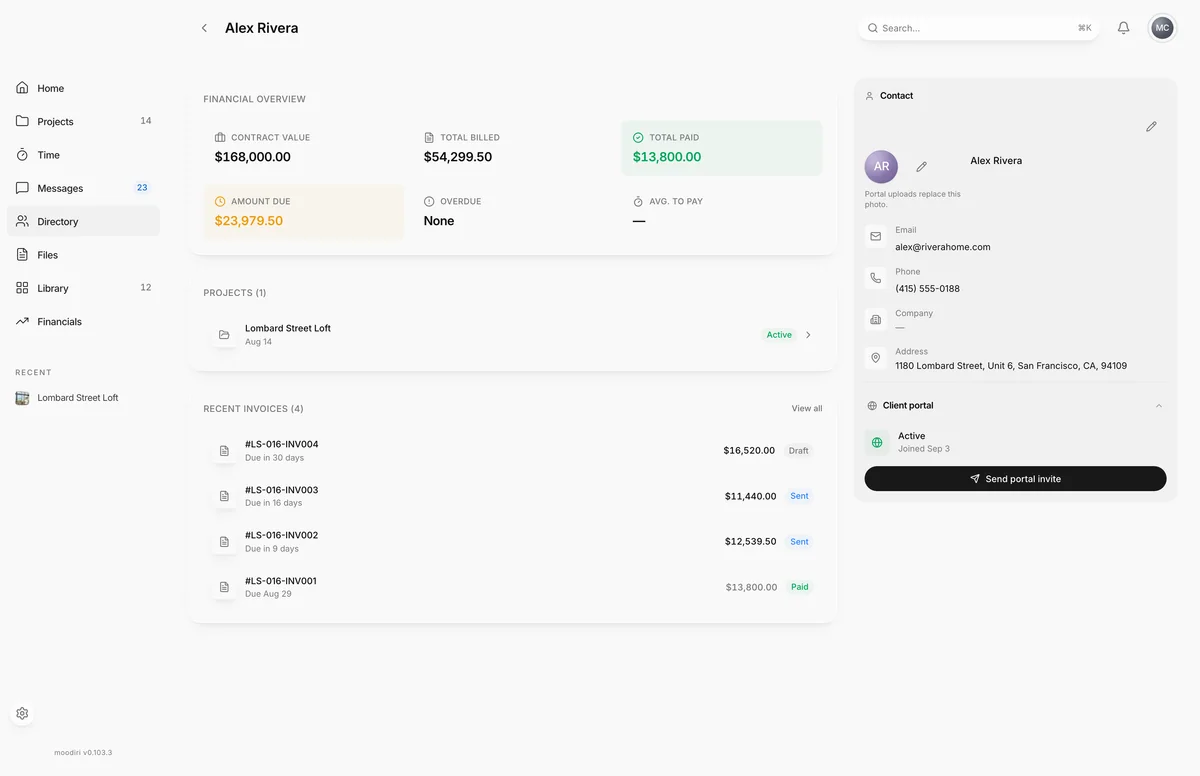
- On the client's page, choose Edit client, the pencil in the Contact panel.
- Update the First name, Last name, Email or Phone, for example (415) 555-0199.
- Add or correct the Address, for example 1180 Lombard Street, Unit 8, with city, state and zip below it.
- Keep anything your team should know in Notes, such as how the client likes to be reached.
- Choose Save changes. The client's page and every linked project show the new details.
Change the client's photo
Choose the photo at the top of the Contact panel to upload or remove one. If your client sets their own photo in the client portal, theirs replaces it.
Delete a client
In Edit client, choose Delete client, then Delete to confirm. You return to the client list. If the client still has projects, the dialog says how many to remove or reassign first, and Delete client is not shown.
What happens next
- After saving, the client page shows the new details straight away.
- A deleted client no longer appears in the Directory.
Limits
- First name and Last name are required.
- Changing a client's Email signs them out of the client portal and cancels any open invite, because the email is their portal sign-in. Send a new portal invite afterwards.
- A client with projects cannot be deleted until those projects are removed or given another client.
- Deleting a client cannot be undone.
Questions
If I change a client's email, which projects use the new one?
All of them. Every project, invoice email and portal invite uses the client record.
Can I get a deleted client back?
No. Deleting a client cannot be undone.