Client page
One client's financial overview, projects, recent invoices, contact details and portal status, all on one page.
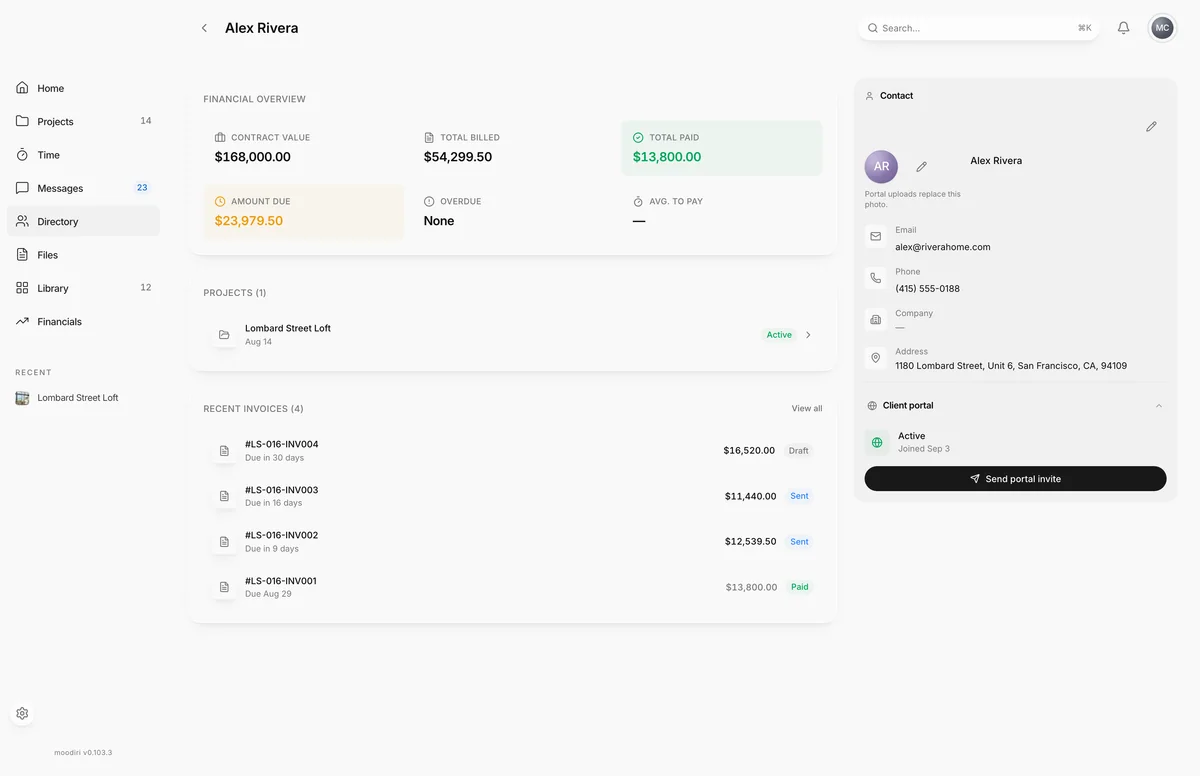
- 1Financial overview
A client page answers the questions you ask before every call: how much have they spent, what do they owe, which projects are live, and can they get into the portal. Open it by choosing a client in Directory > Clients, for example Alex Rivera.
Financial overview
Six figures across all of the client's projects:
- Contract value, Total billed, Total paid and Amount due. Amount due turns amber when something is owed and red when an invoice is overdue.
- Overdue: how many invoices are past their due date, or None.
- Avg. to pay: how many days the client takes to pay on average, coloured by how quickly they pay.
Projects and recent invoices
- Projects lists every project the client is on, with its status. Choose one to open it.
- Recent invoices shows the latest invoices with their totals and status. Choose View all to see every invoice for this client in Invoices.
Contact
The Contact panel shows the client's photo, Email, Phone, Company, Address and Notes. Choose Edit client to change them. See Edit or delete a client.
Client portal
The Client portal panel shows whether the client can sign in:
- Not invited: no portal access yet.
- Invited: an invite has been sent, with the date.
- Active: the client has joined, with the date.
Choose Send portal invite or Resend portal invite from here. See Send or resend a portal invite.
Questions
What does Avg. to pay tell me?
How long this client usually takes to pay. It shows green when they pay within two weeks, and amber or red as it gets longer.
Why does the photo say portal uploads replace it?
If your client sets their own photo in the client portal, it replaces the one you added.