Projects · Manage clients on a project
Add a client to a project
Add an existing client or create a new one on a project. The first client becomes the primary contact; others join as co-clients.
Why use it
Couples, business partners and property managers often share decisions on a project. Adding each of them as a client on the project means each one can be invited to the portal with their own sign-in, instead of forwarding emails between them.
When to use it
- A project created without a client. Add the client once the job is confirmed.
- A second decision-maker. Add a partner or spouse as a co-client.
- A returning client. Choose them from Choose existing so all their projects stay under one record.
Before you start
- You need to be the owner or an admin.
- Open the project from Projects.
Steps
- 1Create new
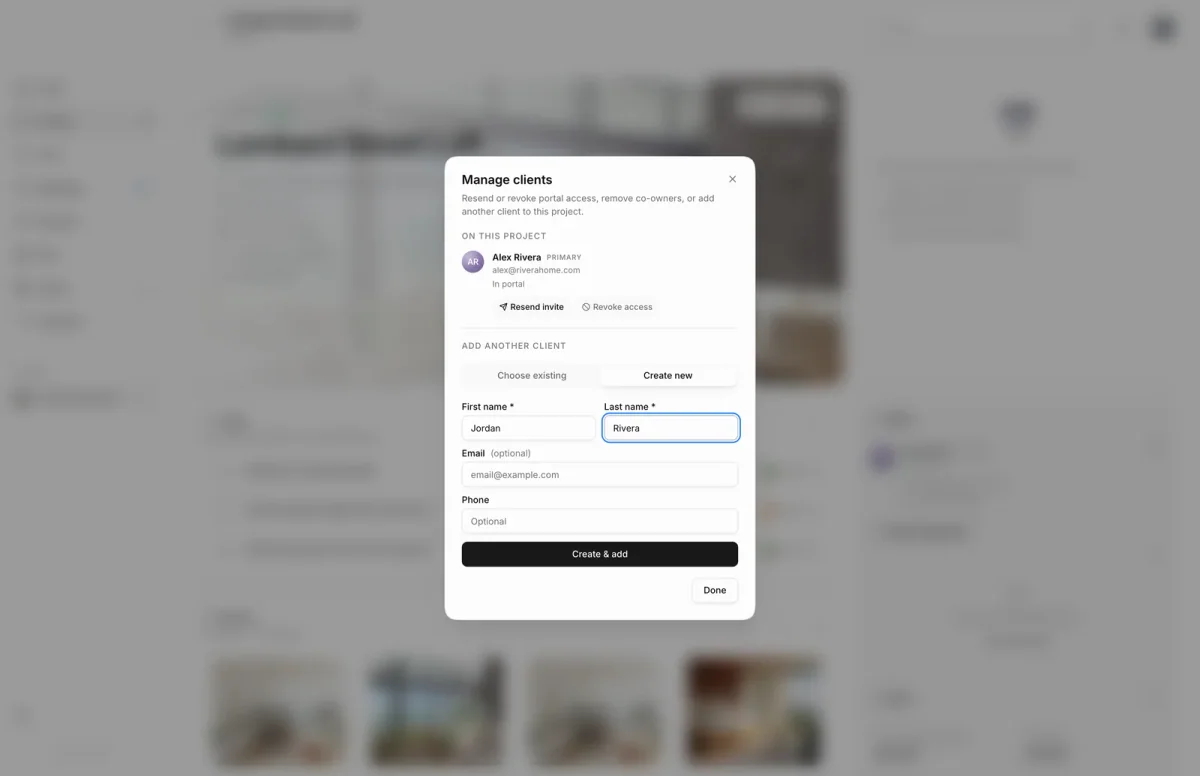
- On the project overview, choose Manage clients next to Clients. On a project with no client yet, choose Add client.
- To add someone already in your client list, search by name or email under Choose existing.
- To add someone new, open Create new and enter their First name and Last name, for example Jordan Rivera.
- Add their email if you have it. You need one to invite them to the portal later.
- Choose Create & add. They join the project as a co-client and your client list.
What happens next
- The client appears in the Clients panel. The first client on a project is marked Primary; anyone after that is a co-client.
- A new client is also saved to your client list, so you can pick them on future projects.
- Adding a client doesn't send any email. Invite them separately: Invite a client to the portal.
Limits
Limits
- The primary client cannot be removed; only co-clients show Remove.
- First and last name are required to create a new client.
Troubleshooting
- First and last name are required: fill in both names before choosing Create & add.
- This person is already the primary client on this project.: they are already on the project as its main contact. No need to add them again.
Questions
Can I change who the primary client is?
Not from this dialog. The first client added becomes the primary contact, and the primary client can't be removed from the project.
Why is a client missing from Choose existing?
Clients already on this project aren't listed. If nothing shows, you may have no other clients yet; use Create new.
Next
Invite a client to the portalProjectsManage clients on a projectProjectsClientsClients, vendors and directory
Was this page helpful?
Thanks, noted.