Manage subscription and payment method
Update the payment method for your Moodiri subscription, fix a failed payment, and download your Moodiri invoices.
Why use it
A card expires, a payment bounces, or your accountant wants last quarter's invoices. This is where you deal with all of it, so your team never loses access because of a billing detail.
When to use it
- Your card is changing or has expired. Update the payment method before the next billing date.
- A payment failed. Choose Resolve payment to fix it within the grace period.
- You need invoices. Download them from Past invoices & charges.
To add or remove seats, use Manage seats instead.
Before you start
- You are the owner, or an admin with the Subscription billing permission.
- Your firm has a subscription. During a trial, subscribe from the plan options first. See Billing and subscription.
Steps
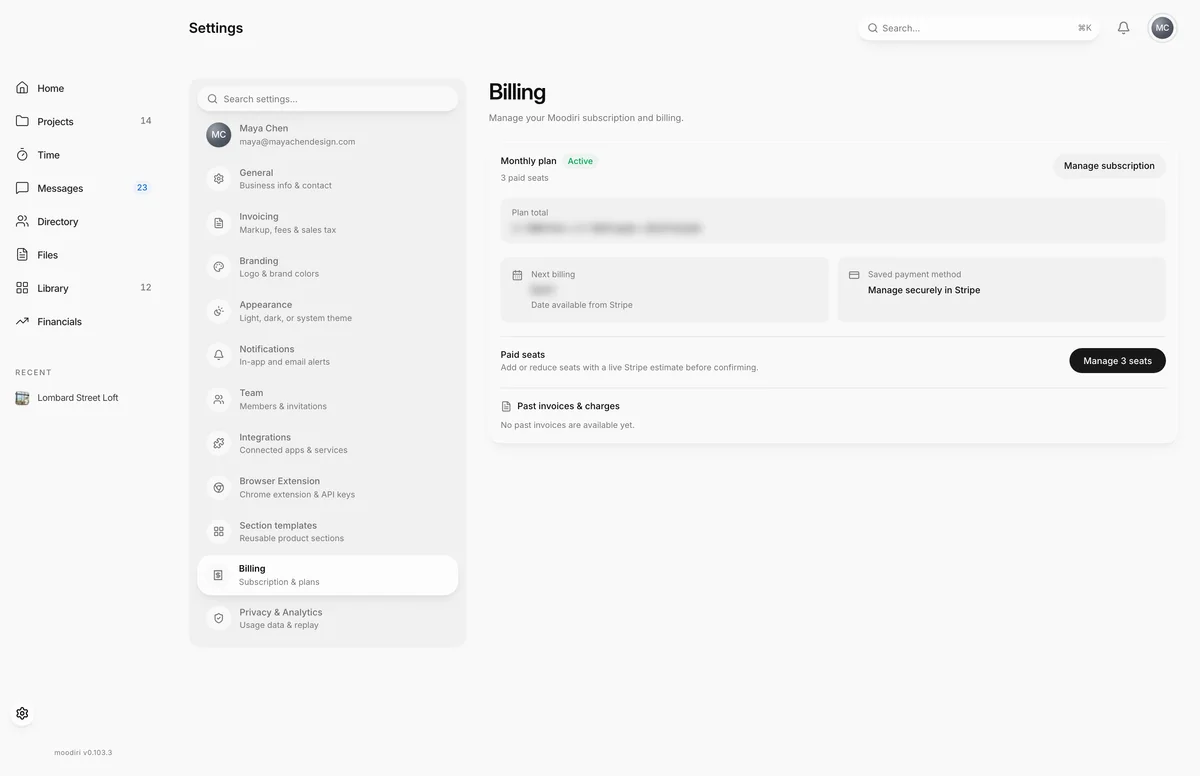
- 1Manage subscription
- In Settings, choose Billing in the list of sections.
- The plan card shows your plan, its status and how many paid seats it covers.
- Next billing shows the amount and date of your next charge, once Stripe has loaded them.
- Your card details stay in Stripe. Change the card from the Stripe billing portal.
- Choose Manage subscription to open Stripe's secure billing portal. It reads Resolve payment if a payment failed.
Past invoices & charges
Each Moodiri invoice is listed with its amount, date and invoice number. Choose Receipt for Moodiri's archived copy when there is one, and PDF (or View charge) for the Stripe copy. When there is nothing yet, the list says No past invoices are available yet.
After a subscription is cancelled, choose View past invoices to open your billing history in Stripe.
What happens next
- Changes you make in Stripe, such as a new card, show on Billing when you come back.
- After you subscribe, Billing shows Confirming your subscription... for a moment, then your active plan.
- If you fixed a failed payment, the status badge updates once Stripe confirms the payment.
Limits
- Only people with the Subscription billing permission can open Stripe from here.
- A past-due subscription keeps working for a 7-day grace period.
Troubleshooting
- Couldn't finish managing billing. Please try again. Moodiri couldn't open Stripe. Wait a moment and choose the button again.
Questions
Where do I download a Moodiri invoice for my accountant?
Under Past invoices & charges on Billing. Choose Receipt or PDF on the invoice you need.
I don't see Manage subscription.
You need the Subscription billing permission. Ask the firm owner.