Edit or delete a vendor
Update a vendor's contact, showroom and account details, set a trade discount, add a sales rep, or delete a vendor with no linked products.
Why use it
Reps change, showrooms move, and trade terms get renegotiated. Keeping the vendor record current means the next order goes to the right person at the right price.
When to use it
- A new rep. Replace the sales rep's name, email and phone.
- New trade terms. Update % off list, then re-apply it to products not yet ordered.
- A duplicate vendor. Delete it once its products point to the right vendor.
Before you start
- Only the owner and admins can edit or delete vendors.
- Open Directory > Vendors and choose the vendor.
Steps
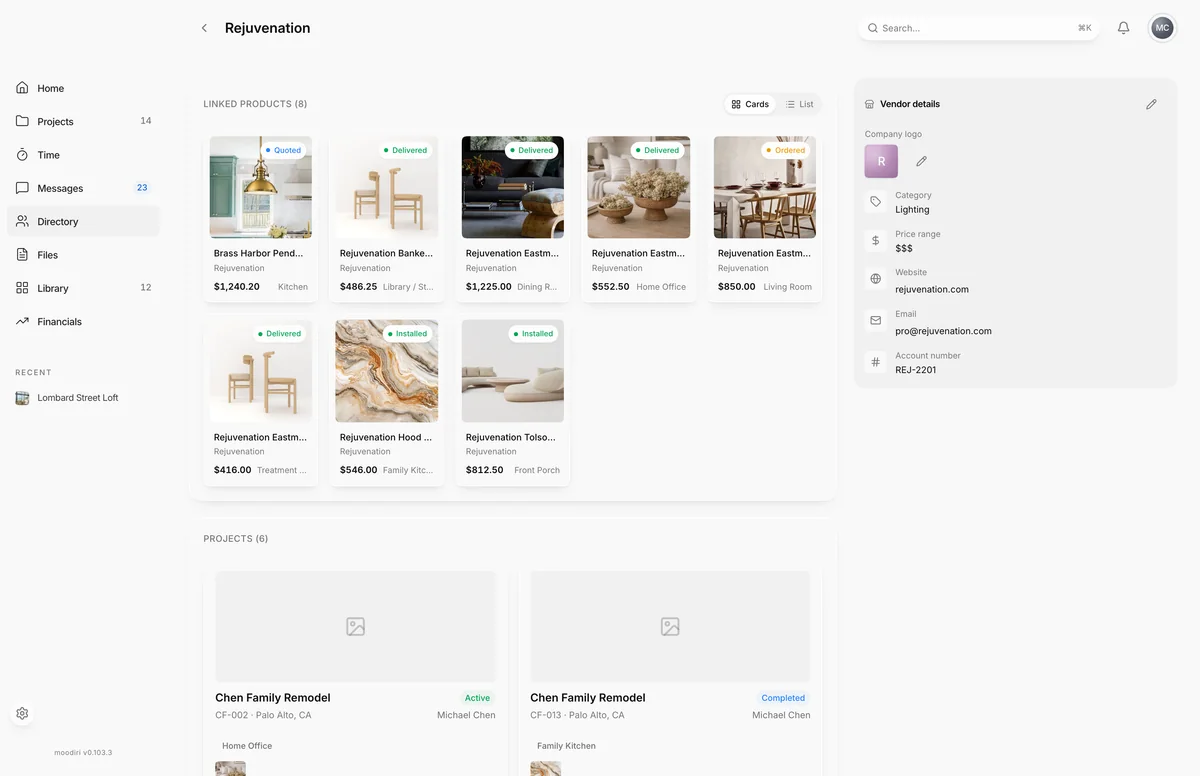
- On the vendor's page, choose Edit vendor, the pencil at the top.
- Update the Name, Category, Price range, Website, Email, Phone or Account number.
- Fill in the Address and the Showroom address, for example 2 Henry Adams Street.
- Under Trade discount, enter the % off list, from 0 to 100, for example 20.
- Add anything else, such as Net 30, under Trade terms / notes.
- Under Sales rep, add the rep's name, email and phone so orders reach the right person.
- Choose Save changes. The vendor page shows the new details right away.
Change the logo or rep photo
On the vendor page, choose the Company logo or the Sales rep photo to upload or remove an image.
Delete a vendor
In Edit vendor, choose Delete vendor, then Delete vendor again to confirm. If the vendor still has linked products, the button says it can't delete and stays unavailable, so the products keep their vendor. Point those products at another vendor first, then delete.
What happens next
- After saving, the vendor page shows the new details.
- With Auto-apply to imports from this vendor on, products you capture from this vendor get the discount. Products already added keep their rate until you re-apply it.
- A deleted vendor cannot be restored.
Limits
- The vendor name is required.
- % off list is from 0 to 100.
- A vendor with linked products can't be deleted. Set another vendor on those products first.
Questions
I changed the discount. Why haven't my products changed?
Products keep the rate they were added with. Use Re-apply to on the vendor page to update products that have not been ordered yet.
Can I delete a vendor I added by mistake?
Yes, as long as no products are linked to it yet.