Record a sales tax remittance
Mark the sales tax you paid to a state as remitted, so each collection period shows what is paid and what is still due.
Why use it
Sales tax you collect from clients belongs to the state. Without a record of what you paid and when, it is hard to tell which periods are settled and which still have tax sitting in your account. Recording each remittance shows, period by period, what was collected, what was remitted and what is left.
When to use it
- After you file and pay a sales tax return.
- Installment payments, recorded one at a time.
- Accrual filers who pay tax that was charged but not yet collected.
To review tax charged and collected for any date range, use the Sales tax report instead.
Before you start
- Only admins can record or undo remittances.
- The Financial Hub and sales tax tools must be on for your firm.
- Have your payment confirmation from the state ready.
Steps
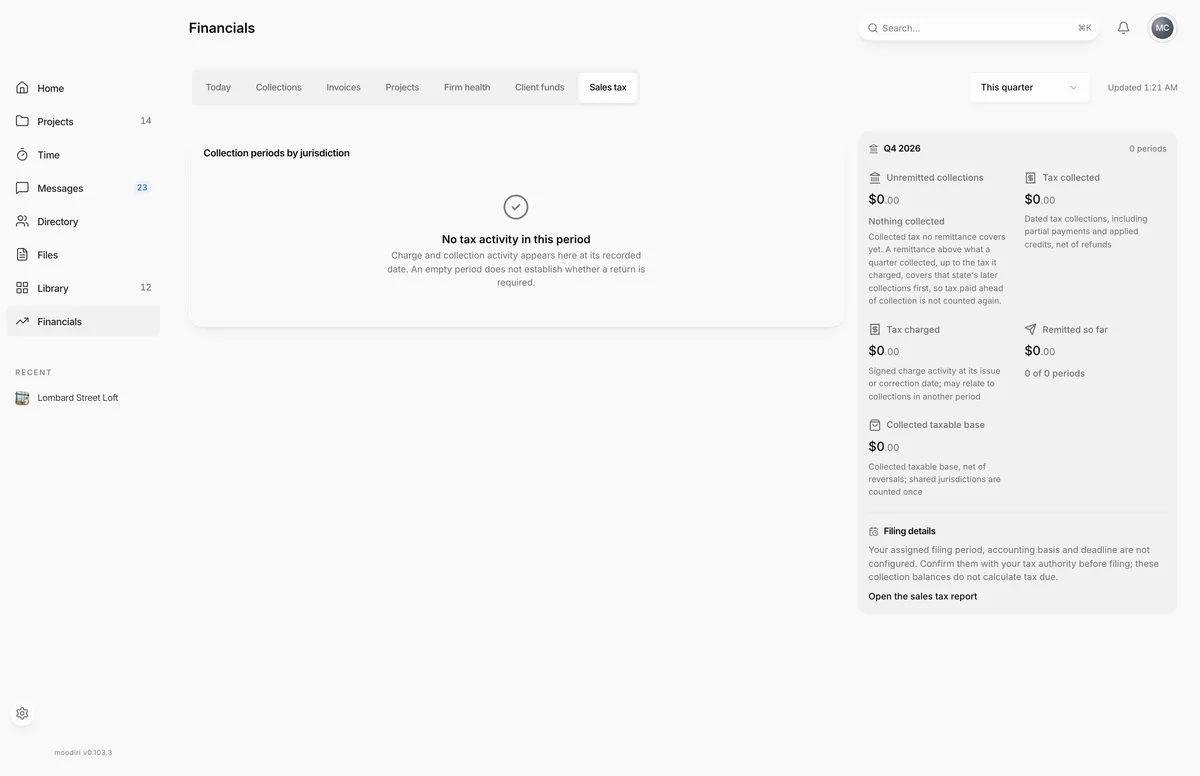
- Open Financials and choose the Sales tax tab.
- Pick the period, This quarter, Last quarter or This year. The summary shows what is still unremitted.
- Under Collection periods by jurisdiction, find the state and quarter you paid and choose Mark remitted.
- Enter the Amount paid and the Payment date from the state's receipt.
- Add the Confirmation or reference number, up to 120 characters.
- Choose Save remittance. The quarter's Remitted so far and unremitted balance update.
What happens next
- The period shows Remitted with the amount, date and reference, or Partly remitted if tax is still unpaid.
- Collected, not yet remitted and Remitted so far update for the period.
- If you paid more than was collected, the period shows Net remittance excess.
Limits
- Recording or undoing a remittance needs an admin, sales tax tools and the Financial Hub.
- The payment date cannot be in the future, or before the collection period starts.
- The amount must be greater than zero.
Troubleshooting
- Only an admin can record remittances. Ask the owner or an admin to record it.
- Sales tax figures need reconciliation. Some invoices carry tax that does not match their tax evidence. Remittances stay on hold until it reconciles; the Sales tax report explains what to do.
Questions
I paid in two installments. Can I record both?
Yes. After the first, choose Record another payment and confirm it is another payment for the period, not the one already recorded.
I recorded the wrong amount. How do I fix it?
Choose Undo next to the remittance, then record it again.
Does Moodiri pay the state for me?
No. You pay the state yourself. Recording the payment here keeps your books straight.